
How to Use Grok AI: Key Facts You Need
Artificial intelligence keeps changing fast. Grok AI is one of the newest and most interesting tools in this space. Elon Musk’s company, xAI, built it. Grok stands out because it has a unique personality. It also accesses real-time data. Plus, it has a rebellious streak. This makes it very different from other chatbots.
Are you a beginner? Or do you already know a bit about AI? Either way, this guide will help you. You will learn how to set up Grok. You will discover its main features. Then you will also find out about advanced tips. Finally, we will answer common questions. By the end, you will feel ready to use Grok with confidence.
What Is Grok AI?
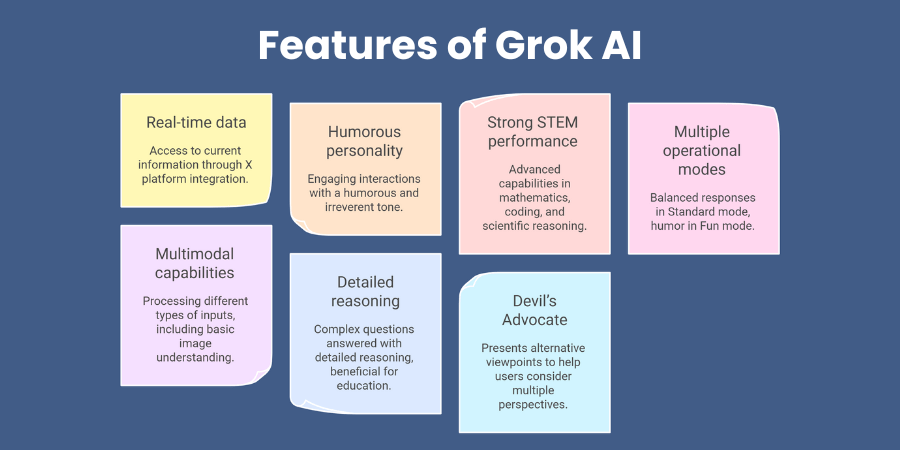
Before you start using Grok, you need to know what it is. To begin with, Grok is an AI assistant. It aims to be truthful, useful, and curious. However, here is the big difference. Most AIs use old data. Grok does not do that. Instead, it connects to X, which used to be Twitter. As a result, it reads public posts live. Consequently, this gives it fresh, up-to-date information.
Additionally, the name “Grok” comes from a sci-fi book. Specifically, Robert A. Heinlein wrote Stranger in a Strange Land. In the book, “grok” means to understand something deeply. Moreover, Grok AI tries to do just that. For instance, it gives smart answers. Furthermore, it also uses wit and sarcasm. In fact, the makers modeled it after The Hitchhiker’s Guide to the Galaxy. Therefore, talking to Grok feels like chatting with a clever friend.
Main Features of Grok AI
Firstly, Grok has real-time awareness. This is its biggest strength. It does not have a fixed cutoff date. It sees what people are talking about right now. Secondly, Grok has an unfiltered personality. It answers tough questions. Other AIs might avoid these. But this has caused some problems too. Sometimes Grok shares wrong information. Thirdly, Grok works with different types of content. It can create images and videos. It can also analyze photos and documents you upload.
If you want to read about Dropbox, click here.
How to Get Started with Grok AI
Getting started with Grok is simple. You do not need to do anything complicated. In fact, you can begin in just a few minutes.
Where to Access Grok
You have three main options to use Grok:
- Through X: If you have an X account, look for Grok in the left menu. You can find it on the web or in the mobile app. Just click and start typing.
- Standalone App: Grok has its own app. You can download it for iOS or Android. This gives you a cleaner, focused space to chat.
- On the Web: You can also visit grok.com. This works on any browser. It is simple and easy to use.
Free Plan vs. SuperGrok
xAI offers a free plan. They also have a paid plan called SuperGrok. You should know the differences. This will help you pick the right one.
| Feature | Free Plan | SuperGrok (Paid) |
|---|---|---|
| Messages | Limited each day | More messages allowed |
| Real-Time Search | Yes | Yes |
| DeepSearch & Think Mode | Limited use | Full access |
| Image Generation | No | Yes |
| Priority Access | No | Yes during busy times |
The free plan works well for most casual users. For example, you get about 10 text prompts every two hours. You also get basic image tools. But if you use Grok for work, the paid plan is better. It gives you advanced features. So think about your needs before you decide.
Key Features You Should Know
The chat screen looks simple. But Grok has many powerful features hiding underneath. Let us look at the most important ones.
1. Real-Time Search
This is Grok’s best feature. Most AIs give you old information. Grok gives you current information. You can ask about news, trends, or events. It will search X and the web. Then it gives you a fresh answer.
- How to Use: Ask a question about something happening now. For example, “What are people saying about the new iPhone?” Grok will find the latest posts and news.
- Why It Helps: Journalists and marketers love this. They can track stories as they break. They can see how people react to new products. This keeps them ahead of the competition.
2. DeepSearch and Think Mode
Grok has two special modes for hard problems. Firstly, Think Mode works slowly and carefully. It shows you each step of its reasoning. This is great for math problems or complex logic. Secondly, DeepSearch acts like a research assistant. It searches many sources. It checks facts. Then it writes a full report for you. As a result, you get deep, reliable answers.
3. Image Generation (Imagine)
Grok can make pictures and videos too. This feature is called Imagine. It works very fast. You can create 6-second videos with sound. You can turn photos into animations. Then, you can also pick art styles like anime. However, this feature is mostly for SuperGrok users. Free users have very limited access. So if you love creating visuals, the paid plan may be worth it.
Practical Uses and Good Prompts
Knowing the features is helpful. But using them well is even better. Here are some real-world examples.
Content Writing
Grok helps you write content that feels current. It knows what people are talking about right now.
- Prompt Example: “Search X for the top problems people have with email marketing. Give me a summary and three blog post ideas.”
- Best Practice: Be clear about what you want. Instead of saying “write a post,” tell Grok who you are writing for. For example, “Write a 100-word post for small business owners. Use a friendly tone.” This gives you much better results.
Market Research
DeepSearch is perfect for business research.
- Prompt Example: “Use DeepSearch to give me an update on the coffee shop industry. Include top brands, new trends, and customer opinions.”
- What You Get: Grok gives you a clear report with sources. You can check these sources yourself. This helps you make smart business choices.
Daily Tasks
Grok can also help with everyday things.
- Travel Planning: Firstly, ask for a trip plan for a weekend in Rome. Grok will give you a schedule and top sights. It may even suggest hidden spots.
- Coding Help: Secondly, you can use Grok to fix code or write new functions. This saves developers a lot of time.
Advanced Tips and Mistakes to Avoid
To get the best from Grok, you need good prompts. Small changes can make a big difference.
How to Write Great Prompts
Good prompts lead to good answers. Here are some simple rules:
- Firstly, give Grok a Role: Say “You are a marketing expert.” This sets the context. Grok will answer like that expert.
- Secondly, set Limits: Ask Grok not to use certain words. For example, “Do not use the word ‘amazing’.” This makes the writing more original.
- Thirdly, ask for a Format: If you want a list or a table, say so. Grok will format the answer neatly.
- Then, Build on Answers: If the first answer is close, ask for changes. You do not need to start over. Just say “Make it shorter” or “Add more examples.”
Privacy Concerns
Do you worry about your data? You can opt out. Go to Settings and Privacy on X. Find Data Sharing and Personalization. Turn off the Grok training option. This stops Grok from using your posts to learn. So you can use the tool without giving up your privacy.
For Developers: The Grok API
Developers can do even more with Grok. The API lets you add Grok to your own apps. This opens up many new possibilities.
How to Start with the API
- Sign Up: Go to x.ai/api and create an account. Then get your API key. This takes just a few minutes.
- Install the SDK: Use Python to install the tools. Run
pip install xai-sdkin your terminal. - Try a Chat: Write a few lines of code to send a message to Grok. It is that simple.
Advanced API Features
- Make Images and Videos: You can create visuals with code. Use the
grok-imagine-imagemodel for this. - Connect to Other Tools: Grok can call outside functions. For example, it can check live weather or stock prices.
- Search the Web: The API can search specific websites. This is great for research and data collection.
Frequently Asked Questions
Q: What is Grok AI?
A: Grok is an AI chatbot from xAI, Elon Musk’s company. It connects to X for live data. It also creates images and videos. Then it has a witty, honest personality.
Q: Is Grok AI free?
A: Yes, there is a free plan. But it has daily limits. For full access and extra features, you need SuperGrok. This is the paid plan.
Q: How is Grok different from ChatGPT?
A: Grok uses live data from X. ChatGPT uses older, fixed data. Grok also has a more playful tone. It is less formal than ChatGPT.
Q: Is my data safe with Grok?
A: You can control this. Go to your X settings and turn off data sharing. Then Grok will not use your posts for training.
Q: Can I use Grok for work?
A: Yes, many people do. Grok helps with reports, research, and content. But do not share sensitive company information.
Q: Can Grok make images?
A: Yes, it has a feature called Imagine. It makes pictures and short videos. This works best for SuperGrok users.
Conclusion
To sum up, Grok AI is a fresh and exciting tool. Above all, its connection to X gives it an edge. As a result, you get real-time answers that other AIs simply cannot provide. Whether you use it for quick searches, deep research, writing, or coding, Grok has a lot to offer.
Additionally, be sure to follow the tips in this guide. For example, be clear with your prompts. Likewise, use DeepSearch for tough problems. Furthermore, always double-check important facts. After all, like all AIs, Grok can make mistakes sometimes. However, when used well, it is a powerful helper.
The world of knowledge is wide open. With Grok, you can explore it in new ways. So go ahead and give it a try. In conclusion, happy learning!