
Unlock the Magic
Canva Pro: Let’s be honest for a moment. We all love a good deal, especially one that gives us access to premium tools without burning a hole in our pockets. Canva has revolutionized the design world. It has transformed anyone with a creative spark into a designer. The free version is fantastic, no doubt. However, we all hit that wall eventually. We want the background remover, the million-plus stock photos, and the Magic Resize tool.
But wait, the price tag of $15 a month makes you pause, doesn’t it? Don’t worry; you are not alone. In fact, there are legitimate, legal, and surprisingly easy ways to get your hands on Canva Pro without paying a single cent. Consequently, let’s dive into the secret vault of free access. This blog will show you exactly how to unlock the premium experience.
The Golden Ticket: The 30-Day Free Trial Canva Pro
First things first, the most straightforward path to premium glory is the 30-day free trial. Think of it as a test drive for a luxury car. Canva offers this trial to let you experience the full power of the Pro toolkit. Therefore, you can truly decide if the investment is worth it.
How does it work? It is incredibly simple. You head to the Canva Pro page and click “Start my free trial.” However, be warned! You must provide your credit card details upfront. This is Canva’s way of ensuring a seamless transition if you decide to stick around.
Consequently, set a reminder on your phone. Mark the calendar for day 25. If you aren’t sold on the idea, cancel your subscription before the trial ends. In that case, you will have enjoyed a month of premium features completely free, and your card will never be charged. The trial unlocks everything. You get instant access to over 140 million premium photos, videos, and audio clips. You also gain the ability to export images with transparent backgrounds, which is a game-changer for logos and branding.
Free for Educators: Canva Pro for Education
Now, let’s talk about a program that gives back to the community. If you are a teacher or a student, you are in luck. The Canva for Education program is a godsend. It provides verified K-12 educators and students with completely free access to Canva Pro.
The application process is usually straightforward. You need to verify your status through the Canva website using your school email address. Once you are verified, you unlock everything. You get access to a massive library of educational templates. You also get premium collaboration tools for your classroom. It is an excellent way to engage students and make learning materials pop. It doesn’t matter if you are a student in senior high school or a teacher in elementary school. This program opens doors to endless creativity.
Making a Difference: Canva Pro for Nonprofits
Do you run a charity or a non-profit organization? Then, this one is specifically for you. Canva strongly believes in helping organizations that make the world a better place. For this reason, they offer Canva for Nonprofits. This program gives eligible registered non-profits free access to Canva Pro.
The benefits are immense. Your team can collaborate on designs. You can create professional-looking campaigns with premium assets. You will also get up to 50 free user seats for your team. It is a powerful tool for organizations that need to create compelling visual stories. You can apply directly on the Canva website to see if you are eligible. After all, clear communication is key to fundraising and spreading awareness. Canva helps you achieve that without the financial strain.
Alternative Paths: Student Discounts and Lite Plans
Now, what if you don’t fit into the above categories? There are still ways to save. You can look into student discounts. Services like the GitHub Student Developer Pack sometimes include Canva Pro offers. It is worth checking if your university provides similar benefits.
Also, keep an eye out for regional plans. Canva has introduced a “Pro Lite” plan in some Asian countries. This is a cheaper tier that gives you access to many premium features but at a lower cost. It is not exactly free, but it is a fantastic alternative if you need the tools but have a tight budget.
The Fine Print: Features You Actually Get
So, what exactly do you unlock with all these free methods? The list is impressive. You say goodbye to that frustrating “Magic Resize” paywall. You can now automatically resize your designs for any platform in one click.
The one-click background remover is also yours. No more fussing with complicated software. Just click, and your subject is isolated. You get access to thousands of premium templates. These are often much more professional than the free ones. You also get a “Brand Kit.” This allows you to store your brand colors, fonts, and logos in one place. Finally, there is the scheduling tool. You can plan and post social media content directly from Canva. It becomes your one-stop shop for social media management.
Frequently Asked Questions
Let’s clear up some common queries.
Q: Is the 30-day trial available for existing free users?
A: Usually, yes. If you have a free Canva account, you can usually start the 30-day trial. It is typically available as long as you haven’t used a Pro trial before. It is a great way to upgrade temporarily for a big project!
Q: Can I use Canva Pro for free forever?
A: Unless you qualify for the Education or Nonprofit programs, no. The free trial is temporary. The annual subscription, however, offers significant savings if you decide to buy.
Q: How do I cancel my trial so I don’t get charged?
A: You must cancel before the 30-day period ends. Go to your account settings, find the “Billing & Plans” section, and select “Cancel Subscription.” It is a very straightforward process, but do it early.
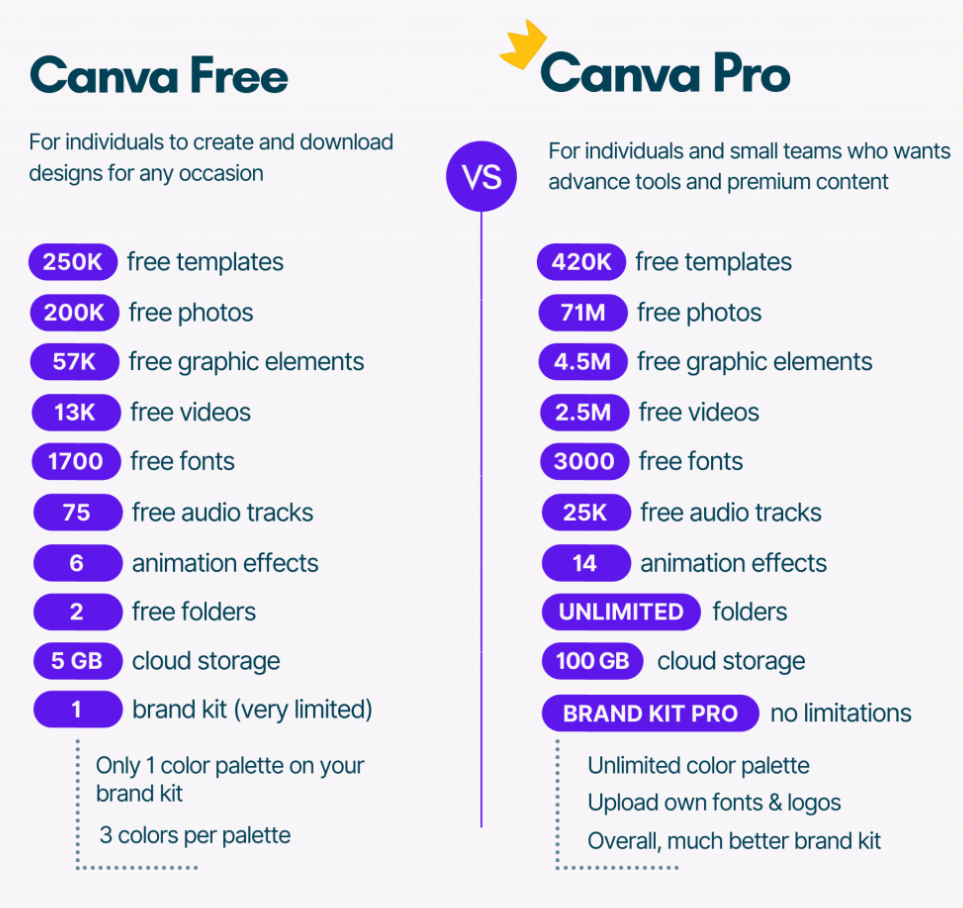
Q: What is the main difference between Canva Free and Pro?
A: The free version gives you a solid base. Pro, however, gives you the “pro” edge. It offers a 30-day trial. It also gives access to over 100 million premium assets. You get a one-click background remover. You also get Magic Resize and much more.
Q: Can I use Canva Pro for commercial projects during the trial?
A: Yes! The trial grants you full commercial rights. You can use it for your business, freelancing, or side hustle. Just ensure you read the licensing agreements, but generally, it is safe for commercial use.
The Bottom Line
There you have it. You don’t have to be a design expert to look like one. Canva Pro is an incredible tool, but it doesn’t have to be expensive. Whether you choose the 30-day free trial, the Education route, the Nonprofit route, or a regional Lite plan, there is a way to get the premium experience.
So, don’t hesitate. Try the free trial. Apply for the programs. Your designs will thank you. So, go ahead and unlock your creativity without unlocking your wallet. Enjoy the magic of Canva Pro