
Google Drive vs iCloud: How to Choose & Key Facts
Google Drive vs iCloud: The Great Cloud Storage Debate: Which One Actually Fits Your Life?
Let us be honest for a moment. You have probably seen that notification pop up on your phone before: “iCloud Storage is Full.” It always seems to appear at the worst possible time, right when you are trying to capture a video of your kids or download an important document for work. Meanwhile, your friend with an Android phone never seems to complain about this problem. They keep snapping photos and storing files without a second thought. Consequently, this is the classic Google Drive vs iCloud dilemma, and it affects almost everyone who owns a smartphone or a computer.
I have been there myself. In fact, I used to wrestle with this decision constantly. Should I pay Apple for more storage? Should I switch everything to Google? Or should I try to manage with the available free space? In this guide, I will walk you through the key differences between these two cloud storage giants.
Google Drive vs iCloud: What Are We Actually Comparing?
Before we dive into the details, let us establish what each service actually does. Both Google Drive and iCloud serve the same fundamental purpose: they store your files securely in the cloud, giving you access from anywhere with an internet connection. However, the way they approach this task is completely different.
Think of it like choosing between two different neighborhoods. Both have houses, but the streets are laid out differently, and the neighbors might not be as welcoming depending on where you come from.
iCloud is Apple’s cloud storage service. It comes built into every iPhone, iPad, and Mac. As a result, you do not need to install anything; it simply exists there in the background, ready to back up your photos, messages, and device settings. Moreover, the service is incredibly seamless if you live entirely inside Apple’s ecosystem. For many users, this convenience outweighs any limitations the service might have.
Google Drive belongs to Google’s massive family of online tools. You get it for free with any Google account, and it works across practically every device and operating system. Unlike iCloud, Google Drive does not care whether you use an iPhone, an Android phone, or a Windows computer. Therefore, this cross-platform flexibility makes it a favorite among users who switch between different devices throughout their day.
Google Drive vs iCloud: Free Storage: What Do You Get Without Spending Money?
Let us start with the most attractive feature for many users: the free storage. Both services offer a decent amount of free space, but their approaches differ significantly.
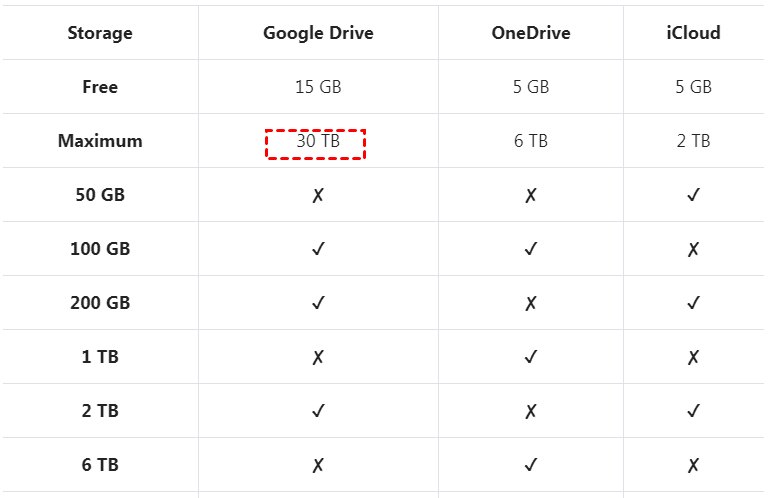
Google Drive gives you 15 GB of free storage right from the start. This is a generous amount, and you do not need to jump through any hoops to claim it. Then, you create a Google account, and the space becomes yours. Importantly, this 15 GB is shared across Gmail, Google Photos, and Google Drive. Therefore, if you receive lots of emails with large attachments or store many high-resolution photos, your free space can vanish quickly.
iCloud offers a much more modest 5 GB of free storage. For a modern smartphone user, 5 GB fills up almost instantly. For instance, a single backup of your iPhone can easily consume 2 to 3 GB. Similarly, add a few hundred photos, and your free storage is gone. Apple clearly designed this tier to encourage users to upgrade to a paid plan.
The winner in free storage? Google Drive takes this round without question. After all, you get three times the space for absolutely nothing.
Google Drive vs iCloud: Paid Storage Plans: Which One Offers Better Value?
Eventually, most users need more storage. Let me show you what you get when you decide to pay.
Google Drive offers the following plans through Google One:
| Plan | Storage | Price (Monthly) |
|---|---|---|
| Basic | 100 GB | $1.99. |
| Standard | 200 GB | $2.99. |
| Premium | 2 TB | $9.99. |
iCloud offers these storage tiers:
| Plan | Storage | Price (Monthly) |
|---|---|---|
| First Tier | 50 GB | $0.99. |
| Second Tier | 200 GB | $2.99. |
| Third Tier | 2 TB | $9.99. |
At first glance, iCloud appears cheaper at the entry level. Fifty gigabytes for 99 cents is an excellent deal, especially if you need a little extra breathing room. However, Google Drive gives you 100 GB for $1.99, which is better value per gigabyte.
For the 2 TB plan, both services cost the same. However, Google One offers additional benefits. Subscribers get access to Google experts, special deals on hotels, and the ability to share storage with up to five family members at no extra cost. iCloud’s 2 TB plan also supports Family Sharing, but it lacks the extra perks.
The winner here depends on your needs. Need minimal extra space? iCloud’s 50 GB plan is a bargain. Want maximum value for your money? Google Drive’s 100 GB plan gives you more bang for your buck.
Cross-Platform Compatibility: Will It Work on My Devices?
This is where the two services differ the most. Your choice here can make or break your daily experience.
Google Drive vs iCloud:
Google Drive works everywhere. You can access it on:
- Android devices (seamless integration)
- iPhones and iPads (through a dedicated app)
- Windows computers (via desktop app or web browser)
- Mac computers (via desktop app or web browser)
- Any device with a web browser
Google Drive does not care about your operating system. It treats every user equally, whether they use Windows, macOS, Android, or iOS. This universal approach makes Google Drive the preferred choice for people who use multiple devices from different manufacturers.
iCloud works best on Apple devices. The integration is simply unmatched. On an iPhone, your photos back up automatically. Your documents sync instantly across your Mac, iPad, and iPhone. Your device settings restore effortlessly when you get a new phone. It is a beautiful experience when everything works.
However, iCloud struggles outside the Apple ecosystem. While Apple does offer iCloud for Windows, the experience feels clunky and limited. You cannot access iCloud on Android devices at all, except through a basic web interface that offers minimal functionality. Linux users cannot use iCloud at all.
The winner for cross-platform compatibility is Google Drive. If you use an Android phone alongside a Windows laptop, Google Drive is your clear choice. If you live entirely in Apple’s world, iCloud offers a superior integrated experience.
File Management and Organization
How do these services handle your files? Let me walk you through the experience.
Google Drive vs iCloud:
Google Drive uses a classic folder structure. You can create folders, subfolders, and move files around just like you would on a computer. This familiar approach makes navigation intuitive for most users. You can color-code folders, star important files, and even add shortcuts to frequently accessed items.
The search function in Google Drive is exceptional. Google’s powerful search algorithms help you find files instantly. You can search by file name, content, file type, or even keywords inside documents. This search capability saves you hours of frustration.
iCloud takes a different approach. The service does not offer a traditional file browser in the same way. Instead, iCloud integrates directly into apps. When you save a document from Pages, it goes to iCloud. When you take a photo, it appears in iCloud Photos. Apple assumes you will access files through the apps you use, not through a central file manager.
iCloud does have a Files app on iOS, but it often feels confusing and less intuitive than Google Drive’s folder system. On Mac, iCloud integrates into Finder, which works reasonably well for desktop users.
The winner for organization is Google Drive. The traditional folder system combined with powerful search makes file management significantly easier.
Collaboration Features
Google Drive vs iCloud: Cloud storage is rarely just about storing files. Most people want to share and collaborate with others.
Google Drive shines in collaboration. The integration with Google Docs, Sheets, and Slides is seamless. You can share a document with anyone, and they can edit it in real time. Multiple people can work on the same file simultaneously, and you can see their changes as they type. You can leave comments, suggest edits, and even chat with collaborators directly within the document.
The sharing options are flexible. You can share files with specific people or generate a link that anyone can access. You can set permissions to allow viewing, commenting, or editing. This flexibility works wonderfully for both personal and professional use.
iCloud offers collaboration features through iCloud Drive. However, the experience feels less polished. You can share files and folders with others, but real-time collaboration is limited compared to Google. Apple’s productivity suite (Pages, Numbers, Keynote) does support collaboration, but it works best when everyone in the group uses Apple devices.
The winner for collaboration is Google Drive. The real-time editing and seamless integration with Google’s productivity tools create a vastly superior collaborative experience.
Photo Backup and Management
Google Drive vs iCloud: For many people, photos are the primary reason they use cloud storage. Let us compare how each service handles your precious memories.
Google Photos integrates with Google Drive. When you enable backup, your photos save automatically to Google Photos, and they also appear in a folder within Google Drive. The service offers unlimited “Storage Saver” quality backups for free (at reduced resolution), or you can use your 15 GB for original quality photos.
Google Photos includes powerful AI features. The app automatically organizes your photos by people, places, and things. You can search for “beach” and see all your beach photos. You can search for “dog” and find pictures of your furry friend. Then the AI even creates animations, collages, and stylized photos automatically, which adds a fun element to photo management.
iCloud Photos offers a different experience. Your photos are stored in original quality, which preserves every detail. However, this quality comes at the cost of storage space. A phone full of high-resolution photos can quickly consume multiple gigabytes of storage.
The integration with Apple devices is flawless. Photos appear instantly across all your Apple devices. Edits you make on your iPhone show up immediately on your Mac. Live Photos and video formats are preserved exactly as captured. The “Shared Albums” feature allows you to share specific photos with family and friends.
However, iCloud does not offer the same AI-driven organization as Google Photos. You will need to manually create albums and organize your photos, which requires more effort.
The winner depends on your needs. Want intelligent organization and more free storage? Choose Google Photos. Want original quality and perfect Apple ecosystem integration? Choose iCloud Photos.
Security and Privacy
Google Drive vs iCloud: Security is a significant concern in today’s digital world. Let me explain how each service protects your data.
Google Drive encrypts your data both in transit and at rest. This means your files are secure while traveling across the internet and also when stored on Google’s servers. Google offers two-factor authentication, which adds an extra layer of protection to your account.
However, Google’s business model relies on data. Google scans your files to improve its services and serve targeted advertisements. This scanning is automated and does not involve human review, but some users find this practice concerning.
iCloud also encrypts data in transit and at rest. Then, Apple offers two-factor authentication as well. Additionally, Apple provides end-to-end encryption for specific categories of data, including messages, health data, and keychain passwords. This encryption means even Apple cannot access this data.
Apple positions itself as a privacy-focused company. The company’s business model does not rely on selling user data. Apple states clearly that they do not scan your iCloud data for advertising purposes, giving privacy-conscious users peace of mind.
The winner for privacy is iCloud. Apple’s commitment to privacy and end-to-end encryption offers superior protection for sensitive data.
Google Drive vs iCloud: How to Choose the Right Service for You
Google Drive vs iCloud: Now comes the important question: which one should you choose? Let me break it down based on your situation.
Choose Google Drive if:
- Firstly, you use a mix of Android, Windows, and Apple devices
- Secondly, you collaborate frequently on documents with others
- Thirdly, you want generous free storage and better value paid plans
- Fourthly, you love AI-powered photo organization
- Then, you prefer a traditional folder-based file system
Choose iCloud if:
- You only use Apple devices (iPhone, Mac, iPad)
- Privacy is your top priority
- You want seamless device backups
- Then, you do not collaborate on documents frequently
- You want affordable entry-level storage
Use both services if:
- Firstly, you want maximum flexibility
- Secondly, you want to separate personal and professional files
- Then, you want backup redundancy
Practical Tips for Getting the Most from Each Service
Google Drive vs iCloud: Let me share some practical tips that will save you time and frustration.
Tips for Google Drive users:
- Firstly, download the desktop app: The Backup and Sync app automatically uploads files from your computer to the cloud.
- Secondly, use Google Photos for image backup: The unlimited storage option helps you save space.
- Thirdly, master the search function: Learn to use advanced search operators for faster file location.
- Then, organize with folders: Then, create a clear folder structure from day one to avoid future chaos.
Tips for iCloud users:
- Firstly, optimize iPhone storage: Enable “Optimize iPhone Storage” in Photos settings to save local space.
- Secondly, use Family Sharing: Share your 200 GB or 2 TB plan with family members.
- Thirdly, manage backups selectively: Only back up essential apps to conserve space.
- Then, enable two-factor authentication: Then, protect your account from unauthorized access.
Frequently Asked Questions
1. Can I use both Google Drive and iCloud together?
Absolutely. Many users subscribe to both services. You can use Google Drive for file sharing and collaboration while using iCloud for device backups and photo storage. This dual approach gives you maximum flexibility and redundancy.
2. Is Google Drive safe for sensitive files?
Yes. Google uses strong encryption and advanced security measures. However, if privacy concerns bother you, consider encrypting sensitive files locally before uploading them to Google Drive.
3. Can I access iCloud on Android?
You can access iCloud through a web browser on Android. However, the experience is limited. You cannot access iCloud Photos or iCloud Drive seamlessly on Android through dedicated apps.
4. Does Google Drive work offline?
Yes. Google Drive allows you to make files available offline. You mark a file as available offline, and you can access it without an internet connection. Changes sync automatically when you reconnect.
5. Does iCloud work on Windows?
Yes. Apple offers iCloud for Windows, which allows you to access iCloud Drive, Photos, and passwords on your Windows computer. The experience is not as smooth as on Mac, but it works.
6. What happens if I stop paying for a paid plan?
Both services will give you a grace period. After that, they may limit your storage. You will not lose your files immediately, but you will not be able to upload new content until you free up space or renew your subscription.
Final Verdict
So, which service should you choose? Let me give you my honest conclusion. This will help you make a decision.
Google Drive vs iCloud: Google Drive wins for versatility. It works everywhere. It offers more free storage. Then, it provides better collaboration tools. It gives you smarter photo management. Therefore, if you switch between devices frequently, Google Drive is the smarter choice. If you work with people who use different platforms, choose Google Drive.
On the other hand, iCloud wins for integration. If you are deeply invested in the Apple ecosystem, iCloud delivers an experience that Google Drive cannot match. Backups happen automatically. Photos sync effortlessly. Consequently, everything feels like it belongs together. It just works.
Personally, I use both. Google Drive handles my work documents and collaborative projects. For instance, I share files with colleagues using Google Docs. I appreciate the folder system. Meanwhile, my iPhone backs up to iCloud. My photos automatically sync across my Apple devices. Therefore, this hybrid approach gives me the best of both worlds.
At the end of the day, you cannot make a wrong choice here. Both services are reliable. Both are secure. Then, both are well-designed. Your decision should reflect your devices, your habits, and your priorities.
Take a moment to think about how you actually use your devices. Do you collaborate frequently? Do you switch between operating systems? Then, do you worry about privacy? Answer these questions honestly. Your choice will become clear.
One final piece of advice: Start with the free tier of both services. Use them for a few weeks. See which one feels more natural to you. You can always upgrade later. After all, the best cloud storage is the one you will actually use and enjoy. That is the truth.