
Recover Roblox Account Without Gmail: How To (Step-by-Step)
So, you locked yourself out of Roblox. And to make things worse, you don’t have access to that old Gmail account anymore. First, take a deep breath. Consequently, don’t panic. Many players face this exact situation every single day. Therefore, you are not alone. Surprisingly, Roblox offers several ways to recover your account without touching your Gmail account. In fact, you can use a phone number, a parent’s email, or even backup codes. Above all, you need patience and a clear strategy.
Now, let me walk you through the entire process. Meanwhile, keep your device nearby because we will take action immediately.
Why Did You Lose Access to Gmail?
First of all, let’s understand the problem. For instance, you might have created your account using a school email that no longer exists. Alternatively, you might have lost the password to your Gmail account itself. Similarly, you could have deleted that Gmail account months ago without thinking about it. In any case, the result is the same: you cannot receive password reset emails. Nonetheless, recovery remains possible.
What You Need Before Starting in Roblox
Before we begin, gather these items. First, your username. Secondly, any phone number linked to the account. Thirdly, a parent’s or friend’s email address that you do control. Finally, remember any past purchase receipts (if you bought Robux). Consequently, having these ready will speed up recovery.
If you want to read about how to change your password in Roblox, click here.
Method 1: Recover Using a Phone Number (No Gmail Needed)
Here is the most effective method. It allows phone number verification. Therefore, if you added a phone number to your account earlier, you are in luck.
Step 1: Open the login screen. Then, click “Forgot Password or Username?”
Step 2: Instead of typing an email, choose “Use Phone Number to Reset.” Roblox will immediately show this option.
Step 3: Enter your phone number exactly as you registered it. Afterward, click “Submit.”
Step 4: Within seconds, Roblox sends a 6-digit code via SMS. Enter that code on the website.
Step 5: Now, create a strong new password. Finally, log in with your new credentials.
Important: This method works only if you previously verified your phone number on Roblox. Otherwise, move to Method 2.
Method 2: Contact Roblox Support Without Gmail
What if you never added a phone number? Then, you need customer support. However, you might think, “But I don’t have my old Gmail!” Fortunately, Roblox support does not require you to send messages from that old email. Instead, you can contact them from any working email address.
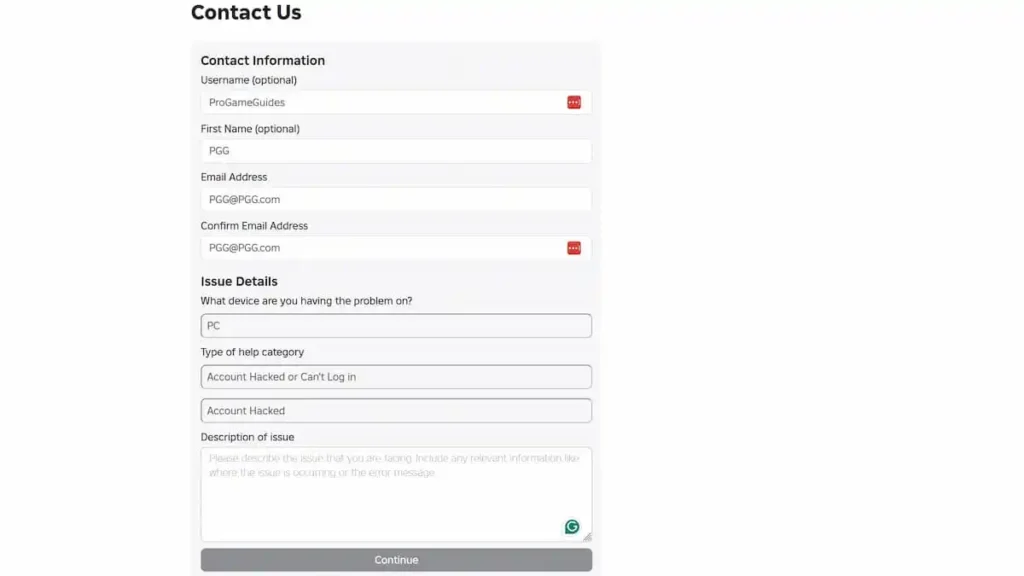
Step 1: Go to the Support page (www.roblox.com/support).
Step 2: Fill out the form carefully. Under “Email Address,” use your current, working email (e.g., Outlook, Yahoo, or a new Gmail). Meanwhile, clearly state your old Roblox username.
Step 3: In the description box, write: “I need to recover my Roblox account [insert username]. I no longer have access to the original Gmail. However, I can prove ownership.”
Step 4: Attach proof of ownership. For example, a screenshot of your Robux purchase receipt. Alternatively, show a picture of your Roblox avatar taken from a friend’s account.
Step 5: Submit the form. Thereafter, wait 24–48 hours. Support will reply to your new email address.
Pro tip: Be polite and detailed. Consequently, your chances of recovery increase dramatically.
Method 3 Roblox: Use a Parent’s Email or Linked Account
Interestingly, many young players link their accounts to their original Gmail account or a parent’s email. If that’s your case, rejoice because you can r becauseaccounts to their without the original Gmail.
Step 1: Ask your parent to check their email inbox (the one they used for Roblox).
Step 2: On the login page, click “Forgot Password.” Then, enter the parent’s email address instead of yours.
Step 3: Roblox sends a reset link to that email. Your parent can forward it to you.
Step 4: Click the link and set a new password. After that, log in immediately.
Remember: Once inside, go to Settings > Account Info and add your own phone number. Consequently, you won’t face this problem again.
Method 4: Backup Codes – The Hidden Gem
Did you ever enable 2-Step Verification (2SV) on Roblox? If yes, you might have saved backup codes. These codes allow login without an email or phone.
Step 1: Look through your old notebooks, cloud storage, or screenshots. Search for a list of 8-digit codes labeled “Roblox Backup Codes.”
Step 2: Go to the login page. Enter your username and then click “Forgot Password?”
Step 3: Choose “Use Backup Code” (sometimes hidden under “Other Options”).
Step 4: Enter one unused backup code. Roblox will then let you create a new password immediately.
Note: Each backup code works only once. Therefore, save the remaining codes after recovery.
What If Nothing Works? The Final Option
Unfortunately, sometimes all methods fail. For instance, you never added a phone number, lost backup codes, and cannot reach support. Nonetheless, do not lose hope. Try this last resort:
Create a new Roblox account using a fresh email. Then, use that new account to message Roblox support directly. Write: “Support team, I am [new username]. My old account [old username] is locked. I have no access to the original Gmail. Can you please verify me using my in-game purchase history?” Attach any receipts you find.
Admittedly, this takes longer. However, many players recover their accounts this way within two weeks.
How to Prevent This Problem in the Future
After you recover your account, act immediately. First, add a phone number. Secondly, enable 2-Step Verification and save backup codes. Thirdly, add a secondary email (like Outlook or Yahoo). Finally, write down your new password in a safe place. Consequently, you will never need to recover your Roblox account without Gmail again.
Frequently Asked Questions (FAQ)
Q1: Can I recover a Roblox account if I never added any email or phone number?
A: Yes, but it is difficult. You must contact Roblox support with proof of ownership. For example, show them Robux purchase receipts or a video of you playing on that account. Without any proof, recovery becomes nearly impossible.
Q2: How long does Roblox support take without a Gmail?
A: Usually 24 to 72 hours. However, during holidays, it might take up to one week. Therefore, be patient and check your current email daily.
Q3: Will Roblox ban my account if I try too many recovery attempts?
A: No, Roblox does not ban accounts for failed recovery attempts. Nevertheless, entering wrong passwords 20+ times might temporarily lock you out for an hour.
Q4: I used a fake birthday when creating my account. Does that matter?
A: Unfortunately, yes. If you cannot verify your age, support may reject your request. Therefore, always use real information on gaming accounts.
Q5: Can a friend help me recover my Roblox account without Gmail?
A: Absolutely. A friend can go to your profile, click “Report,” and explain the situation to support. Then, support might contact you via your friend’s email. However, this method rarely works unless you also provide purchase proof.
Q6: What if I never spent any Robux? Can I still recover?
A: Possibly. You can still provide a screenshot of your avatar, your friend list, or your join date. Support uses this information to verify ownership. Nonetheless, purchase receipts remain the strongest proof.
Q7: Is it safe to give my phone number to Roblox?
A: Yes, it is safe. Roblox encrypts all phone numbers. Furthermore, they never sell your data to third parties. Consequently, adding a phone number protects your account.
Q8: I recovered my account, but now I see strange items. What happened?
A: Someone else may have accessed your account before recovery. Immediately change your password again. Then, check “Settings > Security” and log out all other sessions. Finally, review your inventory for stolen items.
Q9: Can I use a temporary phone number (like from an app) for recovery?
A: No, avoid that. Roblox blocks most temporary or VoIP numbers. Moreover, you will lose access to that number later. Therefore, always use a real, permanent phone number.
Q10: What if I forgot my Roblox username, too?
A: Then, ask a friend to look at their friend list. Alternatively, search your old emails for “Welcome to Roblox” even if you cannot log into that Gmail. The subject line often shows your username.
Final Thoughts
Recovering a Roblox account without a Gmail account feels frustrating. Nevertheless, you have multiple paths to success. First, try your phone number. Second, contact support from a new email. Third, use backup codes or a parent’s email. Above all, do not give up.
Consequently, once you regain access, secure your account properly. Add a phone number, a secondary email, and backup codes. Thereafter, you will never need to search for “how to recover a Roblox account without Gmail” again.
Now, go ahead and try these methods. Your favorite Roblox games are waiting for you.