
Introduction
Tensor Processing Units (TPUs) are changing how we train machine learning models. These custom-built chips, designed by Google, turbocharge deep learning workloads. But how do they work, and when should you use them?
In this guide, we’ll break down everything you need to know from setting it up to maximizing its performance.
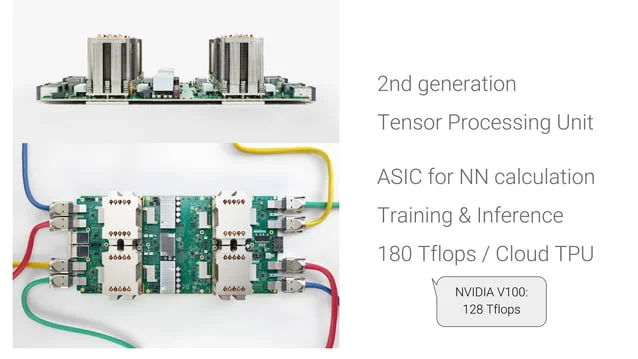
What Exactly Are TPUs?
These are specialized processors built specifically for machine learning tasks. Unlike general-purpose CPUs and GPUs, they excel at handling the massive matrix calculations that neural networks rely on.
Why Should You Consider TPUs?
- Blazing-fast training: it processes data in parallel, slashing training times for large models.
- Cost efficiency: They often deliver better performance per dollar than GPUs for big workloads.
- Seamless scaling: Google Cloud lets you distribute training across multiple chips effortlessly.
Getting Started with TPUs
1. Accessing TPU Hardware
Firstly, you’ll need a Google Cloud Platform (GCP) account. Some of its resources require quota approval; check Google Cloud’s documentation.
2. Picking the Right Framework
TPUs work best with TensorFlow, but PyTorch users can tap into them via XLA.
3. Adapting Your Code
- Use TPU-friendly operations: Some TensorFlow functions run better on it than others.
- Optimize batch sizes: it thrives on large batches. Adjust your data pipeline accordingly.
- Enable mixed precision: Then, speed up training
bfloat16without losing much accuracy.
4. Launching Your Training Job
You can run workloads on Google Cloud TPU VMs or experiment with free TPUs on Google Colab (with limitations).
Important TPU Tips
- Not all models benefit: TPUs shine with large-scale workloads but may not help smaller projects.
- Watch your data pipeline: Slow data loading can bottleneck performance, use TFRecords for efficiency.
- Monitor costs: Then, cloud TPUs can get pricey; set usage alerts to avoid surprises.
Frequently Asked Questions
1. Are TPUs faster than GPUs?
For large TensorFlow models, yes! But GPUs might still be better for smaller tasks or non-TensorFlow frameworks.
2. Can I try TPUs for free?
Absolutely! Google Colab offers limited free TPU access, great for testing before committing to cloud costs.
3. Does PyTorch work well with it?
It works, but TensorFlow is better optimized. PyTorch users need XLA, which has some limitations.
4. How do I fix common issues?
Moreover, Check for:
- Shape mismatches in your tensors
- Then, unsupported operations
- Data loading delays
5. Is it worth the investment?
For big models and production use, yes. Then, for small experiments, GPUs or Colab’s free it may be enough.
Final Thoughts
It offers game-changing speed for deep learning, but it requires some setup. If you’re training large models, mastering it can save you time and money.
Pro Tip: Start with Colab’s free TPUs to get a feel for them before scaling up!
Need a hands-on TPU tutorial? Drop a comment, and we’ll create one!