
Introduction
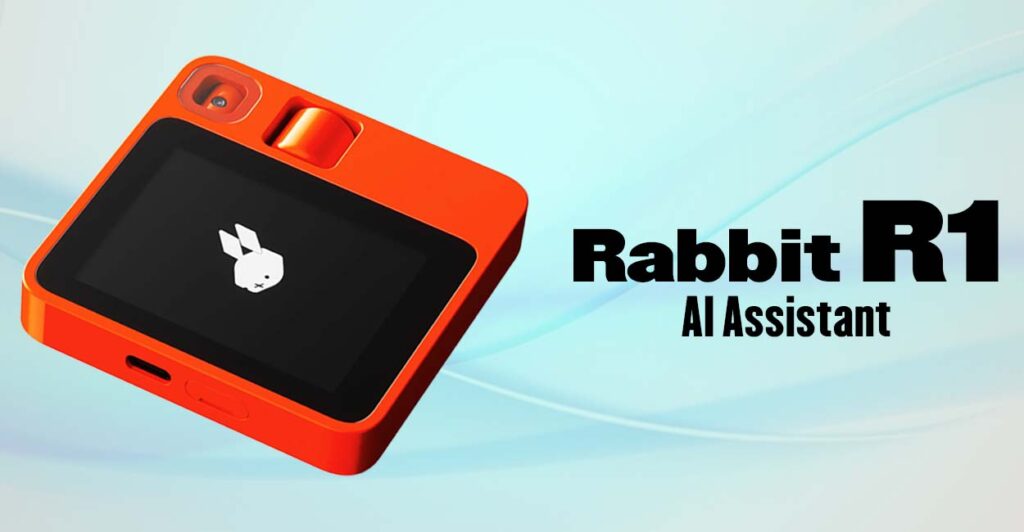
The Rabbit R1 is one of the most talked-about AI gadgets of 2025. This little orange device promises to change how we interact with technology; there are no apps or clutter, just pure AI assistance.
But is it worth the hype? How does it work? And should you buy one?
In this guide, we’ll break down:
Let’s dive in.
Firstly, what the Rabbit R1 does
Secondly, how to set it up and use it daily
Thirdly, Key features vs. limitations
Then, who should (and shouldn’t) buy it
What Is the Rabbit R1?
The Rabbit R1 is a standalone AI device designed by Teenage Engineering. Unlike smartphones, it doesn’t run apps, instead, it uses a Large Action Model (LAM) to perform tasks through natural conversation.
Key Specs:
- Firstly, Size: Smaller than an iPhone (pocket-friendly)
- Secondly, Screen: 2.88-inch touchscreen
- Thirdly, Camera: Rotating 8MP (for photos and vision tasks)
- Fourthly, Battery: All-day use (varies by activity)
- Then, Price: $199 (no subscription required)
How to Set Up Your Rabbit R1
Step 1: Unbox & Charge
- Firstly, comes with the device USB-C cable and docs.
- Secondly, fully charge before first use (~2 hours).
Step 2: Connect to Wi-Fi
- Firstly, press the side button to wake it up.
- Secondly, follow prompts to connect to Wi-Fi.
Step 3: Log In to Rabbit Hole
- Firstly, visit the rabbit. tech on a computer.
- Secondly, link your accounts (Spotify, Uber, DoorDash, etc.).
Step 4: Start Using Voice Commands
- Firstly, hold the push-to-talk button and speak naturally.
- Secondly, try: “Play my workout playlist on Spotify” or “Order an Uber to downtown.”
What Can the Rabbit R1 Do?
1. AI Assistant (Like Siri, But Better?)
- Firstly, Voice-controlled: Ask it anything (“What’s the weather?”)
- Secondly, Multi-language support (English, Spanish, French, and more)
2. Task Automation
- Firstly, Book rides, order food, and send messages hands-free.
- Secondly, Example: “Order my usual from Starbucks.”
3. Vision & Object Recognition
- Firstly, point the camera at objects: “What’s this plant?”
- Secondly, scan menus: “Which dish has less than 500 calories?”
4. Media Control
- Moreover, play music, podcasts, or videos (via Spotify, YouTube, etc.).
5. Learning Mode (“Teach Me” Feature)
- Then, show it how to use a website, and it remembers.
- Furthermore, Example: Teach it to book a flight on a specific airline.
Rabbit R1 vs. Smartphones: Why It’s Different
| Feature | Rabbit R1 | Smartphone |
|---|---|---|
| Interface | Voice-first | Touchscreen + apps |
| Speed | Instant actions | App loading times |
| Learning | Adapts to habits | Static app usage |
| Price | $199 (one-time) | $700+ (with apps) |
Best For:
- Firstly, People who hate app overload
- Secondly, Quick task automation (ordering, booking, etc.)
- Then, Minimalists who want fewer screens
Rabbit R1 Limitations (What It Can’t Do Yet)
🚫 No calling/texting (yet—coming in updates).
Limited third-party app support (only major services).
🚫 Learning curve (teaching it takes patience).
Who Should Buy the Rabbit R1?
👍 Good For:
- Tech enthusiasts who love AI experiments.
- Busy professionals who want faster task automation.
- Minimalists are tired of smartphones.
👎 Not For:
- App-heavy users (Instagram, TikTok, etc.).
- Offline users (needs Wi-Fi/data).
- Budget shoppers who expect a full phone replacement.
If you want to read about Perplexity vs ChatGPT, Click Here
Rabbit R1 Final Verdict: Should You Buy It?
✅ Buy If You Want:
✔ A fun, futuristic AI gadget
Faster task automation than phones
✔ To reduce screen time
❌ Skip If You Need:
✖ Full smartphone replacement
Advanced app support
✖ Perfect accuracy (still in early stages)
Rabbit R1: Where to Buy & Discounts
- Firstly, official Site: rabbit.tech ($199)
- Then, wait for deals: Black Friday may drop prices.
Conclusion
The Rabbit R1 isn’t a smartphone killer—it’s a new kind of AI sidekick. If you love tech and want a faster way to handle daily tasks, it’s worth trying. But if you need apps and perfect reliability, stick with your phone for now.
Try it if:
🔹 You hate app overload
🔹 You love voice-controlled tech
You want the future of AI in your pocket