
Introduction
Choosing the right password manager is crucial for online security. Two of the most popular options, LastPass vs 1Password, offer strong encryption, cross-platform support, and user-friendly features. But which one is better for you?
Additionally, picking the right password manager keeps your online accounts safe without the hassle. Then, two big names—LastPass and 1Password—both promise top security and easy logins. But which one works best for you?
Moreover, in this simple guide, we’ll compare features, security, pricing, and ease of use in plain language. By the end, you’ll know exactly which app fits your needs, no tech jargon required.
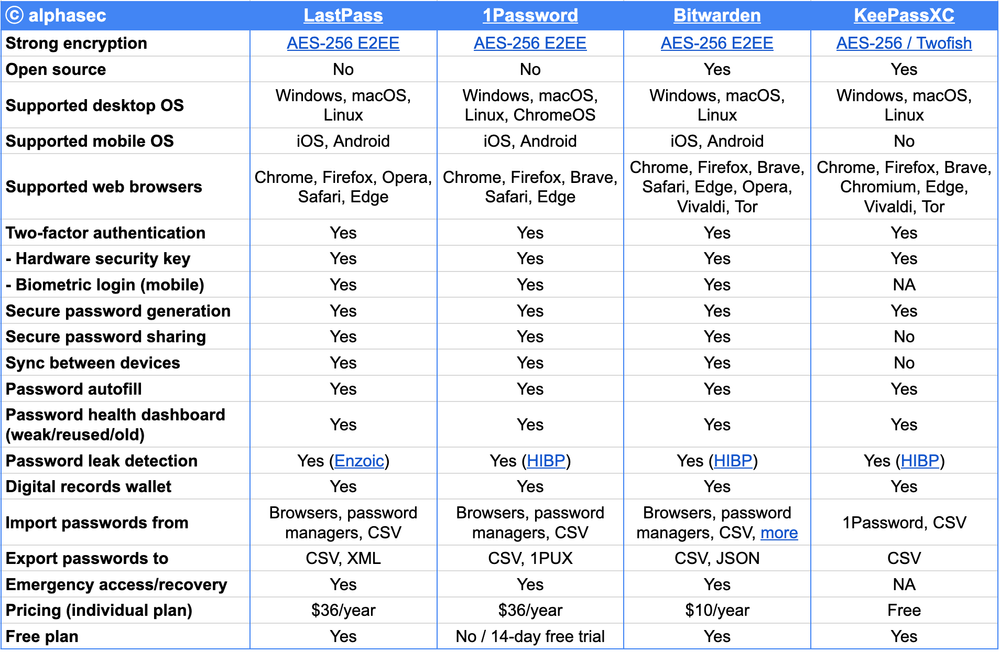
1. Quick Look: LastPass vs 1Password
Both apps store passwords, fill in logins, and create strong passwords. But they work differently:
- LastPass has a free version (with limits) and works on most devices.
- 1Password costs money, but feels smoother and has extra security tools.
Now, let’s break it down.
2. LastPass vs 1Password Security: Which Keeps Your Passwords Safer?
LastPass Security
- Firstly, uses military-grade encryption (AES-256).
- Secondly, supports two-factor login (like fingerprint or text codes).
- Thirdly, the free version lacks some security checks.
1Password Security
- Also uses military-grade encryption.
- Adds a Secret Key—an extra password only you know.
- Travel Mode hides sensitive passwords when crossing borders.
Which is safer?
Both are very secure, but 1Password’s extra steps make it stronger.
3. LastPass vs 1Password Ease of Use: Which Feels Simpler?
LastPass: Easy but Messy
- Good: Firstly, fast setup, works in browsers.
- Bad: Secondly, recent updates made it harder to navigate.
1Password: Clean and Organized
- Good: Firstly, neat layout, easy to find passwords.
- Bad: Secondly, it takes a few minutes to learn.
Moreover, the Winner for ease? 1Password—if you don’t mind a small learning curve.
4. LastPass vs 1Password: Works on All Your Devices?
Additionally, both work on:
Phones (iOS & Android)
Computers (Windows, Mac, Linux)
Web browsers (Chrome, Firefox, Safari, Edge)
Key difference:
- LastPass Free additionally only works on one device type (phone or computer).
- 1Password syncs everywhere but costs money.
5. Price: Which Costs Less?
| Feature | LastPass Premium | 1Password Personal |
|---|---|---|
| Yearly Cost | $36 | $35.88 |
| Free Option? | Yes (limited) | No (14-day trial) |
| Family Plan | $48 (6 people) | $60 (5 people) |
Moreover, the Best free pick: LastPass
Best for families: 1Password (better features per person)
6. LastPass vs 1Password: Cool Extra Features
LastPass Bonuses
- Emergency Access (let someone unlock your passwords if needed).
- Dark Web Scan (checks if your passwords leaked online—paid only).
1Password Bonuses
- Travel Mode (hides passwords when traveling—great for airports).
- Watchtower (alerts you about weak or reused passwords).
Furthermore, the best extras? 1Password—especially if you travel.
7. LastPass vs 1Password: Help When You Need It
- LastPass: Email support (slow), forums.
- 1Password: 24/7 email help, easy guides.
Moreover, for better support? 1Password responds faster.
8. Final Decision: Which Should You Get?
Pick LastPass If You:
Want a free version.
Only need basic password storage.
Then, don’t mind occasional clunky design.
Pick 1Password If You:
Prefer a clean, easy-to-use app.
Then, want stronger security (Secret Key, Travel Mode).
Don’t mind paying a few dollars a month.
LastPass vs 1Password FAQs (Simple Answers!)
1. Is 1Password safer than LastPass?
Yes, slightly, thanks to its Secret Key and Travel Mode.
2. Can I switch from LastPass to 1Password?
Yes! Both let you export passwords in a few clicks.
3. Does 1Password have a free plan?
No, but you can try it free for 14 days.
4. Which is better for families?
1Password—its family plan includes better sharing tools.
5. Has LastPass been hacked before?
Yes, but they’ve fixed security issues since then.
LastPass vs 1Password Bottom Line
- Moreover, for most people → 1Password (better design + security).
- If you need free → LastPass (just avoid sensitive stuff on the free plan).
Try them out and see which you like!