
How to Use Seedance 2.0: What You Need to Know
Have you ever dreamed of making your own videos but felt you lacked the skills or budget? Well, those days are over. A powerful new tool has arrived, and it is changing everything. It is called Seedance 2.0. ByteDance released it in February 2026. This AI model is not just another small update. It is a massive leap forward for video creation.
Consequently, you can now create stunning videos with just a few words and images. You do not need a film crew. You do not need expensive cameras. Then, you need your imagination. Therefore, if you want to learn how to use this incredible tool, you have come to the right place.
This guide will show you everything. We will cover how to access it. Then, we will explore its coolest features. We will also help you avoid common mistakes. So, let us get started right away.
What Makes Seedance 2.0 So Special?
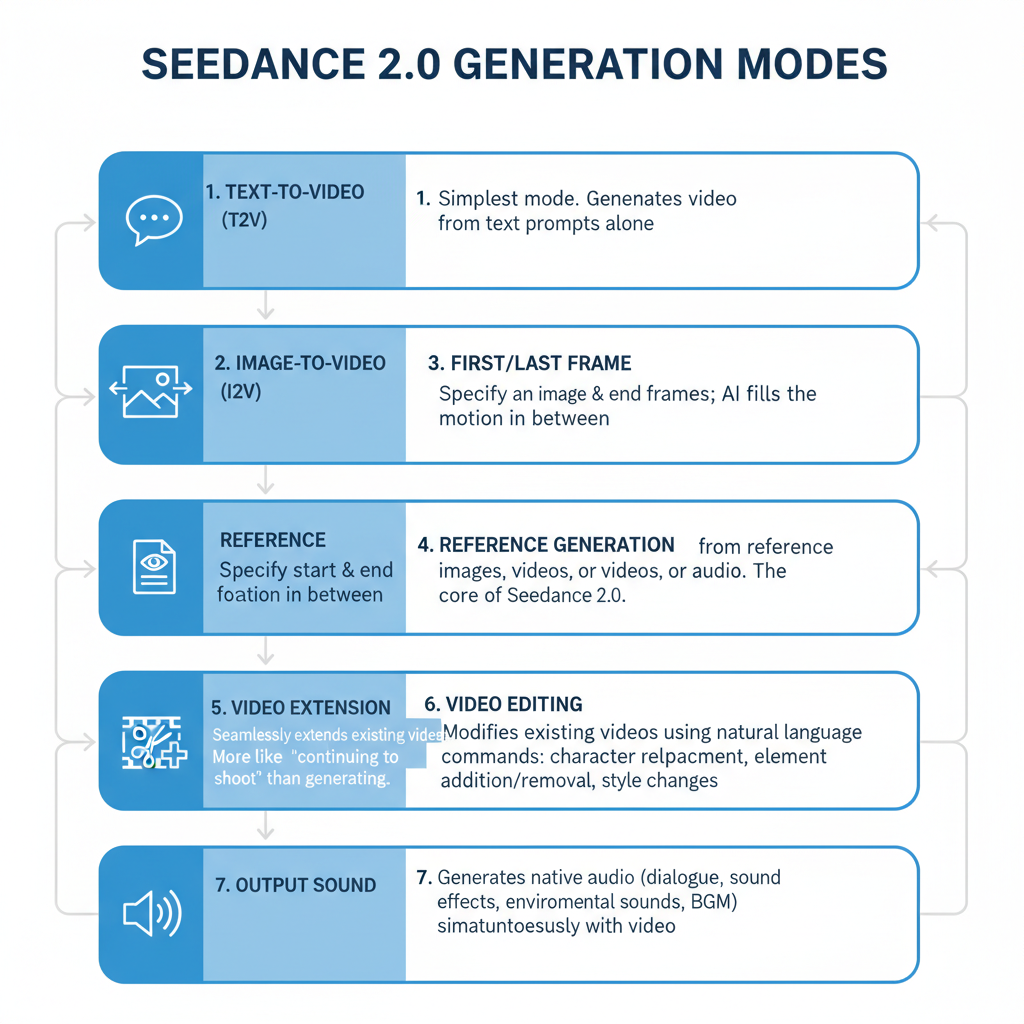
Firstly, let us talk about what this tool actually does. Seedance 2.0 is a multimodal AI video generator. That sounds complex, but it is actually quite simple. It means you can give it different types of input. You can give it text. Then, you can give it pictures. You can give it videos. You can even give it audio.
Then, the AI blends everything. It creates a brand new video based on your instructions. This is different from older tools. Older tools mostly just read text. Then, Seedance 2.0 watches your videos and studies your images. It listens to your audio. Then, it follows your directions.
Many experts are very excited about this tool. Some are calling it the “ChatGPT moment” for video. Elon Musk even commented on it online. Then, a famous game producer said it is the strongest video model available right now. Clearly, this is a big deal. Fortunately, you can now try it yourself.
How Do You Access Seedance 2.0?
Getting started is easier than you might think. You have a few different options. Here are the main platforms where you can find it.
Option One: Jimeng (Dreamina)
This is the official platform from ByteDance. It is a great place to begin. When you sign up, you usually receive free credits. Then, these credits let you generate several videos at no cost. This is perfect for experimenting.
Option Two: Doubao App
Doubao is another ByteDance product. Then, they have fully integrated Seedance 2.0 into their app. Therefore, you can access the model directly from your phone. It is very convenient.
Option Three: Little Skylark (Xiao Yunque)
This is a mobile app option as well. It offers a limited free tier. However, you should note one important detail. This app has restrictions on uploading real human faces. Keep that in mind when choosing your platform.
A Quick Word of Caution: Privacy is very important. If you plan to generate videos of real people, you must verify their identity. Then, always get permission first. Always follow the local laws in your area. This protects everyone involved.
If you want to read about Loveart.ai, click here.
The @ Mention System Explained
Now we reach the most exciting part of Seedance 2.0. It is called the @ mention system. This feature gives you incredible control. It lets you act like a real film director.
Then, think about how social media works. You tag a friend using the @ symbol. Seedance 2.0 works the same way. You upload your images and videos. Then, in your text prompt, you tag them.
For example, you might upload a photo of a character. You might also upload a video of a specific camera movement. Then, you write your prompt like this: @Image1 performs the action from @Video1.
Then, the AI understands this perfectly. It knows you want the character from the first image to move like the video you provided. This is incredibly powerful.
How to Organize Your References
- Images: You can upload up to 9 images. Use these to show the AI what your characters look like. Show their clothes. Show the background setting.
- Videos: You can upload up to 3 short clips. These clips can total 15 seconds. Use them to demonstrate camera movements or specific actions.
- Audio: Then, you can upload up to 3 audio files. These files control the mood and rhythm of your video.
Seven Techniques That Actually Work
Now, let us move to the practical part. Here are seven techniques that will help you create amazing videos. These come from experienced users who have tested the tool extensively.
1. Write Your Prompt Like a Script
Do not just write one long sentence. Instead, break your prompt into smaller parts. Describe what happens in the first few seconds. Then, describe the next part.
For instance, you could write: “0-3 seconds: Close-up of @Image1 looking worried. 4-8 seconds: Wide shot of @Image1 running from an explosion.”
Seedance 2.0 understands this format very well. It knows film terms like “close-up” and “tracking shot.” Use these terms to get better results.
2. Lock In Your Character’s Face
One common problem with AI video is “character drift.” This means your character’s face changes between scenes. It is very frustrating. Fortunately, you can prevent this.
Use the “Perfect First Frame” method. Firstly, generate a high-quality image of your character. Make sure the lighting is exactly how you want it. Then, make sure the pose is correct. Then, use this image as your main reference in every scene.
Creators report that this method improves consistency by nearly 80%. That is a huge difference.
3. Copy Cool Camera Moves
Have you ever seen a movie with an amazing camera shot? Did you wish you could use it? Now you can. Simply upload that clip as a reference. Then, ask the AI to use that same camera movement with your characters.
The AI will analyze the movement. It will then apply that exact style to your scene. This works great for action sequences and dance videos.
4. Match Your Video to Your Music
Audio matters a lot. Do not just add music at the end. Instead, upload your audio file first. Let the AI see it. Then, ask it to create visuals that match the beat.
When the visuals sync with the music, everything feels more professional. The rhythm guides the editing. The drops hit at the right moments. Your video will look polished and intentional.
5. Speak Like a Cinematographer
Seedance 2.0 knows film terminology. Therefore, you should use it. Tell the AI to use a “low-angle shot” to make someone look powerful. Ask for a “dolly zoom” for dramatic effect. Request “rack focus” to shift attention from one object to another.
The model was trained on professional cinematography. It responds accurately to these terms. Using them will significantly improve your results.
6. Organize Your Assets Carefully
You have up to 12 assets to work with. That is a lot. Therefore, you need a system. Assign specific slots for specific things.
For example, use slots 1-3 for your character’s face from different angles. Use slots 4-5 for wardrobe options. Use slots 6-7 for lighting examples. This keeps everything organized. It also helps the AI understand your references better.
7. Extend Your Videos
Do you have a great 5-second clip but need it longer? Seedance 2.0 allows video extension. You can ask the AI to add another 10 seconds. It will maintain the same style and narrative flow.
You can also edit existing storylines. Maybe you want a character to react differently. You can instruct the AI to change that specific moment. Then, this gives you tremendous flexibility.
Mistakes to Avoid
Learning what not to do is just as important as learning what to do. Here are the most common mistakes people make.
Mistake One: Being Too Vague
Do not say “make it look cinematic.” That is too vague. The AI will guess what you mean, and you might not like its guess. Instead, be specific. Describe the lighting. Then, describe the lens. Describe the camera angle. The more details you provide, the better the result will be.
Mistake Two: Uploading Too Much
You have limits for a reason. You can only use 9 images and 3 videos. Therefore, be selective. Choose your best assets. Then, do not just dump every file you have. Quality matters more than quantity.
Mistake Three: Ignoring Audio
Do not treat audio as an afterthought. It is a core input. Upload a rhythmic track. It helps the AI generate motion that flows naturally. Your videos will look smoother and more professional.
Mistake Four: Conflicting Instructions
Make sure your references agree with each other. If your reference video shows slow movement, do not ask for a fast sprint. Then, the AI will get confused. Ensure your text matches your visual references.
Frequently Asked Questions
Q: Is Seedance 2.0 free?
A: It depends on the platform you choose. Jimeng (Dreamina) gives new users free generations. They also provide daily points. However, these eventually run out. After that, you may need to purchase additional credits. The Little Skylark app also offers a limited free trial.
Q: Can I put my own face in videos?
A: Yes, but you must verify your identity first. Apps like Doubao and Jimeng require a verification process. You need to record yourself. Only then will the system generate a digital avatar of you. Then this prevents misuse and protects privacy.
Q: How long can my videos be?
A: You can generate clips between 4 and 15 seconds long. However, you can also use the extension feature. This lets you add more time to existing clips. You can build longer narratives piece by piece.
Q: How do I keep my character looking the same?
A: Use the “Anchor & Master” technique. Create a character sheet with 3-4 images from different angles. Always reference that main image in every prompt using the @ tag. Also, re-upload that anchor image at the start of each new scene. This reminds the AI what your character should look like.
Q: Does the video have sound?
A: Yes, it does. Seedance 2.0 generates native audio along with the video. This includes sound effects and ambient noise. It also includes background music. Everything syncs perfectly with the action on screen.
Final Thoughts
Seedance 2.0 represents a major shift in video creation. It puts powerful tools in the hands of ordinary people. You no longer need a studio budget to create professional content. You need a good idea and the willingness to experiment.
Master the @ mention system. Think like a director. Use specific language. Organize your assets carefully. Avoid common mistakes. If you do these things, you will create videos that amaze your friends and followers.
Then, the barrier between imagination and reality is shrinking every day. Seedance 2.0 proves that. So, go ahead and try it. Experiment with different prompts. Play with different references. See what you can create.
The digital director’s chair is waiting for you. Are you ready to sit in it?