
Inroduction
Masterpiece Studio, For aspiring 3D artists, the initial foray into digital modeling and animation is frequently fraught with overwhelming technical challenges. Consequently, the intricate interfaces and profound feature depth of conventional software suites often present a formidable barrier to entry.
Have you ever wanted to make 3D art but felt totally lost? First, you get a big idea. Then, you open a complicated program. Suddenly, you feel overwhelmed and close it. Sounds familiar, right? Fortunately, there is a much easier way to start. Masterpiece Studio is here to help! Basically, it turns complex 3D creation into a simple, fun process.
This guide will walk you through everything you need to know. So, let’s get started on your 3D journey!
What is Masterpiece Studio, Anyway?
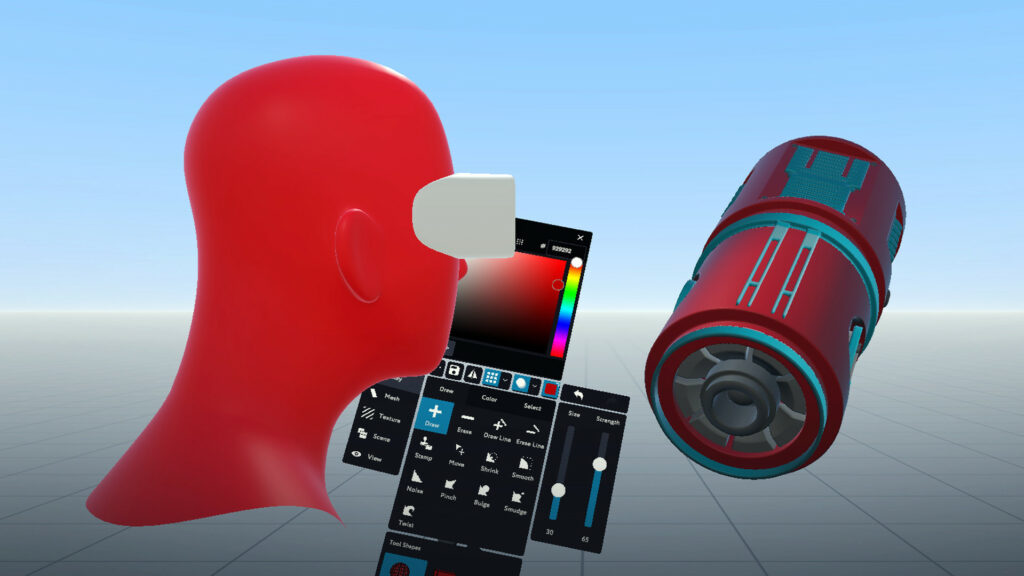
Before we jump in, let’s quickly explain what it is. Essentially, Masterpiece Studio is a set of tools that makes 3D creation easy. It’s famous for its VR tools, but you can use it on your computer too! Specifically, it has three main parts:
- Masterpiece X: Firstly, this is where you build your 3D model. You can sculpt it yourself or use AI to generate it from text!
- Masterpiece Pro: Next, this tool automatically adds a skeleton to your model. This is called “rigging,” and it’s needed for animation.
- Masterpiece Motion: Finally, this is where you bring your character to life by making it move and dance.
Moreover, the best part is how these apps work together seamlessly. As a result, you can go from an idea to a moving character incredibly fast.
If you want to read about a Small language model, click here.
Getting Started is Simple with Masterpiece Studio
Ready to try it? First, go to the Masterpiece Studio website. From there, you can download the app for free to start learning. After you install it, open the program. You’ll see a clean and simple screen. Now, you’re ready to create your first project!
How to Create Your 3D Model with Masterpiece Studio
This is the most exciting step! Importantly, you have a few choices on how to begin.
Option 1: Use AI to Generate a Model (The Easiest Way!)
If you don’t know where to start, the AI is your best friend.
- Firstly, inside Masterpiece X, find the “Generate” button.
- Then, type what you want to create. For example, try “a friendly robot” or “a shiny gem.”
- After that, pick a style and click generate. In just seconds, you’ll have options!
- Finally, choose your favorite one to edit or use as-is.
Option 2: Sculpt in VR (The Most Fun Way!)
If you have a VR headset, this feels like magic.
- Put on your headset and grab your controllers. You’ll be inside a virtual studio.
- Then, use your hands to sculpt! Pull, push, and smooth the digital clay like it’s real.
- You can walk around your creation, which makes it easy to see it from every angle.
Option 3: Sculpt on Your Desktop (The Familiar Way)
Prefer to use your mouse? No problem!
- Select a tool like “Move” or “Clay” from the menu.
- Then, click and drag on your model to shape it.
- You can change your brush size to add fine details or make big changes.
How to Rig Your Model Easily with Masterpiece Studio
Rigging sounds technical, but Masterpiece Studio makes it simple. After you finish your model, you need to give it a skeleton.
- Simply send your model from Masterpiece X to Masterpiece Pro.
- The AI will instantly analyze your model and build a perfect skeleton for it.
- You can then adjust the pose if you need to. It’s that easy!
How to Animate Your Character
Now for the really fun part: making it move!
- Next, import your rigged model into Masterpiece Motion.
- If you’re in VR, you can grab the controls and move the limbs yourself, like a puppeteer.
- Set keyframes on the timeline to create a sequence of movements.
- The software fills in the movement between your poses, creating a smooth animation.
How to Export and Use Your Creation with Masterpiece Studio
You’re done! Now, let’s get your work out into the world.
- Go to the export menu. You’ll see many file formats.
- Choose the right one for your project. For example, used
.fbxfor animation or.objfor 3D printing. - Finally, click export! Now you can use your model in game engines, other software, or send it to a 3D printer.
Frequently Asked Questions about Masterpiece Studio
Q: Do I need VR to use Masterpiece Studio?
A: Absolutely not! While VR is a blast, you can do almost everything on your desktop. So, don’t worry if you don’t have a headset.
Q: How does the AI work? Is it ethical?
A: The AI is trained on lots of data to learn what 3D models look like. It uses this knowledge to create brand-new models from your words. It doesn’t copy existing art, so it’s a great tool for inspiration.
Q: Is it easier than Blender?
A: Yes, definitely! Masterpiece Studio is designed to be easy from day one. You can make a full character on your first day. Blender is powerful but has a much steeper learning curve.
Q: Can I sell what I make?
A: Yes, you own your creations! However, always double-check the terms of your specific plan. The free version is for learning, while the paid plans are for commercial use.
Masterpiece Studio Final Thoughts: You Can Do This!
In conclusion, Masterpiece Studio is the perfect starting point for 3D. It removes the fear and technical walls. Instead, it focuses on fun and creativity. Whether you use AI, VR, or your mouse, you have the power to create.
So, what are you waiting for? Download it today and start building your dreams