
How to Use Ideanote.io: Unlock Innovation Easily
Ideanote.io, have you ever seen a great idea get lost in endless emails? Or watched a team meeting end with sticky notes tossed away? You know that frustration all too well. Luckily, you can end that mess right now.
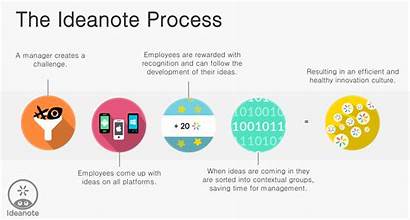
Meet Ideanote.io. First, it changes how teams grab ideas. You collect them fast. Then, you build on them together. For example, no more scattered notes or spreadsheets.
Moreover, it acts like your innovation hub. Everyone submits thoughts easily. Additionally, you track progress in one spot. So, ideas turn into real wins.
Next, let’s dive in step by step. You set it up quickly. You manage users. Then, you use features that work. Thus, you launch successfully today.
If you want to read about Handbrake, click here.
Why Ideanote.io Shines
First, forget email chaos. Ideas live in a clean dashboard. Then, teams vote and comment. For instance, top ideas rise fast.
Additionally, AI helps out. It sums up discussions. It spots duplicates too. So, you save time every day.
Furthermore, companies love it. Telecom teams use it. Housing groups thrive. They harvest hundreds of ideas monthly.
Ideanote.io: Quick Setup Guide
Start with the signup. Click the link. Enter your email. You get a workspace instantly.
Next, name your project. Pick a template. Add your logo. Then, invite your team.
After that, build a form. Ask “How can we improve?” Add fields for details. Thus, submissions flow smoothly.
Manage Users Easily
First, send invites. Use emails or links. Guests join without hassle.
Moreover, set roles now. Admins review. Others vote. So, control stays tight.
Additionally, segment groups. Employees see internal stuff. Customers view public ideas. This keeps things organized.
Core Basics First
First, Ideanote is an innovation platform. You collect ideas from teams. Then, you prioritize them quickly. For example, companies harvest hundreds of ideas monthly.[getapp]
Moreover, it feels alive and simple. You stop chasing feedback everywhere. Instead, everything stays in one spot. Thus, you focus better.
Next, workspaces host your projects. You invite people with links. Additionally, AI summarizes comments. So, teams stay aligned always.
Build Your Idea Collection
First, start a new collection. You call it a “mission.” Then, write a clear question. For example, ask “How do we boost sales?”
Next, design the form. You add fields like text or files. Moreover, use dropdowns for choices. Thus, submissions stay clean.
Afterward, set up the stages. You create Review and Implement phases. Also, add rules for movement. For instance, require votes first.
Furthermore, enable sharing. You embed a widget on your site. Then, anyone submits ideas. This brings fresh input.
Submit Ideas Smoothly
Click “Add Idea” anytime. First, type a title. Then, add details. For example, describe the problem clearly.
Moreover, attach images or links. You rate effort, too. Additionally, tag for categories. So, organization happens fast.
After submission, others see it. They comment right away. Thus, collaboration sparks quickly.
Manage Ideas Actively
Switch to the Manage view. First, view your Kanban board. Then, drag ideas between stages. For instance, move good ones to Evaluate.
Next, assign owners. You notify them instantly. Moreover, the rate impacts high or low. Also, merge duplicates with AI.
Furthermore, use bulk tools. Select many ideas. Then, update them together. This speeds up work a lot.
Collaborate Effectively
Invite your team now. First, send emails or links. Then, they join easily. For example, guests vote without accounts.
Additionally, use comments daily. You mention @names for alerts. Moreover, likes show support. Thus, top ideas rise.
After that, gamify it. Leaderboards reward active users. So, engagement grows naturally.
Ideanote.io: Automate for Speed
Set triggers first. For new ideas, send Slack pings. Then, auto-assign to experts. Moreover, AI spots similar ones.
Next, connect apps. You use Zapier for flows. For instance, push data to Google Sheets. This links everything.
Furthermore, save time weekly. Automations handle routine tasks. Thus, focus on big wins.
Track Progress Clearly
View dashboards daily. First, check submission trends. Then, see phase bottlenecks. For example, many ideas stall in Review.
Moreover, create custom reports. You track ROI metrics. Additionally, it exports to CSV. So, share insights easily.
Afterward, refine strategies. Analytics guide next steps. Thus, innovation improves steadily.
Customize Fully
Brand your space first. Add colors and domains. Then, remove Ideanote labels. For instance, use your URL.
Next, set advanced security. Enable SSO logins. Moreover, control data access. This keeps things safe.
Furthermore, go mobile. Download apps for iOS. Access ideas anywhere. So, stay productive always.
Ideanote.io: Frequently Asked Questions
How do I sign up?
First, go to Ideanote.io. Then, click Sign Up. Enter details. You get a workspace instantly.[ideanote]
Is there a free plan?
Yes. Start free with core features. Upgrade later for more. Thus, test without risk.
Can guests submit ideas?
Absolutely. Share links or widgets. They join without accounts. Moreover, allow anonymous posts.
How secure is it?
Very. GDPR compliant. Use SSO and roles. So, protect your data fully.
What integrations work?
Zapier links 1,000+ apps. Also, native Teams support. For example, notify via Slack.
Need custom forms?
Yes. Drag fields easily. Add logic too. Thus, fit your needs perfectly.
How to track success?
Dashboards show all. Check engagement and impact. Moreover, set custom goals.
Mobile access available?
Yes. iOS and Android apps. Work on the go. So, never miss an idea.