
Introduction
Managing tasks, collaborating with teams, and staying organized can be overwhelming—but ClickUp simplifies it all. Whether you’re a freelancer, a project manager, or part of a large team, ClickUp offers powerful tools to streamline workflows.
Do you feel overwhelmed by tasks and projects? ClickUp can help! This powerful tool makes teamwork and personal productivity easier. Let me show you how to use it in simple terms.
Why Choose ClickUp?
ClickUp beats other tools because:
It does everything – Tasks, docs, goals, and more in one place
It fits your style – Change how it looks and works for you
Teams love it – Chat, share files, and track progress together
Free version works great – No need to pay if you’re just starting
Now, let’s get you set up!
If you want to read about Asana, click here.
First Steps in ClickUp
1. Make Your Workspace
When you sign up:
- Firstly, pick a name (like “My Business” or “Family Projects”)
- Secondly, add friends or coworkers if needed
- Thirdly, choose a ready-made layout or start fresh
Moreover, helpful tip: The templates save tons of time!
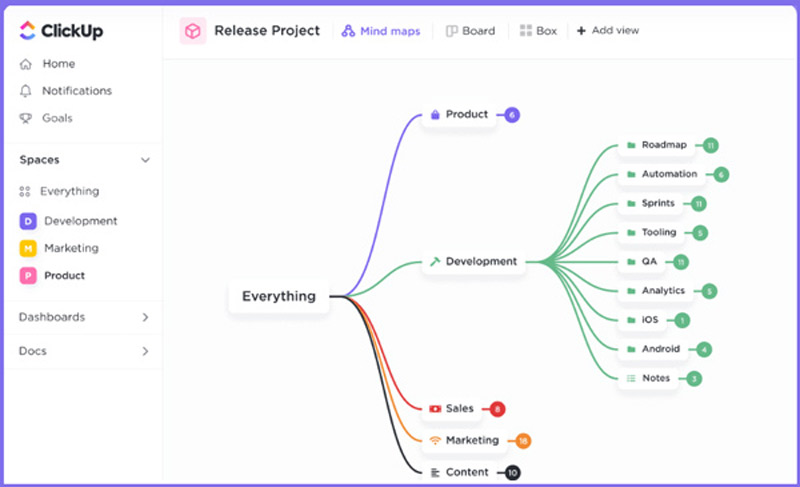
2. How ClickUp Organizes Things
Think of it like this:
- Spaces = Firstly, big areas (Work, Home)
- Folders = Secondly, sections inside (Finances, Groceries)
- Lists = Thirdly, groups of tasks (Bills to Pay, Chores)
- Tasks = Then, single things to do
This keeps everything neat and easy to find.
3. Adding Tasks Made Simple
To create a task:
- Firstly, click the “+” button
- Secondly, write what needs doing
- Thirdly, pick when it’s due
- Then, add details if you want
Cool trick: Big jobs? Break them into smaller steps!
Smart Features to Try
1. Let ClickUp Do the Work
Set up these time-savers:
Move tasks automatically when dates change
Then tell teammates when their turn comes
Get alerts on your phone
2. Track Your Time
See how long work takes with:
⏱️ A built-in timer
📊 Easy reports
📱 Then, sync with other time apps
3. Write and Share Notes
ClickUp Docs lets you:
✏️ Take meeting notes
📎 Attach files
🔗 Then, share with one click
Works With Other Apps
Moreover, connect it to:
Slack for messages
Google Drive for files
Zapier for special automations
Common Questions
Q: Is it free?
A: Yes! The free version has plenty. Pay only if you need extras.
Q: Good for personal use?
A: Perfect for shopping lists, home projects, or school work!
Q: Better than Trello?
A: More flexible with more features.
Q: Phone app?
A: Yes, for both iPhones and Androids.
Q: Move my old tasks?
A: Yes, from Trello, Asana, and others.
Quick Tips
Firstly, use colors to spot important tasks fast
Secondly, try the mobile app on the go
Thirdly, watch free video guides
ClickUp Final Thought
Moreover, It helps you stay on top of work without stress. Start small, try one feature at a time, and soon you’ll wonder how you managed without it!
Ready to try? Sign up at ClickUp.com today.