
Introduction
Google’s Gemini 1.5 is the next evolution in AI, offering smarter, faster, and more efficient performance. Whether you’re a developer, content creator, or tech enthusiast, understanding how to use Gemini 1.5 can boost your productivity.
Additionally, Google just released Gemini 1.5, its most powerful AI yet. It’s smarter, faster, and easier to use than ever before. Whether you’re a student, developer, or just curious about AI, this guide will show you how to make the most of it.
Let’s break down everything you need to know in simple terms.
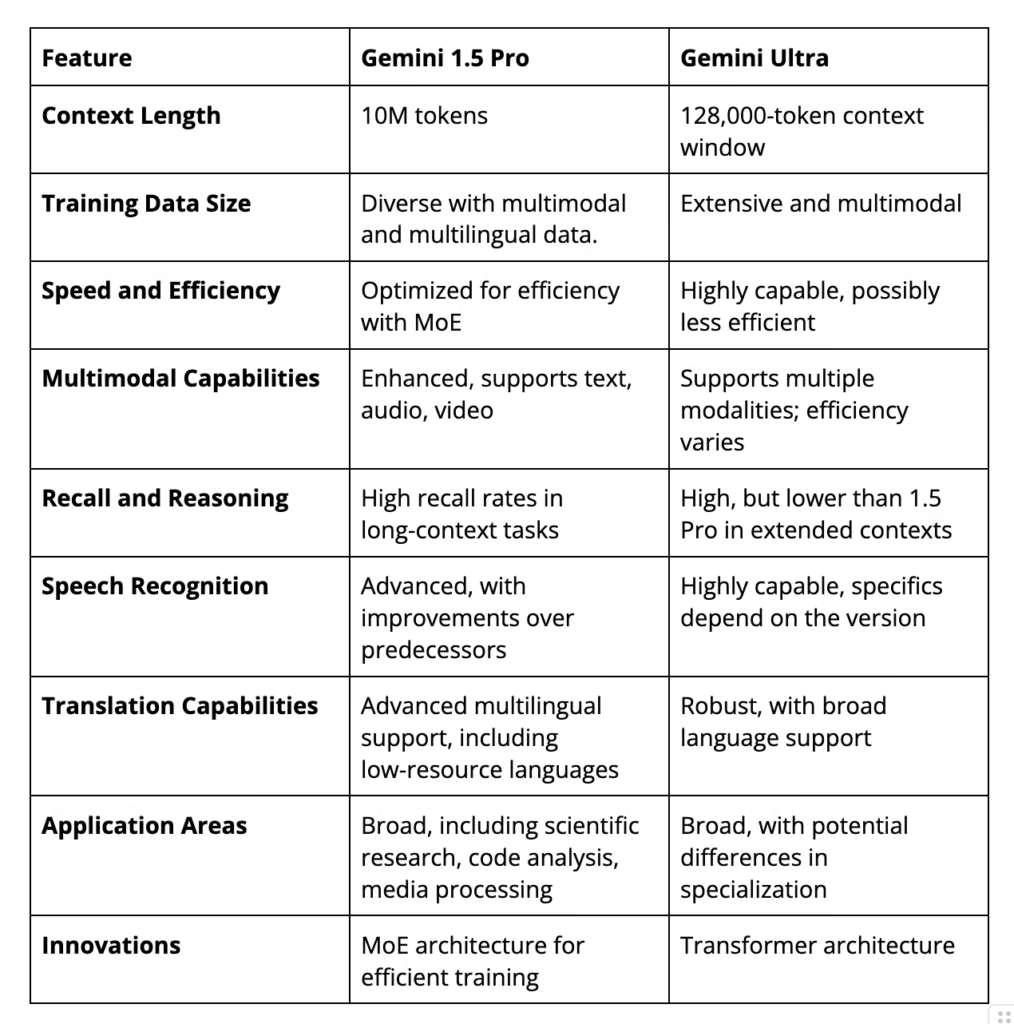
What Can Gemini 1.5 Do?
Gemini 1.5 is like a super-smart assistant that can:
Understand and write text in many languages
Analyze documents, images, and even code
Remember much more information at once
Work faster while using less computing power
Furthermore, the best part? It’s great at following complex instructions without getting confused.
How to Start Using Gemini 1.5
1. Gemini 1.5 Where to Find It
Right now, you can access it through:
- Google AI Studio (free for testing)
- Vertex AI (for business use)
Moreover, just visit aistudio.google.com, sign in with your Google account, and select it.
2. Asking the Right Way
Additionally, to get the best answers:
- Be clear and specific
- Then, break big questions into smaller ones
- Give examples when possible
Instead of:
“Tell me about space.”
Try:
*”Explain how rockets work in simple terms for a 10-year-old”*
3. Working With Files
You can upload:
- PDFs or Word docs (for summaries)
- Pictures (to analyze what’s in them)
- Code files (to find mistakes or explain how they work)
4. For Developers
If you want to build apps with Gemini 1.5, Google provides an API. Then, their documentation walks you through setting it up step by step.
If you want to read about Google Bard Vs Chat GPT, click here.
Why Gemini 1.5 Is Special
Compared to other AIs like GPT-4:
It can remember much more at once (like reading a whole book)
It’s better at understanding pictures and documents
It costs less to run big projects
Common Questions about Gemini 1.5
Is it free?
You can try it for free in AI Studio, but heavy use might require paying through Vertex AI.
Can it make images?
No, it only understands images but can’t create new ones.
Is it better than GPT-4?
In some ways, yes – it remembers more information at once and handles files better.
What languages does it know?
Over 40, including all major world languages and programming languages.
Is it safe to use?
Google protects your data, but don’t share passwords or private info.
Ready to Try It?
It could be your new favorite tool for learning, working, or creating. The easiest way to start is through Google AI Studio – just sign in and start asking questions!
Remember: The more you practice with it, the better results you’ll get. Why not try it today?