
Flutter AI: How to Start & What You Need to Know
The app development world is changing fast. We no longer build apps that display static data. We don’t simply wait for user input anymore. Instead, we now create intelligent experiences that surprise people. For instance, imagine your app understands user voices perfectly. Similarly, picture it recognizing objects in photos instantly. Likewise, envision it generating personalized recipes on the fly. Clearly, this isn’t science fiction at all. In fact, it’s the reality of Flutter AI development right now.
Why Combine Flutter with AI?
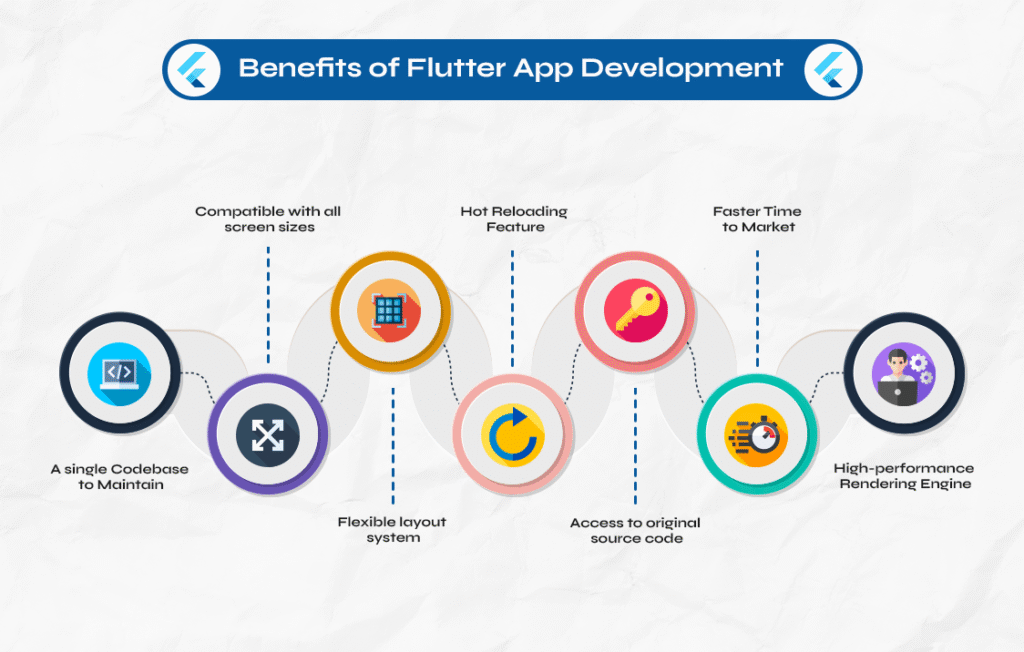
First, let’s understand why this combination is so powerful for developers. Specifically, Flutter lets you build beautiful, natively compiled apps effortlessly. For example, you can target mobile, web, and desktop platforms simultaneously. Best of all, you do this from a single codebase. Furthermore, when you add AI to the mix, you make those apps much smarter.
Think about the amazing possibilities that open up before you. For instance, your app could analyze images instantly. In addition, it might understand natural language commands perfectly. Moreover, it could even guess what users might do next. In today’s world, users expect smart features. For example, they want apps that recognize their faces. Similarly, they desire apps that translate text from images. Likewise, they love apps that recommend products they’ll truly enjoy.
If you want to read about Kimi K2.5, click here.
The Two Paths of Flutter AI
When we discuss AI in Flutter, we’re really talking about two different concepts. In fact, understanding this distinction is very important for your success.
Path One: Integrating AI into Your App’s Features
This path involves adding AI capabilities directly to your application. Specifically, you embed machine learning models. Additionally, you connect to powerful AI services. As a result, your app can perform very smart tasks.
In short, this path focuses on user-facing intelligence. Ultimately, it makes your app do amazing things.
Path Two: Using AI to Build Your Flutter App
In contrast, this path is quite different. Here, AI acts as your personal development assistant. For instance, tools like Gemini Code Assist help you write code faster. Similarly, the Gemini CLI assists with debugging issues. Moreover, they can even generate entire widgets for you. Consequently, they speed up your work a lot. As a result, they boost your overall productivity significantly.
Think of it as having an expert pair programmer who never gets tired. In other words, you describe what you want. Then, AI helps you build it faster. Additionally, you can ask questions about best practices. Likewise, you can request code explanations. Therefore, you learn while you build.
Both paths offer great value. In this article, I focus primarily on the first path. However, knowing that AI can also help you code is a powerful secret weapon.
Your Toolkit for Flutter AI
So, what tools do you actually need? Fortunately, Google provides excellent options. Specifically, these work smoothly with Flutter right out of the box.
The Flutter AI Toolkit
The Flutter team officially released the Flutter AI Toolkit. Honestly, it’s a complete game-changer. Specifically, this set of widgets helps you add AI chat functionality. In fact, you need very little code to make it work. Moreover, it’s built around an abstract LLM provider API. Therefore, you can easily swap between different language models.
Key features include these amazing capabilities:
- Multiturn chat: The conversation keeps track of context across multiple exchanges.
- Streaming responses: Users see AI replies appear in real-time. As a result, this creates a very smooth experience.
- Voice input: You can let users speak their prompts naturally.
- Multimedia attachments: Your app can send and receive images within the chat.
The toolkit handles all the hard work. Consequently, you focus on your app’s beautiful design. In other words, it manages the complex AI interactions.
Firebase AI Logic
For production apps, Firebase AI Logic is your best friend. Specifically, this Firebase SDK lets you use generative AI features directly. In fact, it works perfectly in your Flutter app. Moreover, it supports both the Gemini Developer API for prototyping. Additionally, it works with Vertex AI for production workloads.
The beauty of Firebase AI Logic lies in its security. For example, it keeps API keys completely out of your client code. In addition, Firebase handles all authentication automatically. As a result, it manages everything securely. Consequently, you don’t accidentally expose sensitive credentials. In fact, this alone saves you from major security headaches.
ML Kit and LiteRT
Sometimes you need specialized models. For instance, maybe you want to detect specific objects. Similarly, perhaps you need to recognize custom gestures. That’s exactly where ML Kit and LiteRT come into play.
Specifically, ML Kit provides ready-to-use APIs for common tasks. For example, these include text recognition and face detection. Similarly, they also cover barcode scanning perfectly. In essence, it’s like having pre-built AI features you can instantly drop into your app.
For custom models, you use LiteRT. First, you train your own model using your data. Next, you convert it to the LiteRT format. Then, you run it directly on the user’s device. As a result, this approach is very fast. Furthermore, it respects user privacy completely. Best of all, it works perfectly offline.
Getting Started: Your First Flutter AI Feature
Let’s get practical right now. In other words, how do you actually start building? Specifically, I’ll walk you through adding a simple AI chat feature. We’ll use the Flutter AI Toolkit together.
Step 1: Set Up Your Project
First, create a new Flutter project. Then, add the necessary dependencies. Specifically, open your pubspec.yaml file. After that, include these lines:
dependencies:
  flutter_ai_toolkit: ^latest_version
  firebase_ai: ^latest_version
  firebase_core: ^latest_version
Remember to replace ^latest_version with the actual current versions.
Step 2: Initialize Firebase
First, you need a Firebase project. Specifically, head to the Firebase Console. Then, create a new project there. After that, enable the Gemini API. Next, follow Firebase’s Flutter setup guide. Finally, add your app to the project.
In your main.dart file, initialize Firebase early:
void main() async {
  WidgetsFlutterBinding.ensureInitialized();
  await Firebase.initializeApp(options: DefaultFirebaseOptions.currentPlatform);
  runApp(const MyApp());
}
In short, this code makes sure Firebase is ready. As a result, it works before your UI loads.
Step 3: Create Your Chat Page
Now comes the fun part. Specifically, create a simple chat page. Then, use the LlmChatView widget:
class ChatPage extends StatelessWidget {
  const ChatPage({super.key});

  @override
  Widget build(BuildContext context) => Scaffold(
        appBar: AppBar(title: const Text('My AI Assistant')),
        body: LlmChatView(
          provider: FirebaseProvider(
            model: FirebaseAI.vertexAI().generativeModel(
              model: 'gemini-2.5-flash',
            ),
          ),
        ),
      );
}
That’s genuinely it! In just a few lines, you have a working AI chat interface. Specifically, it FirebaseProvider connects to your model. Meanwhile, LlmChatView renders the nice UI. For example, it includes message bubbles and input fields. In fact, it handles all the interactive elements automatically.
Step 4: Add Personality with Instructions
Your AI assistant needs guidance. Specifically, use system instructions to shape its behavior. For example, if you’re building a recipe app, set it up like this:
model: FirebaseAI.vertexAI().generativeModel(
  model: 'gemini-2.5-flash',
  systemInstruction: Content.system('''
You are a helpful chef who specializes in quick, easy recipes.
Keep responses friendly and encouraging.
Suggest substitutions for common ingredients when possible.
'''),
),
As a result, your AI speaks with the exact voice you want.
Step 5: Welcome Users and Suggest Prompts
First impressions matter. Specifically, set a welcome message. Additionally, suggest prompts to guide users:
LlmChatView(
  welcomeMessage: 'Hi there! I\'m your cooking assistant. What would you like to cook today?',
  suggestions: [
    'What can I make with chicken and rice?',
    'Show me a 15-minute pasta dish',
    'I need a vegetarian dinner idea',
  ],
  provider: // ... your provider
)
These suggestions appear when the chat starts. Consequently, users know what to ask right away.
What You Absolutely Need to Know
As you build Flutter AI apps, keep these important lessons in mind.
AI Makes Mistakes
Here’s the truth. Specifically, AI is probabilistic, not deterministic. In other words, it samples from probability distributions. Unfortunately, sometimes it samples the wrong thing. In fact, Brett Morgan calls this “Morgan’s Law.” Eventually, AI will fail to do the thing that must be done.
Therefore, you must build guardrails. Always let users check and fix AI-generated data. For example, if your app pulls puzzle grid info from a screenshot, show users what the AI found. Then, let them adjust it before moving on.
In short, bad data leads to bad results. Consequently, user review is your key safety net.
Security Is Non-Negotiable
Never hardcode API keys in your app. Seriously, don’t do this. In fact, anyone can take apart your app. Subsequently, they can steal your keys fast.
Instead, use Firebase AI Logic. Specifically, it keeps keys server-side. For other services, set up a proxy server. In other words, your app talks to your server. Then, your server holds the keys. After that, it calls external APIs for you. As a result, this approach adds a key layer of control. Ultimately, it protects your security completely.
Plan Before You Code
Whether you’re writing code yourself or using AI help, planning matters. Before you write a single line, define your needs. Specifically, what should the AI feature do? Furthermore, what are your success goals? Additionally, how will users interact with it?
In essence, this approach gives much better results. For one thing, it gives you a clear target to aim for. Moreover, it helps your AI coding assistant grasp what you need.
Test, Validate, Iterate
Building AI features is an ongoing process. After you build something, test it well. For instance, does it work as expected? Additionally, are there edge cases where it fails? Subsequently, get feedback. Then, improve your approach.
If you use AI coding tools, use the same standards. For example, run the Flutter analyzer. Similarly, run your tests. Likewise, review the code. Then, fix any issues you find.
Real-World Examples to Inspire You
Let’s look at what others have built. In particular, these examples might spark your own ideas.
The Crossword Companion App
The Flutter team built a Crossword Companion app. Specifically, users upload a screenshot of a mini-crossword puzzle. Then, the AI figures out the grid size. After that, it finds the filled letters. Next, it spots the clues. Finally, it helps solve the puzzle.
Crucially, the app lets users check the AI’s reading. For example, if the AI misreads the grid size, the user fixes it. In short, this simple guardrail changes a frustrating experience. As a result, it becomes truly helpful.
The Coin Counter App
Another great example exists. Specifically, someone built a coin counter with Roboflow. In this app, users snap a photo of loose change. Then, a computer vision model finds each coin. After that, it identifies each type. Finally, it adds up the total value.
This app shows how to mix Flutter with special vision models. For instance, it handles picking images. Additionally, it manages talking to APIs. Moreover, it shows results nicely.
The Recipe Generator
Think of an app that creates recipes based on what’s in your fridge. Specifically, users list ingredients. Then, the AI suggests meals. However, this app goes further. For example, it remembers user’s likes and dislikes. If someone has peanut allergies, the AI recalls that. Similarly, if someone eats only vegan food, the AI adjusts. In other words, it changes its ideas to fit each person.
This personalization creates much more value. In fact, it shows how AI can fit individual needs.
Overcoming Common Challenges
You’ll face some problems. Fortunately, here’s how to deal with them.
Handling Permissions
Many AI features need permissions. For example, voice input needs mic access. Similarly, image analysis needs camera or storage access. Don’t assume these permissions are given. Instead, ask for them politely. Furthermore, explain why your app needs them.
For Android, add permissions to AndroidManifest.xml. For iOS and macOS, set up the .entitlements files. Additionally, add usage descriptions that explain your need.
Managing State for AI Results
When your AI model returns results, you need to present them clearly. Specifically, create a clear state management plan. For simple cases, use setState. Then, for complex apps, try stronger solutions. For instance, Provider or Bloc work great.
Additionally, show loading states with indicators. Similarly, handle errors gently with kind messages. Never let your app crash. Likewise, never let AI service delays ruin the fun.
Working with Different Model Formats
AI models come in many forms. For instance, you might use cloud APIs for some tasks. Alternatively, you might use on-device models for others. Therefore, design your setup to handle both. Specifically, create service classes that hide the details. Consequently, your UI doesn’t care where AI runs. In fact, it just works.
The Future Is Intelligent
Flutter AI development opens up amazing chances. For example, you can build apps that really get users. Similarly, you can create apps that truly learn. Moreover, you can craft apps that shift smoothly. In addition, you can design experiences that please users. Ultimately, you can fix real problems.
Start small. For instance, add one smart feature to an existing app. Then, play with the Flutter AI Toolkit. After that, try out Firebase AI Logic. As you gain skill, you’ll find more chances. In fact, you’ll find many ways to add smarts to your work.
Keep the key lessons close. Specifically, plan well. Additionally, put security first. Moreover, let users check AI results. With these ideas in hand, you’re set. In conclusion, you can build the next wave of Flutter apps.
The tools are here. The guides exist. Now it’s your turn to build something great.
Frequently Asked Questions
Q: Do I need a machine learning background to use AI in Flutter?
A: No, not at all. In fact, tools like the Flutter AI Toolkit make things easy. Similarly, Firebase ML Kit hides the hard parts. As a result, you can add strong AI features with ease. Moreover, you don’t need to know any deep math.
Q: Which is better for Flutter AI: cloud-based or on-device models?
A: It depends on what you need. Specifically, cloud models give more power. Additionally, they’re simpler to update. In contrast, on-device models keep things private. Furthermore, they work offline. In fact, many apps use both kinds.
Q: How do I keep my API keys safe?
A: Never put them in your app code. Instead, use Firebase AI Logic. Specifically, it deals with server keys. For other services, set up a proxy server. In other words, your server holds your keys safely. Then, it sends requests from your app.
Q: Can I use AI to help me write Flutter code?
A: Yes, you can. For example, tools like Gemini Code Assist work well. Similarly, the Gemini CLI helps a lot. Moreover, many IDE plugins make code fast. In addition, they explain hard topics. Likewise, they help you find bugs. In short, they’re like having a wise coder with you.
Q: What if the AI gives wrong answers?
A: Plan for this case. Specifically, build your UI to let users check AI results. Then, let them fix errors. In other words, treat AI as a strong helper. However, recall that it can make mistakes.
Q: Is the Flutter AI Toolkit ready for real apps?
A: Yes, it is. In fact, it’s built for actual apps. For example, it can save chat history. Additionally, it gives many style choices. Moreover, it offers lots of settings. Consequently, it fills all real-world needs well.