
Introduction
Edge computing is changing how we process data by bringing computation closer to where information is created. Instead of sending everything to faraway cloud servers, this approach handles data locally on devices or nearby edge servers. Moreover, this shift solves major problems like slow response times, network congestion, and security risks with traditional cloud computing.
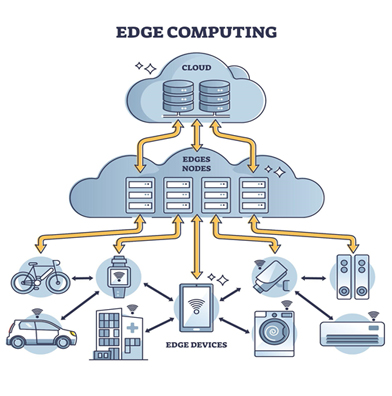
What is Edge Computing?
Let’s break it down in simple terms. Edge computing means doing computer work closer to where the information comes from, instead of sending it far away to big data centers. Imagine you’re at a busy coffee shop:
☕ Firstly, Old way: You shout your order to the barista at the counter, who writes it down, sends it to the kitchen in back, then brings your drink when it’s ready (this is like cloud computing).
☕ Secondly, New way: The barista makes your drink right at your table (this is edge computing)!
Why Should You Care?
Here are four big reasons edge computing is becoming popular:
- Firstly, it’s lightning fast – No waiting for data to travel long distances
- Secondly, saves internet bandwidth – Only sends what’s needed
- Thirdly, keep your data safer – Less traveling means fewer hacking risks
- Fourthly, works anywhere – Even in places with bad internet connections
How Edge Computing Works in Real Life
Let’s look at some everyday examples:
🏭 Smart Factories:
- Firstly, sensors on machines spot problems immediately
- Secondly, fixes can happen before breakdowns occur
- Thirdly, only important alerts go to the office
🚗 Self-Driving Cars:
- Firstly, processes road data in the car itself
- Secondly, makes instant driving decisions
- Then, don’t wait for faraway servers
🏥 Hospitals:
- Firstly, patient monitors analyze data on-site
- Secondly, doctors get instant alerts
- Then, private health info stays more secure
Getting Started with Edge Computing
Want to try it? Here’s how:
1. Find the Right Spot
Start with areas where:
- Firstly, speed matters most
- Secondly, internet connections are unreliable
- Then, you’re collecting lots of sensor data
2. Pick Your Tools
For small projects:
- Raspberry Pi (as cheap as $35)
- Google Coral (for simple AI)
For bigger needs:
- Dell or HPE edge servers
- AWS or Microsoft edge services
3. Keep It Safe
Follow these simple security steps:
- Always use passwords
- Install updates regularly
- Encrypt important data
4. Start Small
Try a pilot project first:
- Choose one machine or process
- Set up basic monitoring
- See how it works before expanding
Common Questions Answered about Edge computing
Q: Will this replace cloud computing?
A: No! They work together like teammates. Edge handles urgent jobs nearby while the cloud manages big storage and analysis.
Q: What’s the easiest way to start?
A: Begin with a simple Raspberry Pi project. Starter kits are available online for under $100.
Q: How much does it cost?
A: Small projects can be very affordable. Bigger business systems cost more but often pay for themselves in saved bandwidth and faster operations.
Edge Computing: The Future is Here
Edge computing is changing how we use technology every day. From faster video streaming to smarter home devices, it’s making our digital world quicker and more responsive.
Ready to try it? Pick one small project this week and see how edge computing can work for you!