
Introduction
Backstage Software, imagine starting a new job as a software developer. On your first day, however, you face a huge problem. You need to find information, but it is scattered everywhere. There are many wikis, hundreds of services, and complex tools. Simply put, you feel lost. This situation, unfortunately, is very common.
Thankfully, a solution exists to this problem. Backstage Software is an open-source platform designed to fix this chaos. Created by Spotify, it acts as a single home for all your development tools and information. Consequently, this guide will clearly explain how to use Backstage. Furthermore, we will detail everything you need to know before your team decides to use it.
Understanding the Basics: What is Backstage Software?
First and foremost, it is important to define what Backstage is. Essentially, it is a developer portal. In other words, it is a website that brings together all the resources a developer needs. Instead of searching across many different sites, a developer can find everything in one place.
For example, it connects to your code, documentation, and deployment tools. Therefore, it creates a central hub. This centralization, as a result, saves time and reduces frustration.
If you want to read about Masterpeace Studio, click here
How to Use the Backstage Software Catalog for Better Visibility
The most important feature is the Software Catalog. Think of it as a constantly updated map of all your software. It automatically lists every microservice, library, and application your team owns.
So, how does it work? First, a developer adds a small file catalog-info.yaml to their project. Then, Backstage reads this file. After that, it displays the project in the catalog with all its key details.
As a user, you can then easily search this catalog. You can instantly see who owns a service, what it does, and how it connects to other services. This transparency, ultimately, makes everyone’s job easier.
How to Speed Up Work with Backstage Software Templates
Another key feature is Software Templates. Often, starting a new project is slow. You have to copy old code, update settings, and set up pipelines. This process is repetitive and prone to errors.
However, Backstage fixes this with templates. Your platform team can create pre-approved, standardized templates for common projects. For instance, a “new React microservice” template.
To use it, you simply go to the “Create” tab in Backstage. You choose your template and fill in a few details. After that, with one click, Backstage creates a new code repository for you. Importantly, this new project is already set up correctly with all the necessary best practices. This means you can start coding immediately.
How to Manage Documentation with TechDocs
Keeping documentation up-to-date is a common challenge. Often, docs are stored in separate systems and become outdated quickly. Backstage tackles this with TechDocs.
This feature lets you write documentation using simple Markdown files. Crucially, these files live right next to your actual code. Therefore, when a developer updates the code, they can easily update the docs too.
When you view a service in the Backstage catalog, you will see a “Docs” tab. Clicking it shows you the latest documentation for that service. This ensures you are always reading the correct and most current information.
How to Connect Your Tools with Plugins Backstage Software
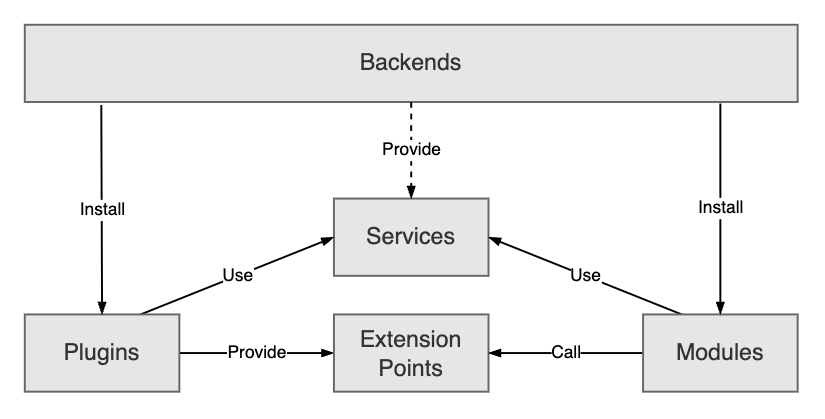
Perhaps the most powerful feature is its plugin system. A plugin is a small add-on that connects an external tool to Backstage. There are plugins for nearly everything: Kubernetes, GitHub, Grafana, and Jira, to name a few.
This creates a single, unified dashboard for your entire workflow. As a result, you avoid constant switching between different tabs and apps, which greatly boosts focus and productivity.
What You Need to Know: The Required Investment
Before you start, however, you must understand that Backstage requires investment. It is not a simple “install and forget” tool. Instead, it is a platform that needs care and attention.
You will need a dedicated team, often called a Platform team, to manage it. This team will customize Backstage for your company’s needs and keep it running smoothly. Without this investment, the platform will not be successful.
What You Need to Know: The Importance of Culture
A technical tool is only as good as the people using it. Therefore, you need a cultural shift for Backstage to work.
Everyone must agree to use it and keep their information there updated. If developers do not maintain their project details in the catalog. The information becomes old and useless. Consequently, promoting adoption and making it easy to use is critical.
What You Need to Know: The Power of Customization
Backstage is like a toolbox. It provides the basic tools, but you must build the final product. This means you can customize it to fit your company’s unique processes.
While this flexibility is a great strength, it also means you have many decisions to make. You must choose which plugins to use and how to design your templates. This requires a clear vision and plan.
Frequently Asked Questions (FAQ)
Q: Is Backstage only for very large companies?
A: Not at all. While big companies use it, mid-sized teams (50+ engineers) can benefit too.
Q: What is the difference between open-source Backstage and the paid version?
A: The open-source version is free, but you need to host and manage it yourself. Spotify also offers a paid, hosted version called Backstage Developer Portal, which handles the maintenance for you.
Q: Does Backstage replace our other tools like GitHub or Jenkins?
A: No, it does not replace them. Instead, it connects to them. Think of it as a dashboard that sits on top of your existing tools, bringing all their information into one place.
Q: Who should be in charge of Backstage at our company?
A: A dedicated Platform Engineering or Developer Experience team should manage it. Their job is to build the portal and help other developers use it effectively.
Q: How long until we see benefits?
A: This can vary. However, many teams see good results in a few months, like faster onboarding for new employees and fewer questions about who owns which service.
Final Thoughts: Is Backstage Right for You?
In conclusion, Backstage is a powerful platform for reducing chaos and boosting developer productivity. It creates a single, clear source of truth for your entire software system.
However, it requires a real commitment of people and time to be successful. If your team is struggling with complexity and information overload, then Backstage is certainly a solution worth considering. Ultimately, it is an investment in making your developers’ lives easier and your organization more efficient.