
Introduction: A New Way to Make Pictures
Imagen 3. Think about making pictures with just your words, for instance. You type what you want, and then the computer draws it for you. Sounds like magic, right? Well, that magic is here now.
Specifically, Google built a tool called Imagen 3. In fact, it turns your ideas into real images. Moreover, you do not need art skills. Likewise, you do not need fancy software. Instead, you need your imagination.
Furthermore, I have tried many AI tools over the years. Generally speaking, most of them are good. However, Imagen 3 feels different. Actually, it feels special. As a result, it works well for everyone. For example, artists love it. Similarly, business owners use it. Even kids can have fun with it, too.
Consequently, let me show you everything you need to know. After that, this guide will walk you through it step by step.
What Is Google Imagen 3?
Let us start with the basics. What is this tool?
Imagen 3 is Google’s newest image maker. It uses artificial intelligence. That just means “smart computer program.” This program reads your words. Then it creates a picture from them.
The technology comes from Google DeepMind. These people are very smart. They study AI for a living. They built Imagen 3 on something called Gemini. Think of Gemini as the brain. It helps the tool understand you better.
Here is the simple version. You type “a cat sitting on a red chair.” The tool makes that picture for you. It looks real. It looks professional. And it takes only seconds.
The best part? You talk to it like a friend. You do not need to learn special codes. Then, you do not need to memorize tricky phrases. Just say what you want in plain English. The AI does the rest for you.
Why People Love Imagen 3
Many AI tools exist today. Why pick this one? Let me share the reasons.
The Pictures Look Real
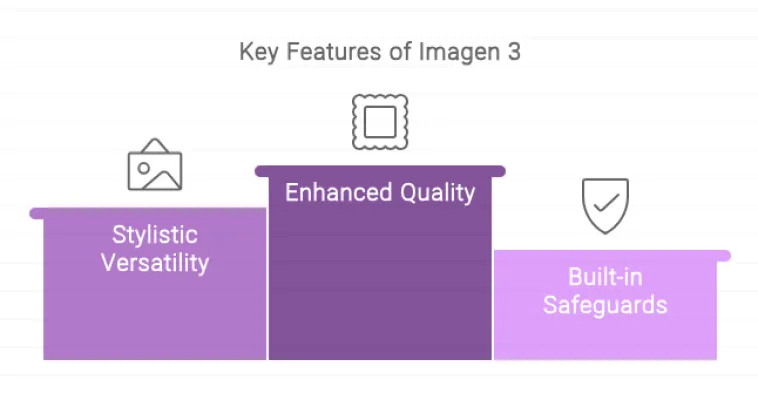
First of all, the image quality blows people away. Specifically, the pictures look lifelike. In addition, they have rich colors. Furthermore, they have fine details. As a result, they feel almost like photographs.
For example, other tools struggle with hands. In particular, they draw too many fingers. Alternatively, they draw them wrong. However, Imagen 3 handles hands well. Likewise, it handles eyes too. Moreover, it handles complex scenes without breaking a sweat.
Additionally, every picture looks polished. Similarly, every picture looks complete. Consequently, you will not see weird smudges. Likewise, you will not see strange blurs. Ultimately, the quality stays high every single time.
It Understands You Better
To begin with, older tools frustrated many users. For instance, you would type a long prompt. However, the tool would ignore half of it. Fortunately, that does not happen here.
On the contrary, Imagen 3 listens carefully. In fact, it pays attention to every detail. For example, you ask for a specific angle? Consequently, it gives you that angle. Similarly, you ask for warm lighting? As a result, it gives you warm lighting. Likewise, you ask for a certain style? Accordingly, it follows your lead.
Therefore, this makes a huge difference. As a result, your vision becomes reality. Moreover, you do not have to fight the tool. Furthermore, you do not have to guess what works. In the end, the tool simply does what you ask.
Text Looks Good Now
Now, here is something cool. To start, most AI tools cannot write text well. For example, they put gibberish in pictures. As a result, the words look like nonsense.
However, Imagen 3 fixes this problem. In fact, it writes clear, readable text. Consequently, this opens many doors for you. For instance, you can make social media posts. Similarly, you can design posters. Likewise, you can create presentations. After that, you can build branded content.
Moreover, the text looks clean. Additionally, the text looks professional. Therefore, you will not feel embarrassed showing it to others.
Safety Features Protect You
First of all, Google cares about safety. As a result, they built strong protections into Imagen 3.
For instance, one feature is called SynthID. Specifically, it adds a hidden watermark to every picture. However, you cannot see it with your eyes. Nevertheless, computers can detect it. Consequently, this shows that AI made the picture. Moreover, it prevents people from lying about their work.
In addition, the tool also blocks bad content. For example, it stops harmful images from being made. Similarly, it stops explicit pictures too. Therefore, this keeps everyone safe and happy.
How to Start Using Imagen 3
Getting started is easy. You have several ways to access the tool. Pick the one that fits your needs.
Option One: ImageFX for Everyone
First of all, the simplest way is through ImageFX. Specifically, this is Google’s free web tool. Moreover, anyone can use it. To begin, go to the website. Then, type your prompt. After that, wait about 30 seconds. Finally, see your picture appear.
Furthermore, Google first released this in the United States. At that time, it was part of their AI Test Kitchen. However, now more people can access it. Best of all, the tool remains free for casual users.
Additionally, you do not need to download anything. Likewise, you do not need to install software. Instead, open your browser. Consequently, you can start creating right away.
Option Two: Vertex AI for Developers
Are you a coder? Do you build apps? Then Vertex AI is for you.
Vertex AI is Google’s cloud platform. It gives you an API. An API lets your app talk to Imagen 3. You can generate pictures automatically. You can build amazing features around it.
Google provides helpful guides. These guides show you how to code. They show you how to use Python. They show you how to scale your project.
This option works best for businesses. It works best for serious creators. It gives you full control over the process.
Option Three: Third-Party Tools
Other companies also offer Imagen 3. Krea is one example. These platforms add extra features. They give you more creative tools. They help teams work together better.
This option suits designers well. It suits creative agencies too. You get the power of Imagen 3. Plus, you get additional helpful features.
Imagen 3 Tips for Writing Great Prompts
Want amazing results? Learn to write good prompts. Here are some simple tips.
Give Lots of Details
Vague prompts give vague pictures. Be specific instead.
Bad prompt: “A dog.”
Good prompt: “A golden puppy playing in a sunny field. The field has yellow flowers. The sun is setting. The lighting feels warm and soft.”
See the difference? The second prompt gives clear directions. The AI knows exactly what to draw.
Name the Style You Want
Tell the AI what style you prefer. This guides its creative choices.
Say “make it photorealistic.” Say “make it look like a cartoon.” Say “make it look like an oil painting.” Say “make it look like anime.”
Each style changes the final picture. Pick the one that fits your vision.
Use Vivid Words
Paint a picture with your words. Use strong descriptive language.
Instead of “a scary house,” try this. “An old house on a hill. The windows are broken. Ivy covers the walls. Dark clouds fill the sky.”
The second version creates a mood. It shows the AI what you imagine.
Learn from the Enhanced Prompt
Here is a neat trick. Imagen 3 improves your prompt sometimes. It adds extra details on its own. It shows you the enhanced version after generation.
Read that enhanced version carefully. It teaches you how the AI thinks. You learn what words work best. You get better with each try.
Dealing with Safety Filters in Imagen 3
Imagen 3 has safety rules. These rules block inappropriate content. Most of the time, they work well. Sometimes they block things by mistake.
Why Filters Trigger
Certain words set off the filters. Names can cause problems. Descriptive words can cause problems too. The system stays cautious to protect users.
Many users report this issue. They type a harmless prompt. The tool says “blocked.” It feels frustrating.
Simple Fixes to Try
Do not give up. Try these easy solutions.
First, simplify your prompt. Remove extra words. Remove specific names. Shorten your description.
Second, avoid risky words. Keep your language clean and neutral. Do not use words that sound suggestive.
Third, focus on visuals. Talk about colors. Talk about lighting. Then, talk about composition. Stay away from controversial topics.
Fourth, developers can adjust settings. You can change the safety level. But be careful with this option.
If you want to read about Veo 3.1, click here.
Imagen 3 Frequently Asked Questions
Is Imagen 3 free?
Yes, for casual users. The ImageFX web tool costs nothing. But developers pay for API usage. Businesses also pay for cloud access.
How does it compare to Midjourney?
Both tools are excellent. Imagen 3 follows prompts better. Midjourney sometimes looks prettier. Your choice depends on your needs.
Can I make pictures of people?
Yes, but with limits. Google restricts people’s generation. You need special permission. Otherwise, the tool blocks these prompts.
What is SynthID?
It is a hidden watermark. You cannot see it. Computers can detect it. It proves an image came from AI.
What picture sizes can I make?
You have many options. Choose 1:1 for squares. Choose 16:9 for widescreen. Then, choose 9:16 for vertical. Choose 3:4 or 4:3 too.
Can I change pictures after making them?
Yes, you can edit them. Use inpainting to fix parts. Select an area. Type what you want to change. The AI updates that spot.
What art styles work with Imagen 3?
Almost any style works. Realistic photos look great. Cartoons look great. Abstract art looks great. Claymation looks great too.
Is Imagen 3 available worldwide?
Slowly, yes. Check Google’s latest updates. US users got it first. Other regions follow over time.
What changed from Imagen 2?
Many things improved. Better details. Richer lighting. Fewer weird artifacts. Much better prompt understanding.
Do I need a Google Cloud account?
Only for developer access. Casual users visit the website. Developers need a project with billing enabled.
Final Thoughts about Imagen 3
Google Imagen 3 changes how we make images. It puts creative power in your hands. You do not need training. You do not need experience. Then, you need ideas.
The pictures look amazing. The tool understands you well. Safety features protect everyone. It works for beginners and experts alike.
Give it a try today. Type your first prompt. Watch the AI work its magic. You might surprise yourself with what you create.
Your next great image waits for you. Start making it now.