
Introduction: Why These Repositories Deserve Your Attention
You open GitHub. You see millions of repositories. Where do you start? Honestly, the platform feels overwhelming. Consequently, most beginners freeze up. They save random projects. However, they never return to them. Therefore, you need a smarter approach. Specifically, you need seven hand-picked repositories. These repos don’t just show code. Instead, they teach you real skills. Moreover, they solve actual problems. So, let me walk you through each one. Consequently, you will save hours of confusion. Finally, you will build confidence.
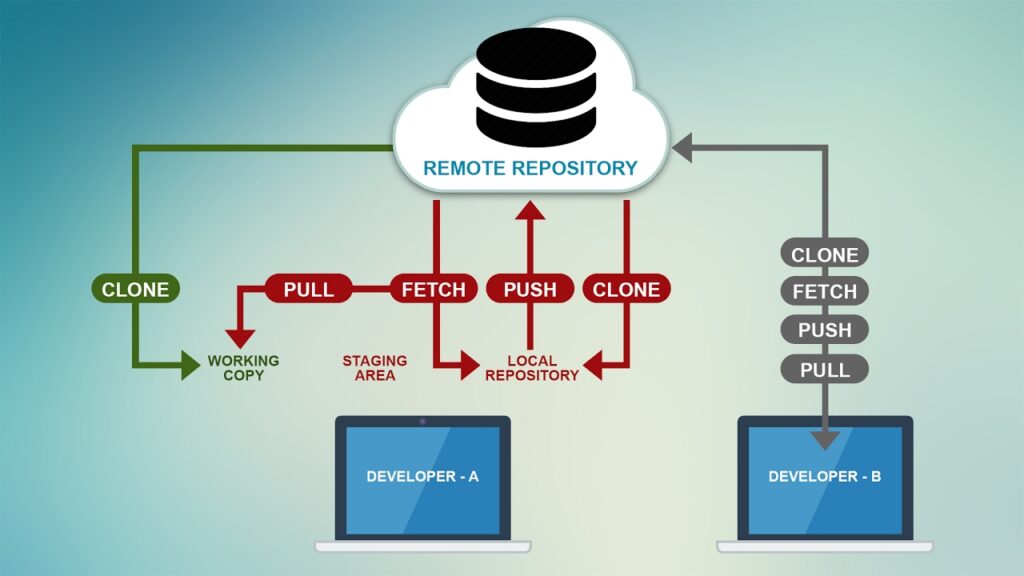
GitHub Repos: 1. FreeCodeCamp: Your Interactive Coding Classroom
First, visit FreeCodeCamp’s repository. You will find thousands of coding challenges. Moreover, the community updates them regularly. How does it work? You clone the repo locally. Then, you run a few simple commands. Suddenly, you have a full learning environment. Additionally, you can contribute your own solutions. This approach keeps you accountable.
Why do you need this repo? Because passive learning fails. You watch videos. You feel productive. But you don’t practice. Consequently, you forget everything. FreeCodeCamp forces active engagement. You write code every single day. Furthermore, you receive instant feedback. Thus, you learn faster.
How to use it:
- Fork the repository.
- Install dependencies using
npm install. - Start the curriculum with
npm run develop. - Complete one module per day.
2. Developer Roadmap: Visualize Your Learning Path
Next, examine the Developer Roadmap repository. This repo shows you step-by-step guides. Specifically, it breaks down frontend, backend, and DevOps careers. Similarly, it includes community-voted resources. Therefore, you never waste time on outdated tutorials.
You need this repo because confusion kills momentum. You ask yourself, “What should I learn next?” Meanwhile, your friends advance faster. This repository eliminates that doubt. It gives you a clear checklist. Consequently, you track your progress visually.
How to use it:
- Open the README file.
- Click on any roadmap image.
- Follow the links to recommended courses.
- Bookmark the ones you complete.
3. First Contributions: Make Your First Pull Request Today
Third, explore First Contributions. This repo holds a special place in my heart. Why? Because it solves one massive fear: contributing to open source. Many developers worry about making mistakes. They think, “What if I break something?” Honestly, that fear paralyzes you. Fortunately, this repository eliminates that anxiety.
You clone the repo. Then, you follow simple step-by-step instructions. You add your name to a list. Finally, you submit a pull request. The maintainers welcome every single contribution. Moreover, they guide you if something fails. Consequently, you gain real experience.
You need this repo because employers love open-source contributors. Furthermore, you build a public track record. Thus, your resume stands out.
How to use it:
- Fork the repository.
- Clone your fork locally.
- Add your name to
Contributors.md. - Push and create a pull request.
4. Public APIs: Find Free Data for Your Projects
Fourth, check out Public APIs. This repository lists hundreds of free APIs. For example, you can get weather data, movie information, or random jokes. Similarly, you can test payment gateways without spending money. Consequently, you build realistic projects without backend headaches.
You need this repo because projects demand real data. You cannot always build your own API. That takes weeks. Instead, you grab a free endpoint. Then, you focus on frontend skills. Moreover, you learn how to handle asynchronous requests. Thus, you become job-ready faster.
How to use it:
- Browse the categorized list.
- Pick an API that excites you.
- Read its documentation.
- Build a small app using
fetchoraxios.
5. Oh My Zsh: Supercharge Your Terminal Experience
Fifth, meet Oh My Zsh. This repository transforms your command line. You install it once. Then, you get plugins, themes, and aliases. For instance, you type gst git status. Similarly, you navigate folders twice as fast. Consequently, you save keystrokes every single day.
You need this repo because speed matters. Every second you waste typing long commands adds up. Over a month, you lose hours. Moreover, a beautiful terminal boosts your motivation. You feel like a professional. Thus, you enjoy coding more.
How to use it:
- Install Zsh on your system.
- Run the installation script from the repo.
- Edit
.zshrcto enable plugins. - Restart your terminal.
6. Build Your Own X: Master Fundamentals by Rebuilding Tools
Sixth, dive into Build Your Own X. This repository challenges you directly. Instead of using existing tools, you rebuild them. For example, you build your own Redis clone. Or you create a simple Docker alternative. Moreover, you build a basic Git system. These exercises feel difficult at first. However, they teach you deep fundamentals.
You need this repo because tutorials lie to you. They hide complexity. They say, “Just use this library.” But what happens when the library breaks? You panic. Consequently, you cannot debug effectively. Building from scratch removes that fear. You understand every layer. Thus, you become the person others ask for help.
How to use it:
- Pick one project from the list.
- Read the problem statement carefully.
- Write code without watching a solution.
- Compare your approach with official implementations.
7. The Art of Command Line: Master Your Terminal Like a Pro
Finally, study The Art of Command Line. This repository contains curated tips and tricks. You learn one-liners that save ten minutes each. For example, you combine grep, sed, and awk to process logs. Similarly, you automate backups with cron. Consequently, you look like a wizard to your teammates.
You need this repo because the command line never goes away. GUIs change every year. However, terminal skills last forever. Moreover, remote servers often lack graphical interfaces. Thus, you must feel comfortable in the black-and-white window.
How to use it:
- Read one section per day.
- Practice each command in your terminal.
- Create your own cheat sheet.
- Teach one command to a friend.
Common Mistakes When Using GitHub Repos
You might still struggle. Many developers do. They clone a repository. They stare at the files. Then, they close the tab. Sound familiar? Let me identify three mistakes.
First, you skip the README. Honestly, this document answers 80% of your questions. It explains setup steps, dependencies, and common issues. Therefore, read it twice before writing any code.
Second, you never contribute back. You take value but give nothing. Even fixing a typo helps. Furthermore, maintainers notice regular contributors. Consequently, they offer mentorship or job referrals.
Third, you try to learn everything at once. You bookmark fifty repos. You feel overwhelmed. Instead, pick one repository per week. Master it completely. Then, move to the next.
FAQ: GitHub Repos: Your Burning Questions Answered
Q1: Do I need to be an expert coder to use these repos?
Absolutely not. Beginners benefit the most. Each repository includes clear, step-by-step instructions. You need basic command-line knowledge. Moreover, the communities welcome questions.
Q2: How much time should I spend daily?
You decide. Thirty minutes of daily work wonders. Consistency beats intensity. Therefore, build a small habit. Check one repo. Complete one task. Then, stop. Over the course of a month, you complete all seven.
Q3: Can I add these projects to my resume?
Yes, and you absolutely should. Employers love candidates who engage with open source. Specifically, mention your pull requests. Additionally, link to your forked versions. Consequently, you stand out from copy-paste developers.
Q4: What if I get stuck on a step?
You search the issue tracker first. Someone likely faced the same problem. If not, open a new issue. Describe your error clearly. Include screenshots and error messages. The community will help you.
Q5: Are these repositories free forever?
Every single one remains completely free. GitHub hosts them without charge. Moreover, open-source licenses protect your access. You can fork them today. You can still use them ten years from now.
Q6: Which repo should I start with tomorrow morning?
Start with First Contributions. Why? Because it breaks the psychological barrier. You make your first pull request within ten minutes. That success fuels your motivation. Then, move to FreeCodeCamp for daily practice.
Q7: How do I stay motivated after the first week?
You join each repository’s Discord or Slack channel. Surround yourself with learners. Share your daily wins. Ask questions when stuck. Furthermore, set a public goal. Tweet your progress. Accountability changes everything.
Q8: Can I use these repos to prepare for job interviews?
Definitely. Focus on Build Your Own X. Interviewers ask system design questions. When you rebuild Redis or Git, you internalize those concepts. Consequently, you answer with confidence. Additionally, The Art of Command Line helps with technical screens.
Q9: What if English isn’t my first language?
No problem. Many repositories offer translations. Check the README for language options. Moreover, you use browser translation tools. The code itself speaks a universal language. Therefore, you still learn effectively.
Q10: Will these repos become outdated?
GitHub archives inactive repos. However, popular ones like these update constantly. Thousands of developers contribute weekly. Moreover, fundamental concepts rarely change. Git commands from 2015 still work today. Thus, your investment pays off in the long term.
GitHub Repos: Your Next Move: Stop Reading, Start Doing
GitHub Repos: You finish this article. You feel informed. But information without action wastes time. Therefore, close this tab right now. Open GitHub. Search for “First Contributions.” Fork it. Add your name. Submit that pull request. The whole process takes five minutes.
Then, tomorrow morning, clone FreeCodeCamp. Complete one challenge. Thursday belongs to the Developer Roadmap. Friday, you explore Public APIs. On the weekend, you configure Oh My Zsh. Next week, you rebuild a simple tool. Finally, you master ten command-line tricks.
Consequently, you transform from a passive observer into an active contributor. Moreover, you join a global community of builders. You stop asking “How do I start?” Instead, you ask, “Which feature should I add next?” That shift changes everything.
So go ahead. The repositories wait for you. Your future self thanks you for starting today.