
Introduction: The Alarm Clock Is Not Your Enemy
Save 10 Mins. Let’s be honest for a second. Mornings feel like a race you never win. You hit snooze. You scramble for socks. Then, you burn your tongue on coffee that’s too hot. Then you rush out the door, already exhausted.
But here is the good news. It does not have to be this way.
Therefore, you can save ten minutes every single morning. In fact, that is seventy minutes a week. Furthermore, that is almost five hours a month. So, imagine what you could do with five extra hours. Read a book. Stretch. Actually eat breakfast. Or sit in silence before the world demands your attention.
After all, this blog is not about waking up at 4 AM. Likewise, it is not about becoming a productivity robot. Instead, it is about small, smart automations. Simple scripts. Easy routines that run on their own.
Accordingly, how do you actually do it? Let me walk you through everything you need to know.
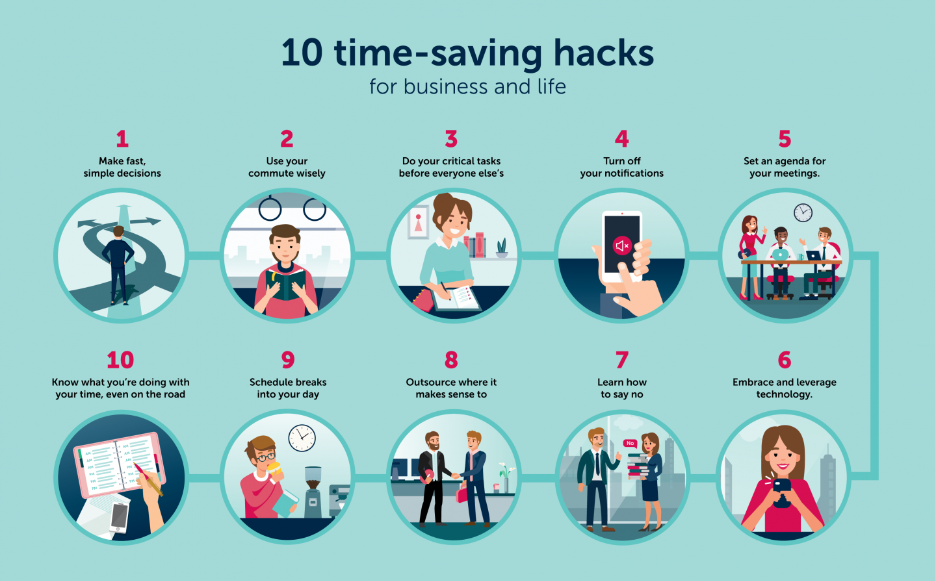
Why Save 10 Mins Matters More Than You Think
We often dismiss ten minutes as nothing. “It is just ten minutes,” we say. However, here is the truth. Ten minutes is the difference between calm and chaos.
For example, think about your worst morning recently. Was it missing the bus? Forgetting your lunch? Leaving your phone on the kitchen counter? Consequently, all of those mistakes happen in a ten-minute window of panic.
Now, flip the script. When you automate small decisions, your brain stays relaxed. As a result, you conserve mental energy for things that actually matter. Meanwhile, your morning stops being a battle. Instead, it becomes a bridge into a better day.
In addition, transitioning to automation does not require coding skills. Similarly, you do not need to be a tech expert. Instead, you need a simple mindset shift. Let things run on their own so you can focus on being human.
What Does “Automate Your Morning” Even Mean?
Great question. To begin with, automation sounds scary. You might picture robots making your bed or AI writing your to-do list.
Nonetheless, morning automation is much simpler than that. In other words, it means creating systems that work without active decisions from you. For example:
- Your coffee maker starts at 7:00 AM automatically.
- Then, your phone sends a weather summary to your lock screen.
- Your smart lights fade on slowly to mimic sunrise.
- Then open your eyes.
As you can see, each of these tiny automations saves small chunks of time. Added together, they save you ten minutes or more.
The best part? Once you set them up, you never think about them again. That is the magic of “set and forget.”
If you want to read about e-commerce business, click here.
Save 10 Mins daily What You Need to Know Before You Start
Before you automate anything, let’s cover a few ground rules. These will save you frustration later.
First, start small. Do not automate your entire morning in one day. Pick one repetitive task. Master it. Then move to the next.
Second, know your pain points. Where do you lose time? Is it choosing clothes? Making breakfast? Finding your keys? Target those specific moments.
Third, test your automations. A script that fails makes mornings worse, not better. Therefore, run a trial on a weekend first.
Fourth, keep a manual backup. Technology glitches sometimes. Consequently, know how to do things the old way just in case.
Fifth, celebrate small wins. Saving two minutes is still a victory. After all, progress builds momentum.
Transitioning into automation feels awkward at first. That is normal. Give yourself grace for the first week.
Save 10 Mins daily Script #1: The Gentle Wake-Up Call
Most people wake up to a jarring alarm. That sudden noise spikes your cortisol. As a result, you start the day in fight-or-flight mode. Not ideal.
Instead, automate a gentler wake-up sequence. Here is how.
What you need: A smartphone with automation apps (iPhone Shortcuts or Android Routines) and a smart bulb or smart plug.
How to set it up:
- Open your automation app.
- Create a new personal automation for “Time of Day.”
- Set it for 15 minutes before your real alarm.
- Add action: Control your smart light to fade on over 5 minutes.
- Add second action: Play a soft playlist or nature sounds.
- Save the automation.
Now your room fills with light and sound gradually. Therefore, you wake up feeling rested instead of attacked. This alone saves you from hitting snooze three times. In fact, that is easily five minutes saved.
Use active voice here: Your light fades. Your music plays. You lie there and wake naturally.
Save 10 Mins daily Script #2: The Weather-Ready Outfit Chooser
How many minutes have you lost staring at your closet? “Is it cold? Will it rain? Do I need a jacket?”
Stop guessing. Instead, automate your weather check and outfit suggestion.
What you need: IFTTT (If This Then That) or a similar automation tool. Most are free.
How to set it up:
- Create an account on IFTTT.
- Search for “Weather to Notification.”
- Set the trigger to “Daily weather report at 6:30 AM.”
- Set the action to send a notification to your phone.
- Customize the message: “Good morning. It is [temperature] and [conditions]. Wear a [jacket/umbrella/sunglasses].”
Now your phone tells you exactly what to wear. No thinking required. As a result, you save at least two minutes of closet confusion.
Transitioning to this script takes five minutes to set up. Then it runs forever. That is a massive return on investment.
Save 10 Mins daily Script #3: Breakfast on Autopilot
Breakfast should not require a cooking show performance. Yet many of us spend ten minutes just deciding what to eat.
Here is a better way. Automate both the decision and the preparation.
What you need: A programmable coffee maker or smart plug + a slow cooker or instant pot.
How to set it up for coffee:
- Fill your coffee maker the night before.
- Program it to brew at your wake-up time.
- Add a smart plug if your machine is not programmable. Then set the plug schedule.
How to set it up for breakfast:
- Prepare overnight oats in a jar before bed.
- Or set your slow cooker to steel-cut oats on a timer.
- Use a smart speaker to remind you: “Your oats are ready.”
Now breakfast waits for you. No cooking. No decisions. Just food.
That saves another three minutes easily. Plus, you eat something nutritious instead of grabbing a stale granola bar.
Use active voice: The coffee brews itself. The oats cook themselves. You lift the spoon.
Save 10 Mins daily Script #4: The No-Thinking News Brief
Do you check news, email, and social media first thing? That is a trap. Each app pulls you down a rabbit hole. Consequently, ten minutes vanish before you blink.
Instead, automate a single, curated morning brief.
What you need: Your phone’s automation app + a news aggregator like Feedly or Pocket.
How to set it up:
- In your automation app, create a time-based trigger for your wake-up time.
- Add action: Open your news app to a specific “Morning Brief” folder.
- Add second action: Speak aloud the top three headlines.
- And add a third action: Show a notification that says “Read for 2 minutes only.”
Alternatively, use a daily podcast automation. Many news outlets offer 5-minute morning briefings. Set your podcast app to download the latest episode automatically. Then play it while you brush your teeth.
This keeps you informed without the scroll hole. Therefore, you save another two minutes.
Transitioning away from doom-scrolling feels hard at first. However, after three days, you will wonder why you ever did it differently.
Save 10 Mins daily Script #5: The Automatic Bag Packer
Forgetting your laptop, lunch, or water bottle ruins a morning. However, you can automate reminders so you never leave anything behind.
What you need: A checklist app (like Todoist or Microsoft To Do) + location-based automation.
How to set it up:
- In your automation app, create a trigger for “When I leave home.”
- Add action: Display a checklist titled “Bag Check.”
- List your items: Keys, phone, wallet, lunch, laptop, water.
- Add a second action: Speak aloud, “Did you pack everything?”
Now your phone literally asks you before you walk out. No more forgetting. No more turning back. That saves at least three minutes of retracing your steps.
Use active voice: Your phone checks. You confirm. The door closes behind you confidently.
How to Combine All Five Scripts to Save 10 Mins daily
Running five separate automations sounds messy. But here is the beauty. They all work in the background simultaneously.
Here is what your fully automated morning looks like:
- 6:45 AM: Lights fade on. Soft music plays.
- 7:00 AM: Weather notification appears. Coffee finishes brewing.
- 7:10 AM: News brief reads headlines aloud.
- 7:20 AM: Smart speaker reminds you that oats are ready.
- 7:45 AM: Location trigger asks for your bag check.
As a result, you wake up, eat, dress, and leave. No decisions. No panic. And no lost time.
Now, add up the savings: Gentle wake-up (5 min), outfit chooser (2 min), automated breakfast (3 min), curated news (2 min), bag packer (3 min). That is 15 minutes total.
Yes, fifteen. Even better than ten.
Save 10 Mins daily Common Fears and Why They Are Wrong
Fear #1: “I am not technical enough.”
Wrong. Most automations use simple apps with drag-and-drop menus. In fact, if you can send a text, you can set these up.
Fear #2: “It will take too long to set up.”
Wrong. The five scripts above take about 30 minutes total to configure. Then they save you 10+ minutes every single day. Therefore, payback time is three days.
Fear #3: “What if something fails?”
Valid concern. However, you keep manual backups. Know how to make coffee without a timer. Keep a paper checklist by the door. After all, automation assists you. It does not replace you.
Transitioning from fear to action is a choice. Therefore, choose action.
Real Results from Real People: Save 10 Mins daily
Let me share a quick story. A friend of mine named Sarah used to run late every single day. She tried waking up earlier. She tried laying out clothes. Nothing stuck.
Then she automated just two things. Specifically, her coffee timer and her weather notification. Suddenly, she saved four minutes each morning. That gave her enough buffer to find her keys without rushing.
Within a week, she stopped running late. Within a month, she added the bag checker. Now she leaves home with time to spare.
Small changes. Big results. That is the power of automation.
Frequently Asked Questions (FAQ)
Q1: Do I need to buy expensive smart home devices?
A: Not at all. Many automations work with just your phone. Start with free apps like iPhone Shortcuts or Google Routines. Then add smart plugs or bulbs later if you want.
Q2: What if I share a home with others? Will my automations bother them?
A: Good question. Keep shared spaces in mind. Use headphones for audio automations. Set light automations only in your bedroom. Finally, communicate with your housemates or family first.
Q3: Can I automate my morning routine without a smartphone?
A: Yes. Use old-school automations. For example, a mechanical timer for your coffee maker. A written checklist taped to your mirror. A weekly meal prep session. Technology helps, but habit works too.
Q4: How long until I see real-time savings?
A: You will save time on day one. However, the real benefit appears after one week. That is when the automations become habits. Consequently, you stop thinking about them. You gain time naturally.
Q5: What is the best first automation to try?
A: Start with the weather notification. It is the easiest. It saves immediate time. Moreover, it builds your confidence. Then move to the wake-up light sequence.
Q6: Will this work for night owls and early birds both?
A: Absolutely. Shift the timing to match your schedule. After all, automations do not care what time it is. They only care about consistency.
Q7: Can I automate exercise or meditation too?
A: Yes. Set a timer for five minutes of stretching. Schedule an app like Calm to open automatically. Likewise, your smart speaker can say, “Time to breathe.” Automation removes the “should I?” question.
Q8: What if my morning varies day to day?
A: Build conditional automations. For instance, “If it is Monday, remind me to pack gym clothes.” Most apps allow weekday-specific triggers.
Q9: Is there a risk of relying too much on automation?
A: That is a wise concern. Use automation to support you, not define you. Practice your manual backups once a month. Finally, stay flexible when technology fails.
Q10: Can I save more than ten minutes?
A: Yes. Many people save fifteen or twenty minutes. Track your morning for three days. Identify where you lose time. Then build an automation for each gap.
Final Thoughts: Your First Step Today
Save 10 Mins daily. Reading about automation does not save time. Doing it saves time.
So here is your challenge. Pick one script from above. Spend ten minutes setting it up tonight. Then test it tomorrow morning.
That one tiny change will save you at least two minutes tomorrow. Then add another script next week. Then another.
Within one month, your mornings will feel completely different. You will stop rushing. You will start living.
And remember this: Ten minutes every morning equals sixty hours per year. That is a full work week and a half. Therefore, you can learn a skill. Start a side project. Or rest.
You deserve that time. After all, your morning does not have to be a fight.
Automate the small stuff. Save your energy for the big stuff. That is how you win the morning.