
Introduction
Instagram Ads have changed everything. You scroll through beautiful photos. You watch entertaining videos. Then, suddenly, an ad stops you. Surprisingly, it feels natural. It blends right in. But here’s the truth: someone planned that moment. And you can plan it too.
Nevertheless, many people fear Instagram Ads. For instance, they worry about high costs. They also stress over targeting the wrong crowd. On top of that, the dashboard looks confusing. Let me clear that up for you.
In this guide, I will show you how to use Instagram Ads step by step. Meanwhile, you will learn what actually works. Furthermore, I will share what you absolutely need to know before spending a single dollar.
So, let’s jump right in.
Why Instagram Ads Matter More Than Ever
First of all, Instagram hosts more than a billion active users. That is a massive audience. As a result, most of these users follow brands. They also buy products directly through the app. But why should you care? Because organic reach keeps falling.
For example, you can post great content. You can also write clever captions. However, only a small fraction of your followers will see it. Consequently, Instagram’s algorithm prioritizes friends and family. That leaves businesses fighting for scraps.
Therefore, transitioning to paid ads solves this problem. You pay for guaranteed visibility. You show your product to people who already show interest. In short, that is a game-changer.
What You Need to Know Before You Start Instagram Ads
Now, do not rush into creating your first ad. Instead, preparation saves money. Here are the critical things you must know upfront.
First, Your Goal Drives Everything
To begin with, Instagram offers several ad objectives. If you pick the wrong one, you waste cash. So ask yourself: what do you want people to do?
- For instance, if you want website visits, choose “Traffic.”
- Likewise, if you want sales, choose “Conversions.”
- Similarly, if you want more followers, choose “Engagement.”
Active voice tip: Match your goal to your outcome. Do not guess. Test instead.
Second, Know Your Audience Like a Friend
You cannot sell to everyone. In fact, that approach rarely works. Instead, define one person. Give them a name. List their hobbies. Understand their problems.
For example, imagine you sell yoga mats. Your audience might be Sarah. Sarah is 28 years old. She works from home. She has back pain. Most importantly, she wants comfort, not just style.
As a result, your ad speaks directly to Sarah. That feels personal. That drives action.
Third, Budgeting Does Not Have to Hurt
You do not need a thousand dollars. On the contrary, start small. Instagram lets you spend five dollars per day. That covers a simple test.
Thus, transitioning from fear to action becomes easier with a low budget. You learn as you go. Then, you scale what works.
Step-by-Step: How to Use Instagram Ads
Let me walk you through the actual setup. Follow these steps closely. Meanwhile, keep your goal in mind.
Step 1: Connect to Facebook Ads Manager
First of all, many people get confused here. Instagram does not have a separate ad tool. Instead, you need a Facebook Business Page. Then you access Ads Manager.
Here is what you do:
- Create a Facebook Business Page (if you do not have one).
- Go to business.facebook.com.
- Click “Ads Manager.”
- Link your Instagram account.
After that, the platform syncs everything. This takes five minutes.
Step 2: Choose Your Campaign Objective
Next, click the green “Create” button. Ads Manager asks you about your goal. Pick one from these three categories:
- Awareness: People see your brand.
- Consideration: People visit your site or watch your video.
- Conversion: People buy or sign up.
Active voice example: Choose “Conversions” when you want direct sales. On the other hand, choose “Traffic” when you build your email list.
Personally, I recommend starting with Traffic. It costs less. Moreover, it gives you quick data.
Step 3: Set Your Budget and Schedule
Now you decide your spending limits. You have two options:
- Daily budget: You spend a fixed amount each day.
- Lifetime budget: You spend a total amount over several days.
Consequently, start with a daily budget of 10. Then, runt head for three days. That gives you 30 hours of learning.
Transitioning from theory to practice: Do not change the budget mid-campaign. Instead, let the system optimize first.
Step 4: Define Your Audience
This step determines success or failure. Specifically, you can target people based on:
- Location (city, state, country)
- Age and gender
- Interests (yoga, fitness, wellness)
- Behaviors (online shopping, travel)
Pro tip: Use a “lookalike audience” later. For now, keep settings broad. A broad audience helps you discover new customers.
Active voice warning: Avoid overlapping audiences. Otherwise, you will bid against yourself. That raises costs.
Step 5: Pick Your Ad Placements
Instagram offers several placements:
- Feed (main scrolling area)
- Stories (vertical full-screen)
- Reels (short video loops)
- Explore (discovery page)
You can let Instagram choose automatically. In most cases, that works best. The system places your ad where it performs well.
However, you can manually select placements. I suggest testing Feed and Stories first. These two generate most results.
Step 6: Create the Ad Itself
Here comes the creative part. You need three elements:
- Visual: Photo, video, or carousel.
- Primary text: The caption above your ad.
- Headline: then, Bold text that grabs attention.
Use video whenever possible. Video stops the scroll. Furthermore, keep videos under 15 seconds. Show your product solving a problem.
Let me give you a real example of our yoga mat:
- Visual: A quick clip of Sarah stretching without back pain.
- Primary text: “Work from home killing your back? Try our grip mat.”
- Headline: “Free shipping on all mats.”
Thus, transitioning from idea to execution: Write three headlines. Test them against each other. Then, keep the winner.
Step 7: Add Your Call-to-Action (CTA)
Your CTA tells people what to do next. Instagram provides buttons like:
- Shop Now
- Learn More
- Then, sign up
- Get Quote
Use “Shop Now” for products. On the other hand, use “Learn More” for blog posts. Make the action obvious.
Active voice reminder: Do not hide your CTA. Place it where thumbs naturally tap.
If you want to read about TikTok ads, click here.
Best Practices That Actually Work
I have run hundreds of Instagram ad campaigns. As a result, these tactics consistently deliver.
Firstly, Hook Viewers in the First 3 Seconds
People scroll fast. Therefore, you lose them immediately if your first frame looks boring. Open with a question or a bold statement.
Bad hook: “Our yoga mat has many features.”
Good hook: “Does your back hurt right now?”
See the difference? The second hook creates a feeling.
Second, Use User-Generated Content (UGC)
Do not produce every visual yourself. Instead, ask happy customers for photos or videos. Real people trust real people. As a result, UGC feels authentic, not salesy.
Transitioning from brand voice to customer voice: Post a customer using your product. Tag them. Then, run that image as an ad.
Thirdly, Test One Variable at a Time
You will hear this often: split testing saves money. Therefore, change only one element per test.
- Test headlines this week.
- Then, test images next week.
- Test audiences after that.
Active voice strategy: Run two identical ads. Change the headline on one. Then, see which gets more clicks. Repeat.
Fourthly, Monitor Frequency Closely
Frequency measures how often someone sees your ad. Below 1.5 is okay. Above 2.5 means fatigue.
When frequency climbs, people ignore you. In fact, they may even feel annoyed. So pause the ad. Then, refresh the creative.
Common Mistakes You Must Avoid
Let me save you from painful errors.
Mistake 1: Sending People to Your Homepage
Never link an ad to your general homepage. Why? Because the visitor gets confused. They do not know where to click.
Instead, send them to a dedicated landing page. That page matches the ad’s promise. Show the exact product. Keep the same colors and words.
Mistake 2: Ignoring Mobile Formatting
People view Instagram on phones. Therefore, vertical video fills the screen. On the other hand, horizontal video looks tiny.
Always preview your ad on a phone. Check text size. Ensure buttons work with one thumb.
Mistake 3: Stopping Ads Too Early
You run an ad for six hours. It gets no sales. As a result, you panic and turn it off.
Additionally, that is a mistake. Instagram needs time to learn. Then, the algorithm tests different audiences. Consequently, give each ad at least 48 hours.
Transitioning from impatience to patience: Trust the learning phase. Let data guide your decision.
How to Measure What Matters
Do not obsess over likes. Likes do not pay bills. Instead, focus on these metrics.
Click-Through Rate (CTR)
CTR tells you the percentage of people who click your ad. A good CTR is 1% or higher. Below 0.5% means your creative needs work.
Cost Per Click (CPC)
CPC shows what you pay for each click. Average CPC ranges from 0.50to1.50. Then, higher costs suggest tough competition or poor targeting.
Return on Ad Spend (ROAS)
ROAS measures revenue against ad spend. A ROAS of 3x means you earn 3 for every 1 spent. Aim for 3x or better.
Active voice reminder: Check your dashboard daily. Make small changes. Do not overhaul everything at once.
Frequently Asked Questions (FAQ)
1. Do I need a Facebook account to run Instagram Ads?
Yes, you do. Instagram Ads operate through Facebook Ads Manager. Create a free Facebook Business Page. Then link your Instagram account.
2. How much should I spend on my first ad?
Start with 10perday.Runtheadforthreedays.Thattotals30. It gives you enough data without breaking your budget.
3. Can I run Instagram Ads without a website?
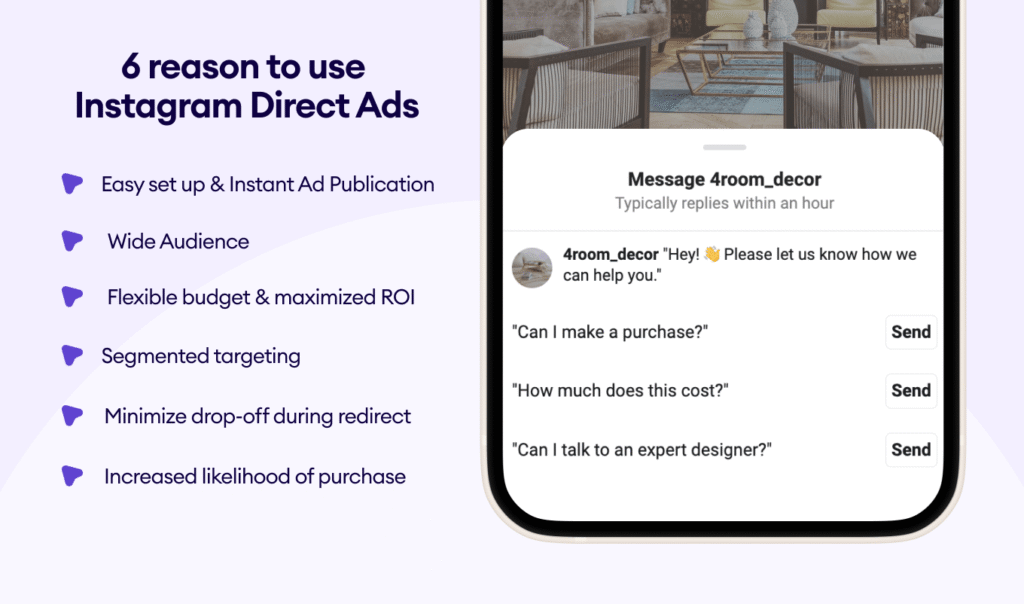
Absolutely. You can drive traffic to your Instagram Shop. You can also promote a “Message Us” button. People send direct messages to place orders.
4. Why does Instagram reject my ad?
Instagram rejects ads that violate its policies. Common violations include too much text on images, before-and-after photos, or prohibited products like supplements. Check Facebook’s Advertising Policies for details.
5. How long does it take to see results?
Give each ad 48 hours. The algorithm needs time to find the right people. Do not judge performance in the first six hours.
6. What type of ad works best for beginners?
Start with a single image ad in the Feed. Keep the image clean. Write a short caption. Use a “Learn More” button. Master this format before trying video or Stories.
7. Can I target my existing Instagram followers?
Yes, you can. Create a custom audience from your Instagram followers. Then show ads specifically to them. This works well for repeat purchases.
8. How often should I change my ad creative?
Refresh your creativity every two weeks. Audiences get bored quickly. New images or videos, then, regain their attention.
9. Does Instagram punish ads with too much text?
Instagram prefers images with less than 20% text. Use their text overlay tool to check. Too much text lowers your delivery and raises costs.
10. What is the best time to run Instagram Ads?
Test at different times. General best times are Tuesday through Thursday, 11 AM to 2 PM. However, your audience may differ. Let data decide.
Final Thoughts: Your Next Step
You now know how to use Instagram Ads. Furthermore, you understand what you need to know before starting. However, the information alone does nothing. Action changes everything.
So, open Facebook Ads Manager today. Set a $10 daily budget. Create one simple ad. Then, measure the results. After that, improve from there.
Transitioning from reading to doing feels uncomfortable at first. That is normal. Most people stop here. You will not. Instead, you will start your first campaign.
And soon, you will see your product stop someone mid-scroll. They will click. They will buy. That moment makes all the effort worthwhile.
Now go launch your ad.