
YNAB vs. Mint: Which One Actually Saves You Money?
YNAB vs. Mint: Let me ask you a blunt question. Have you ever opened your banking app, stared at a number, and thought, “Where did my paycheck go?”
I have. Too many times.
For years, I jumped between budgeting apps. I wanted a magic solution. Instead, I found confusion. Then, I discovered two heavyweights: Mint and YNAB. Many people still ask me which one wins.
Here is the truth. Mint is dead. Intuit killed it in 2024. But its ghost still haunts the conversation. Meanwhile, YNAB (You Need A Budget) keeps growing stronger.
So, which one should you use today? Let me walk you through the real story. I promise to keep this simple, honest, and helpful.
YNAB vs. Mint: First, Let Me Clear Up the Confusion
You might hear people still talking about Mint. They loved its free price tag. Then, they miss its colorful charts. However, Mint no longer exists as a standalone app. Intuit moved most of its users to Credit Karma.
Additionally, Credit Karma offers some budgeting features. But it is not the same Mint. Then, it focuses more on credit scores and loan offers. So, when I compare YNAB vs Mint today, I am really comparing YNAB vs a memory.
Still, understanding Mint helps you see why YNAB works so well. Let me explain.
YNAB vs. Mint: What Made Mint So Popular?
Mint arrived in 2007. It felt revolutionary. You connected all your accounts. Then, the app automatically sorted your transactions. You saw pretty pie charts. Best of all, it costs nothing.
I remember signing up for Mint. I felt like a grown-up. The app showed me I spent $200 on coffee last month. I gasped. Then, I did nothing about it.
Furthermore, that was Mint’s biggest problem. It showed you the past. Then, it never forced you to change. Then, you could watch your money drain away. But Mint never grabbed your hand and said, “Stop right now.”
Transitioning to YNAB felt completely different.
YNAB vs. Mint: How YNAB Changes Your Behavior
YNAB uses four simple rules. Let me break them down for you.
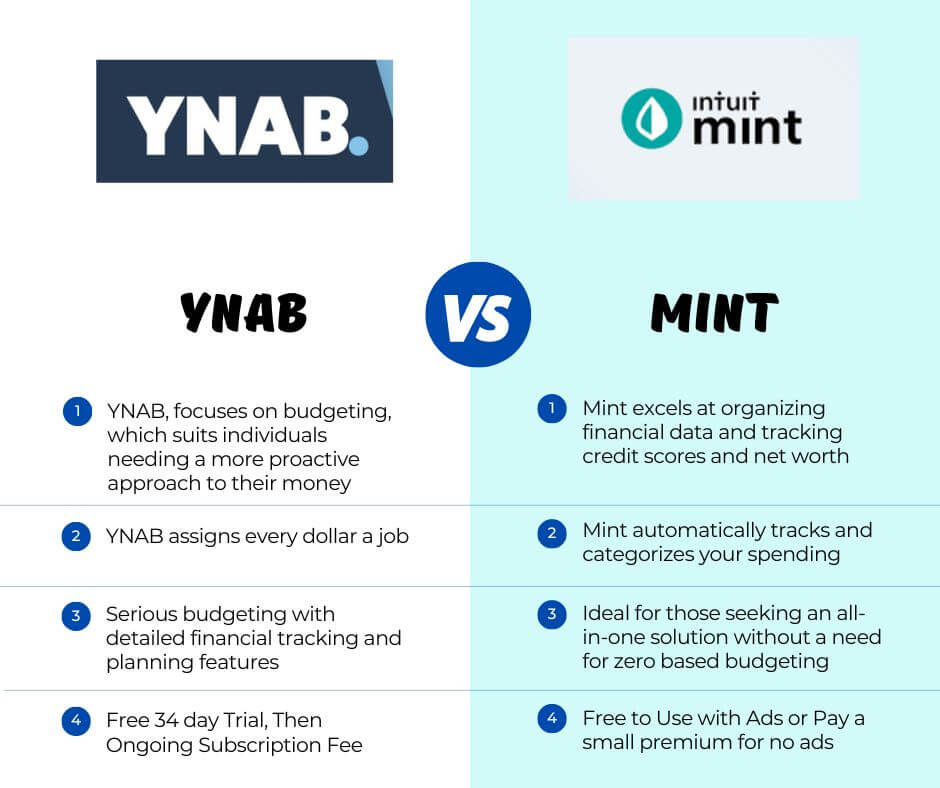
Rule One: Give every dollar a job.
When you get paid, you assign each dollar to a category. Rent, groceries, savings, fun money. Then, you do this until you reach zero. This process feels scary at first. But it also feels powerful.
Rule Two: Embrace your true expenses.
You stop being surprised by big bills. Does car insurance come every six months? No problem. Then, you set aside a little money each month. Christmas presents in July? YNAB handles that too.
Rule Three: Roll with the punches.
You overspend on takeout one week. That is fine. Then, you move money from another category. For example, take $20 from your clothing budget. YNAB teaches flexibility, not shame.
Rule Four: Age your money.
This rule changes everything. You stop living paycheck to paycheck. Instead, you spend money you earned at least 30 days ago. When I first achieved this, I cried happy tears.
YNAB vs. Mint: The Active Difference: Watching vs. Planning
Here is where the active voice makes my point clear.
Firstly, Mint watches your money. YNAB plans your money.
Secondly, Mint tells you what happened. YNAB tells you what will happen.
Thirdly, Mint shows you a hole. YNAB hands you a shovel.
Then, do you see the difference? One makes you a spectator. The other makes you the player.
Transitioning from passive to active budgeting transforms your bank account. I speak from experience.
Let Me Walk You Through a Real Scenario
YNAB vs. Mint: Imagine you have $1,000 in your checking account.
With Mint: Firstly, you log in. Secondly, the app shows you spent $300 on groceries, $150 on gas, and $50 on streaming services. Then, you nod. You leave. Then, you still have $500. But you have no clue what that $500 should do next week.
With YNAB: Firstly, you open the app. Secondly, you see the same $1,000. Then, you assign every dollar. $300 for rent that comes in 10 days. $200 for groceries. $100 for gas. $50 for your phone bill. $50 for a savings goal. Finally, $300 for next month’s car insurance. You hit zero. Now, every dollar has a mission. You feel calm, not confused.
Which experience sounds better to you?
What About Cost? Honest Talk Here
YNAB vs. Mint. Mint was free. Everyone loved that. But you paid in another way. Mint showed you ads for credit cards and loans. It sold your anonymized data to lenders. You were the product, not the customer.
Additionally, YNAB costs money. Currently, it is $14.99 per month or $109 per year. They offer a 34-day free trial. Students get a full year free.
Moreover, that price scares some people. Then, I get it. Paying for a budgeting app feels ironic. However, let me share a statistic. YNAB says new users save an average of $600 in their first two months. The app pays for itself many times over.
Furthermore, transitioning from free to paid feels hard. But ask yourself this. How much money do you leak every month because you do not have a plan?
YNAB vs Mint: The Learning Curve: Be Honest With Yourself
Mint worked right away. You connected accounts. You saw data. No thinking required. That ease also made Mint useless for changing habits.
YNAB has a learning curve. I will not lie to you. The first two weeks feel weird. You might mess up assignments. You might get frustrated. Then, you might watch five YouTube tutorials. That is normal.
But here is the payoff. After one month, YNAB clicks. Suddenly, you understand money differently. You stop wondering where your cash went. You start telling your cash where to go.
Mobile Apps: Which One Feels Better?
YNAB vs. Mint: Mint had a decent mobile app. You checked balances quickly. You saw transaction lists. But budgeting on the go felt clunky.
YNAB’s mobile app shines. Then, you enter transactions as they happen. Standing at the coffee shop? Open YNAB, type $4.50, choose “Coffee” category. Done. The app updates instantly. Your partner sees the change, too.
I love this feature. It keeps us accountable. No more “I forgot to log that” excuses.
Syncing and Banks: The Technical Side
YNAB vs. Mint: Mint syncs with almost every bank. That was its superpower. But Mint frequently broke connections. You often fixed login issues.
YNAB also syncs with thousands of banks. It uses Plaid, a reliable service. However, some smaller credit unions struggle. YNAB offers manual import as a backup. You can drag and drop a file from your bank. This works fine.
Transitioning to manual entry sounds annoying. Surprisingly, it helps you spend less. Typing each purchase makes you feel the money leave. You hesitate before buying unnecessary items.
Debt Payoff: Which App Helps More?
Mint showed your debt balances. That was it. No real strategy for elimination.
YNAB actively helps you kill debt. You create a category for each debt. You assign extra payments. Then, you see your progress daily. The “Credit Card Payment” category automatically reserves money for your bill. You never accidentally spend your payment money.
I paid off $7,000 in credit card debt using YNAB. Mint never helped me do that. Mint showed me the problem. YNAB gave me the solution.
Goals and Savings: Planning for Joy
Mint lets you set savings goals. You aimed for a vacation or a new car. The app tracked your progress. That worked fine.
YNAB takes goals further. You set “Targets” for each category. For example, “I need $1,200 for Christmas by December.” YNAB calculates how much to save each month. If you fall behind, it adjusts. You never guess again.
Transitioning from vague hopes to specific targets changes everything. I now save for gifts, car repairs, and even my next phone. No surprises.
Privacy and Your Data
Mint shared your data with Intuit’s partners. You agreed to this in the fine print. Mint used your spending habits to sell you products.
YNAB takes privacy seriously. They do not sell your data. They show no ads. You pay for the service, so you become the customer, not the product.
For me, this alone justifies the cost. I want my financial data to stay mine.
The Verdict: Which One Wins?
YNAB vs Mint: Here is my honest conclusion.
Choose Credit Karma (Mint’s replacement) if:
- Firstly, you only want to check your credit score.
- Secondly, you do not care about changing spending habits.
- Thirdly, you refuse to pay for any app.
- Then, you want a passive money tracker.
- Firstly, you live paycheck to paycheck and feel stuck.
- Secondly, you want to save for real goals.
- Thirdly, you overspend on takeout, Amazon, or subscriptions.
- Then, you are willing to spend 10 minutes per day on your budget.
- Finally, you want to stop fighting about money with your partner.
I choose YNAB. Every single time.
Frequently Asked Questions
1. Is Mint completely gone?
Yes. Intuit shut down Mint in early 2024. Most features moved to Credit Karma. Credit Karma offers basic budgeting, but it lacks Mint’s detailed transaction categorization.
2. Can I try YNAB for free?
Absolutely. YNAB offers a 34-day free trial. No credit card required to start. Moreover, Students get a full year free with proof of enrollment.
3. Does YNAB work for couples?
Yes, and it works beautifully. Then, you share one budget across multiple phones. Both partners see real-time updates. You can assign categories for each person.
4. What happens to my old Mint data?
Intuit allowed Mint users to download their transaction history as CSV files. Then, you can import those files into YNAB or other apps. Finally, check Credit Karma for your archived data.
5. Is YNAB worth the money?
Let me answer with a question. Is saving $600 in two months worth $109 per year? For most people, the answer is yes. The app easily pays for itself.
6. How long does YNAB take to learn?
Plan on two weeks of daily use. Then, watch the official tutorials. Read the blog. Finally, join the Reddit community. After 30 days, it becomes second nature.
7. Can I use YNAB without linking my bank?
Yes. You can enter everything manually. Some users prefer this method. It forces more awareness. You add transactions as you spend.
8. What if I have irregular income?
YNAB works perfectly for freelancers and commission earners. Moreover, you budget only the money you currently have. Then, you do not forecast future checks. Finally, this prevents overspending.
9. Does YNAB help with investing?
No. YNAB focuses on budgeting and cash flow. For investing, use a separate app like Robinhood, Vanguard, or Betterment.
10. Can I switch from Credit Karma to YNAB?
Yes, easily. Then, start your YNAB trial. Import your transaction history from Credit Karma. Moreover, set up your categories. Begin your 34-day journey.
My Final Words to You
I used Mint for three years, watched my spending, never changed my habits. I stayed broke.
Then, I switched to YNAB. I felt uncomfortable at first and made mistakes. Then, I overspent in some categories. But I kept going.
Six months later, I had an emergency fund. One year later, I paid off debt. Two years later, I stopped living paycheck to paycheck.
Mint showed me my problem. YNAB solved my problem.
Moreover, transitioning from passive observation to active participation changes your financial life. Then, you stop hoping for better. You start building better.
So, which app wins? YNAB wins. Every time.
But do not take my word for it. Start that 34-day free trial today. Open your eyes. Give every dollar a job. Watch what happens.
You might surprise yourself.
Have you used YNAB or Mint? Share your story in the comments below. I read every single one.