
Youart.ai: Your Complete Guide to Creating with AI
Have you heard about Youart.ai? If you’re curious about this new tool, you’re in the right place. Indeed, the world of AI art can seem overwhelming at first. Therefore, this guide is designed to walk you through every step. Specifically, we will cover how to use the platform and, more importantly, what you need to know to use it wisely and well. Let’s begin this creative journey together.
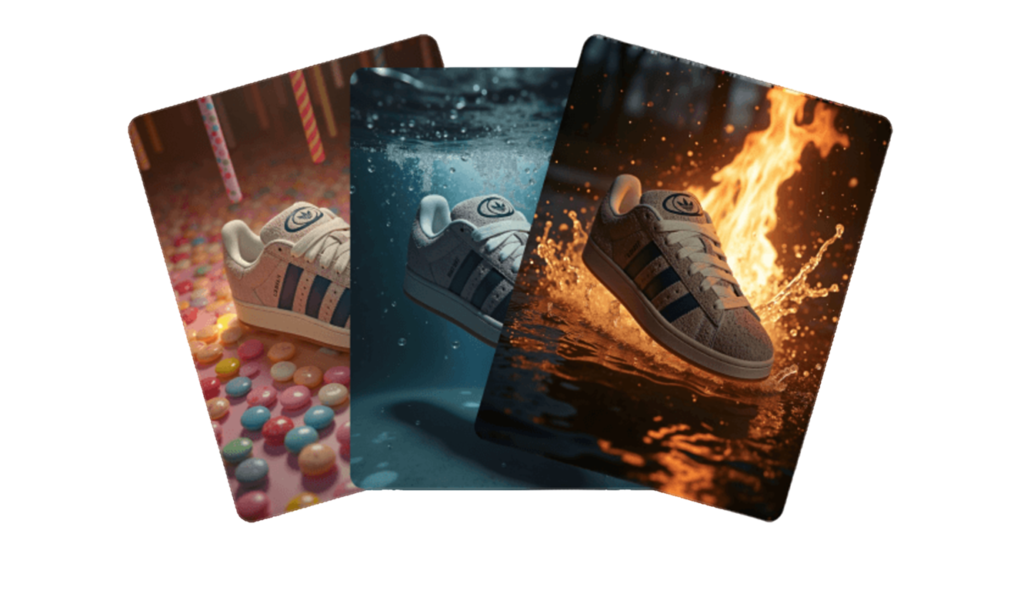
What is Youart.ai?
First, let’s start with the basics. Fundamentally, Youart.ai is an AI art generator. In simple terms, you type a description of what you want to see. Then, the AI creates a unique image based on your words. Consequently, you don’t need to know how to draw or paint. Instead, your imagination becomes your primary tool.
Many AI art tools exist today. However, Youart.ai is often praised for its user-friendly approach. Additionally, it is known for a particular flair with certain artistic styles. Think of it as a creative partner. You provide the initial idea, and it helps bring that idea to life visually.
Youart.ai Getting Started: Your First Creation
Ready to make your first image? Fortunately, the process is straightforward.
Step 1: Create Your Account
First, navigate to the Youart.ai website. Next, you will need to sign up for a free account. Typically, new users receive some free credits to experiment with the tool.
Step 2: Find the Prompt Box
After signing up, you will land on your dashboard. Here, you should look for a large, empty text box. This is where the magic happens; this box is called the “prompt.”
Step 3: Write a Simple Prompt
Initially, start with something easy. For example, try “a red apple on a wooden table.” Don’t make it complicated yet, as the goal is to see how the AI responds.
Step 4: Generate Your Image
Finally, click the button that says “Create” or “Generate.” Wait a few seconds, and your image will appear!
Your first result might be perfect. Alternatively, it might be a little strange. Nevertheless, this is completely normal. Essentially, every image teaches you more about how the AI interprets language.
Youart.ai How to Write Better Prompts
The key to great AI art is your prompt. Simply put, a better prompt gives you a better image. Here is how to significantly improve your descriptions.
Be Specific with Details
Generic prompts inevitably lead to generic results. Therefore, add vivid details to guide the AI effectively.
- Instead of “a house,” try “a small cottage with a thatched roof and a smoking chimney.”
- Instead of “a portrait,” try “a close-up portrait of an old sailor with a weathered face and kind eyes.”
Name the Art Style
Clearly write the AI exactly what style you want. For instance, do you want a painting? If so, say so explicitly
- You can request a photo or a 3D render.
- Moreover, you can specify styles like “watercolor,” “oil painting,” or “anime.”
For example: “a fantasy castle on a cliff, digital art style, vivid colors.”
Use Quality and Composition Words
These words help the final image look more professional and intentional.
- For quality: Use terms like “highly detailed,” “sharp focus,” or “4k resolution.”
- For composition: Try “wide-angle view,” “dramatic lighting,” or “soft shadows.”
Example: “a cozy library, highly detailed, warm lighting from a desk lamp.”
Fix Mistakes by Changing Your Prompt
Do you see something wrong in your image? If so, change your words and try again.
- Do the hands look weird? Subsequently, add “perfect hands” to your next prompt.
- Is the background messy? Then, try adding “simple background” or “minimalist setting.”
In essence, you are having a conversation with the AI. As a result, each new prompt gets you closer to your vision.
If you want to read about Chatsonic, click here.
Exploring Youart.ai’s Key Tools
Beyond the basic text box, Youart.ai offers features that provide greater creative control. Let’s explore these essential tools.
1. Image-to-Image
This is a particularly powerful feature. First, you upload an existing picture. Then, you write a prompt to transform it.
How it works:
- For example, upload a photo of a park. Then, prompt “change to an autumn scene with red and orange leaves.” Consequently, the AI will reinterpret your photo based on this new theme.
2. Choosing the Right Model
Often, Youart.ai offers different “models.” These act like different AI brains, each with unique strengths.
- One model might excel at realistic faces.
- Another might be best for dreamy landscape paintings.
Thus, experiment with each one to see which suits your project.
3. Setting the Size and Shape
You can and should choose your image’s dimensions before generating. This setting is called the “aspect ratio.”
- Firstly, choose a square for Instagram posts.
- Then, choose a wide computer wallpaper.
- Choose tall for a phone background.
Setting this correctly ensures your image is ready to use.
4. Making Improvements: Upscale & Edit
Found an image you love? Fortunately, you can improve it.
- Upscaling it makes a small image bigger and clearer in quality.
- In-painting lets you fix small spots. Specifically, you brush over a problem area and tell the AI what should be there instead.
What You Need to Know: Important Considerations
Using AI art is fun, but it also comes with responsibility. Here’s the crucial knowledge you need to use the tool ethically and effectively.
Understanding the AI’s Limits
Remember, the AI is a pattern-matching system, not a conscious mind. Therefore, it often struggles with specific details.
Text and numbers:
- It cannot frequently spell words correctly within images.
Hands and faces:
- These complex shapes can sometimes look distorted.
Specific counts:
- Asking for “five birds” might yield four or six.
If your image has flaws, adjust your prompt and generate again.
The Ethics of AI Art
This is, without doubt, the most important topic. AI learns from millions of images made by real people across the internet.
Be respectful.
- Do not use the AI to deliberately copy a living artist’s unique, copyrighted style for profit.
Be honest.
- When you share AI art online, it’s good practice to disclose its origin. This transparency builds trust.
Check the rules.
- Always read Youart.ai’s Terms of Service. You must know if you can use your images for personal or commercial projects.
Tips for the Best Experience
Follow these tips to become proficient quickly:
- Firstly, join the community. Look for a Youart.ai user forum or Discord server. Seeing others’ prompts and results is the fastest way to learn.
- Secondly, save your best prompts. Keep a digital note of what worked. This log becomes an invaluable personal resource.
- Thirdly, embrace surprises. Sometimes the AI’s unexpected “mistake” is more interesting than your original idea. So, allow room for happy accidents.
Your Creative Workflow: From Idea to Final Art
Think of Youart.ai as one powerful step in a broader creative process. Here is a recommended workflow:
- Find Your Idea. Firstly, start with a sketch, a photo, or just a written mood.
- Generate Drafts. Secondly, use Youart.ai to create many different visual variations.
- Pick and Refine. Thirdly, choose your favorite. Then, use in-painting or a new prompt to fix any remaining issues.
- Add Final Touches. Finally, use other software (like Photoshop or free alternatives) to adjust colors, contrast, or add personal elements.
This hybrid approach leverages the AI’s speed for inspiration while reserving your artistic judgment for the final polish.
Frequently Asked Questions (FAQ)
Q: Is Youart.ai free?
A: You can start for free with an initial allotment of credits. For regular or commercial use, however, you will likely need a paid plan for more generations.
Q: Can I sell the art I make?
A: You must check Youart.ai’s own license agreement. Often, paid plans grant a commercial license for the images you generate. Then, free tiers are usually for personal use only.
Q: Why are the hands so weird?
A: AI models commonly struggle with the complex anatomy of hands. To help, add keywords like “detailed hands” or “perfect anatomy” to your prompt. Alternatively, use the in-painting tool to correct them.
Q: How is this different from Midjourney?
A: Each AI tool has a different training dataset and “style.” Youart.ai might prioritize accessibility or certain aesthetics. Ultimately, the best way to know is to test it with your own prompts.
Q: Am I still an artist if I use AI?
A: Absolutely. You provide the vision, guide the process, and make the critical choices. The AI is simply a new and powerful brush in your creative toolbox.
Summary
Youart.ai opens a door to a vast new world of creativity. Start with simple prompts and learn from each image. Then, most importantly, always create with respect and honesty. Now, go ahead and type your first idea. Your journey with AI art starts today, and the possibilities are truly endless.