
Your Complete Guide to Using Macaron.ai: What You Need to Know
Staring at a blank page? Crushed by deadlines? If so, you’re not alone. Fortunately, a powerful new tool can help. Specifically, Macaron.ai is a smart writing assistant. Ultimately, it’s designed to work with you, not for you. This guide will show you how to use it. Moreover, we will cover its key features and how to add it to your daily work. Let’s transform your writing from a chore into a smooth, creative process.
First, know this key point: ItMacaron.ai is your creative partner. In essence, it mixes human ideas with AI speed. As a result, you can create, edit, and polish many types of content. For instance, think of blog posts, business emails, stories, and reports. Essentially, the tool changes to fit your needs. To begin, explore its clean, simple dashboard. Then, pick a ready-made template or chat directly with the AI.
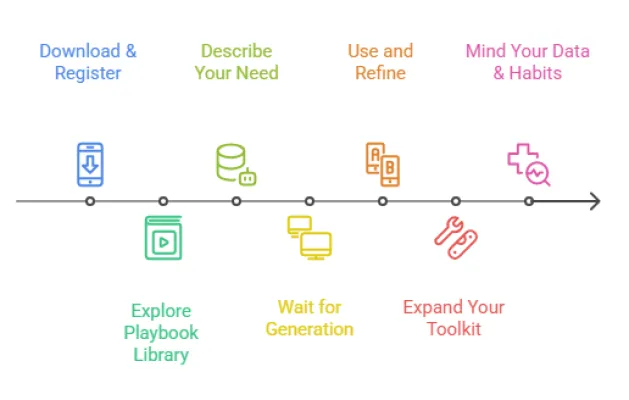
1. Starting: How to Talk to the AI
Your success begins with one skill: writing good prompts. In other words, a prompt is your instruction to the AI. Think of the AI as a helpful assistant; therefore, it needs clear directions. For this reason, be specific for the best results.
Bad Prompt: “Write about healthy eating.”
Good Prompt: “Write a short, friendly Instagram post for a yoga studio. Focus on easy, healthy breakfast tips for busy parents. Use under 150 words.”
After that, the AI gives you a draft in seconds. Remember, this is just a starting point. Consequently, your job is to edit and improve it. You can then give follow-up commands. For example: “Make it more exciting,” “Use simpler words,” or “Add a question at the end.” This process is a back-and-forth conversation. In the end, you guide the AI to your perfect final text.
If you want to read about Durable AI, click here.
2. Macaron.ai Key Features: A Tool for Every Task
Macaron.ai is more than a basic text box. In fact, it has tools for different jobs. So, learning these will make you a power user.
The Long-Form Editor
Use this for projects like articles or reports. First, ask the AI for an outline. Next, write each section one by one. Meanwhile, the AI will suggest ways to improve your sentences as you type. As a result, this keeps your writing clear and strong from start to finish.
Change the Tone Instantly
Need a different style? This feature is key. For example, you can make text formal, casual, friendly, or professional. Simply paste a complex paragraph. Then ask: “Make this easier for a teenager to read.” Immediately, the AI will rewrite it in simple, clear language.
Rewrite and Improve Your Text
Stuck on a sentence? Repeating the same words? If so, use the rewrite tools. Specifically, the “Rephrase” feature gives you new ways to say the same thing. Similarly, the “Expand” tool adds more detail. Conversely, the “Summarize” tool shortens long text. Ultimately, these tools make your writing fresh and easy to read.
Write for the World
Need to reach people in other languages? Then, use the translation tool. Start by writing your text in English. Afterwards, get a good translation in many languages. Consequently, this helps you talk to a global audience quickly.
3. Fitting Macaron.ai Into Your Day
How do you make this tool part of your routine? Here are simple ways for different people.
For Bloggers and Marketers:
- Step 1: Brainstorm catchy headlines.
- Step 2: Create a blog post outline from keywords.
- Step 3: Then, draft each section of the post.
- Step 4: Finally, all your social media posts sound like your brand.
For Students and Teachers:
- Step 1: Build a strong essay outline.
- Step 2: Then, explain hard topics in simple terms for studying.
- Step 3: Additionally, check your work for clear sentences.
Important Note: Always use AI text as a helper. Therefore, your final work must be your own thoughts and words.
For Office Workers:
- Step 1: Write draft emails and reports fast.
- Step 2: Next, summarize long meeting notes.
- Step 3: Finally, polish proposals to sound professional.
By doing this, you save hours every week.
4. Smart and Honest Use Macaron.ai: Best Practices
Use this tool wisely to do great work and keep trust.
Always Add Your Own Touch
The AI gives you a first draft. However, you must make it yours. So, add your stories, your opinions, and your knowledge. In other words, this makes the content real and engaging.
Check Every Fact
The AI is good with words, not facts. Indeed, it can sometimes make mistakes that sound right. For this reason, you must double-check all dates, stats, and names. After all, your reputation depends on truth.
Use It to Start, Not to Finish
The best use is to beat writer’s block. For example, use it to get ideas flowing. Similarly, use it to improve your weak sentences. However, do not use it to write a whole piece without your input. Remember, you are the boss; the AI is your helpful assistant.
5. Understanding AI Writing and SEO
A common worry is about search engines and AI content.
The Simple Truth:
Search engines want helpful content. Importantly, they do not punish AI content if it is good. Therefore, if you use ItMacaron.ai to make useful, well-edited content for people, you are doing it right. Conversely, if you use it to make bad, spammy content, you will fail. In summary, focus on quality and helping your reader. Ultimately, the tool you use does not matter as much as the final value you provide.
Frequently Asked Questions (FAQ)
Q: Is AI-generated content plagiarism?
A: Not directly. Although the AI creates new text, copying an AI draft and calling it your own is wrong. Instead, you must edit it heavily. Additionally, add your own examples and voice. In the end, the final work should be a mix of AI help and your own effort.
Q: Can Google tell if I use AI?
A: Google’s main goal is to find good content for users. Specifically, it looks at quality, not how you wrote it. As a result, well-written, helpful AI-assisted content can rank well. On the other hand, poor content will not. So, your focus should be on making great content, not hiding your tools.
Q: Is my data private with ItMacaron.ai?
A: You should always check the tool’s privacy policy. Generally, good companies protect your data. Moreover, they should not use your private inputs to train public models. For your safety, look for their policy page to be sure.
Q: What can ItMacaron.ai NOT do well?
A: It has limits.
- Firstly, it does not know personal stories or feelings.
- Secondly, it may not know the very latest news.
- Furthermore, it can sometimes give wrong facts that sound right.
- Finally, it lacks real human experience.
Therefore, use it for drafting and ideas, not for final facts or deep personal insight.
Q: How do I write the best prompts?
A: Be like a good manager. In other words, give clear, detailed instructions. Always include:
- Who is the audience? (e.g., “for beginners”)
- What is the format? (e.g., “a 500-word blog post”)
- What is the tone? (e.g., “friendly and encouraging”)
- What are the key points? (e.g., “include cost, speed, and safety”)
In conclusion, better instructions give you better first drafts.
Conclusion: Your New Writing Partner
In short, ItMacaron.ai is a powerful partner. However, it is not a magic solution. Instead, it is a tool that makes your natural skills stronger. First, learn to write good prompts. Next, use the right tool for each task. Most importantly, always add your human touch. When you do this, you will write better and faster. As a result, you will spend less time struggling and more time creating. Welcome to the future of writing—a smart, supportive collaboration between you and AI.