
Copy.ai: Your How-To & Need-To-Know Guide
Staring at a blank page is hard. You need a catchy slogan. You need a persuasive email. Starting is the toughest part. Tools like Copy.ai promise to help. They banished the blank page for many. But what is it really like? How do you use it well? This guide will show you. We will walk you through Copy.ai step-by-step. We will give you the knowledge you need. Let’s turn this AI into your writing partner.
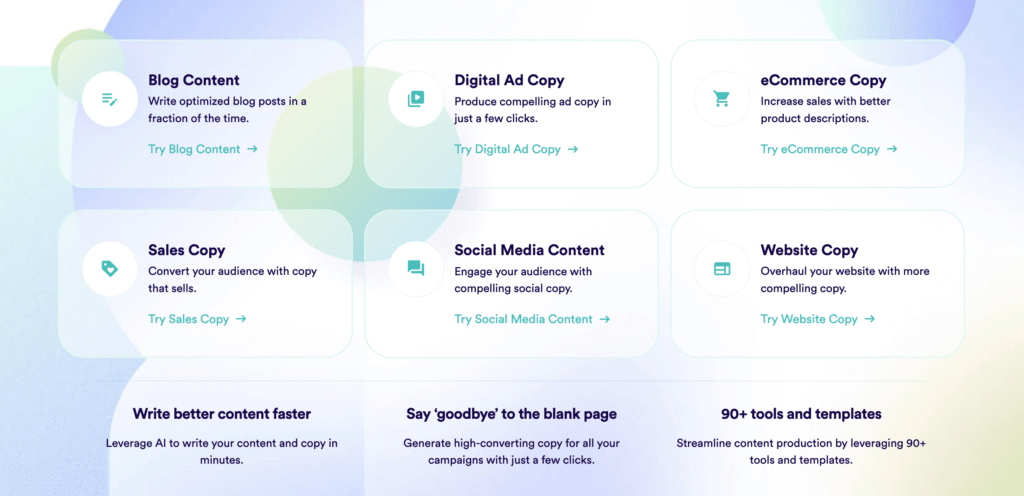
Firstly, Understand Copy.ai
Copy.ai is not a robot writer. It is a brainstorming partner. It is talented and fast. The tool uses advanced language models. It generates text based on your prompts. Moreover, you give it a direction. It gives you options. You choose and refine. The result is your own unique content.
How to Start with Copy.ai: A Simple Walkthrough
Step 1: Sign Up and Explore the Dashboard.
Firstly, create your free account. Then, the dashboard is clean. You will see a menu of tools. These include “Blog Wizard,” “Marketing Copy,” and “Social Media.” Don’t feel overwhelmed. Start with one tool. The “Freeform” chat is a great place to begin.
Step 2: Use the “Chat” Feature Like a Pro.
Secondly, think of this as your conversation with an expert writer. Be specific. For example, don’t just say “Write a blog intro.” Try this instead: “Write a friendly intro for a blog post about starting a vegetable garden for beginners. Focus on the joy of homegrown tomatoes.” See the difference? The second prompt gives context and emotion. The AI will give you a much better result.
Step 3: Master the Templates.
Thirdly, templates are your shortcut to success. Need a LinkedIn post? Click the “Social Media” template. Describe your product (e.g., “an eco-friendly water bottle”). Additionally, list the key benefits (“keeps water cold for 24 hours, plastic-free”). The AI will generate several post options. You can edit any option directly in the tool.
Step 4: The Essential Edit – Make It Human.
Then, this is the most important step. AI provides a great first draft. You provide the human touch. Moreover, read the output aloud. Does it sound natural? Add your personal stories. Swap out generic words for your own voice. Then, correct any odd phrases. This process makes the content yours. It also avoids any “AI sound.”
Step 5: Save, Organize, and Repeat.
Finally, did you find a great output? Save it in a “Brand Voice” folder. Copy.ai lets you store your best work. Then this creates a library of your style. Soon, the AI will learn your preferences. Your results will get better and faster.
What You Really Need to Know: The Crucial Details
Now you know the steps. But success requires deeper knowledge. Here are the non-negotiable truths about using Copy.ai effectively.
1. The Prompt is Everything.
Firstly, Garbage in, garbage out. This old computer science rule is true here. Moreover, A vague prompt creates vague content. Then, a detailed, passionate prompt creates a strong draft. Always spend time on your prompt. It is your most important job.
2. It’s an Idea Generator, Not a Finisher.
Secondly, do not expect a perfect, publish-ready piece. Expect a solid foundation. Then, you must build the house. Plan to edit and refine. Moreover, this tool saves you hours of brainstorming. It does not save you from critical thinking.
3. Your Brand Voice is Your Responsibility.
Thirdly, Copy.ai can try to mimic a style. But you must guide it. Use the “Infinity” or “Brand Voice” features. Then, feed it samples of your past writing. Tell it to be “conversational and witty” or “professional and authoritative.” Consistency is key. You are the guardian of your brand’s sound.
4. Fact-Check Everything.
Fourthly, AI can “hallucinate.” It might invent statistics or false details. Never trust its output blindly. Then, verify all dates, names, and claims. This is especially critical for blogs and product descriptions. You are responsible for accuracy.
5. It’s a Muscle, Not a Magic Wand.
Then, your skills will improve with practice. You will learn which prompts work. Moreover, you will find your favorite templates. Then, the first week might feel clumsy. By the third week, you will have a smooth workflow. Be patient and practice.
Smart Workflows for Common Tasks
Let’s apply this knowledge. Here are real-world workflows.
- Writing a Blog Post: Use the “Blog Wizard.” Enter your topic and keywords. Generate an outline first. Then, use the “Chat” to expand each section. Then, edit for flow and add personal examples. Finally, generate meta descriptions with the template.
- Creating Social Media Content: Use the “Social Media Captions” tool. Input your link or product description. Generate 5-10 options. Then, pick the best parts from each. Finally, combine them. Add emojis and hashtags manually.
- Drafting Sales Emails: Use the “Email” templates. Choose “Welcome Series” or “Cold Outreach.” Provide details about your customer’s pain point. Moreover, generate the draft. Then, insert a real story from a client testimonial. Finally, this builds immediate trust.
Frequently Asked Questions (FAQ)
Q: Is content from Copy.ai considered plagiarism?
A: Not directly, but it is unoriginal. The AI generates new text combinations. However, it trains on existing content. You must edit it heavily. Add your unique insights and stories. Then this transforms the output into original work. Finally, always run final drafts through a plagiarism checker for safety.
Q: Can Copy.ai write my entire blog post?
A: Technically, yes. Practically, no. It can write a full draft. But the result will lack depth and personal touch. Use it for structure and idea generation. Then, you fill in the expert authority and nuance. Finally, this partnership creates the best content.
Q: Is there a free plan?
A: Yes. Copy.ai offers a generous free plan. It includes 2,000 words per month. Additionally, you get access to most core features. This is perfect for testing. You can see if it fits your workflow before paying.
Q: How does Copy.ai compare to ChatGPT or Jasper?
A: Copy.ai excels in marketing-specific templates and workflows. It is built for entrepreneurs and marketers. ChatGPT is a more general-purpose chat. Then, Jasper is a direct competitor with similar features. The best choice depends on your interface preference and budget. Finally, try the free trials of each.
Q: Will Google penalize my site for using AI content?
A: Google states it rewards “helpful, people-first content.” It does not ban AI content. However, shallow, AI-generated content performs poorly. Then the solution is simple: use AI as a tool. Then, add massive value with your expertise and editing. Finally, make the content truly helpful. Google will respond positively.
Conclusion: Your New Writing Reality
Copy.ai changes the writing game. It removes the barrier to starting. But it does not remove the need for your skill. Remember, this tool is your assistant. You are the director. Moreover, master the prompt. Always edit. Infuse your voice. Fact-check without fail.
Follow this how-to guide. Internalize these need-to-know facts. You will save immense time. You will conquer creative blocks. Most importantly, you will create better content, faster. Then, start your free account today. Practice with one email or social post. You will quickly see the potential. The blank page will never intimidate you again.