
Introduction
You see a search box. You type some words. But the results are wrong. This is an old search. New search understands meaning. It is called semantic search. So it is smart. You should learn it now. Then you can use it. Let us start today.
Semantic Search. Firstly, See The Old Problem
The old search looks for words. Just the words you type. So it is not smart. For example, you type “apple”. Is it a fruit? Or is it a phone? The old search does not know. Then, this is a big problem. Also, words can be similar. Like “car” and “auto”. Old search sees two words. So it finds different things. But you want the same thing. This is very frustrating.
But now there is a new search. It is called semantic search. So it understands your meaning. Then, it looks at your full idea. Then it finds the right answers. This is much better for you.
If you want to read about Reddit SEO, click here.
Semantic Search Next, Learn How It Works
How can a computer understand? It uses a special trick. This trick is called “embeddings”. So it turns words into numbers. These numbers are like a code. Similar ideas get similar codes. For example, “cat” and “kitten” are similar. So their codes are close. “Car” and “vehicle” are also similar. So their codes are close to.
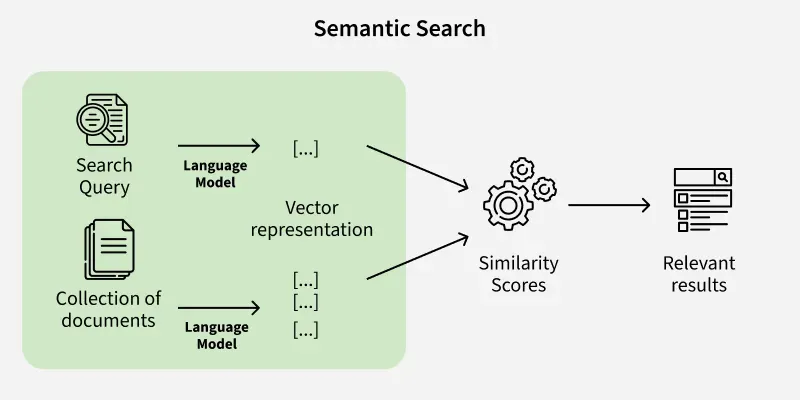
Now the search is easy. Your question becomes a code. All documents become codes. Then the computer compares codes. It finds the closest codes. So it finds the best answers. This is very simple and fast.
Semantic Search Now, Build Your Own Search
You can do this. Just follow these steps.
Step One: Pick A Model
Firstly, get a ready-made model. For example, use “Sentence-BERT”. Because it is made for this. It makes code from sentences. So it is perfect for you.
Step Two: Make Codes
Now take your documents. Give each to the model. Then, the model gives back a code. Save all these codes. This is your new search index.
Step Three: Use A Special Database
Normal databases are slow. So use a vector database. “Pinecone” is a good one. It holds all your codes. And it finds matches very fast.
Step Four: Turn Questions Into Codes
A person asks a question. So give it to the model. Then, the model makes a question code. Now you have a search code.
Step Five: Find Close Codes
Ask the database now. Say “find close codes”. It checks all saved codes. Then it gives the best matches. These are your search results.
See It In Real Life
Many places use this now. Online stores use it a lot. Then, you type “nice warm jacket”. So you see winter coats. You do not see summer shirts. This is very helpful.
Help websites use it too. You explain your problem. Then you see the right answer. You do not see wrong answers. So you are happy.
The good things are clear. Then, people find things fast. People are happier. Sales go up. Everyone wins.
But Know The Hard Parts
Sometimes there are problems. But you can fix them.
You Need Computer Power:
Making code needs power. So use a good computer. Or use a cloud service.
Special Words Are Hard:
Some fields use special words. A normal model might not know. So teach it to your words. Then it works very well.
Use Two Methods Together:
Only meaning can miss things. Also, check the exact words. Use both ways together. Then you get perfect results.
Finally, Start Small Today
Search is getting smarter. And you can use it. This guide showed you how. So start with a small test. Try it with some documents. Then, see the good results. Then make it bigger. You will be glad.
Frequently Asked Questions (FAQ)
What is the big change?
Old search finds words. But a new search finds ideas.
Do I need a lot of data?
No, you can start small. A ready model works first.
Is this very expensive?
No, it is cheap now. Many cheap tools exist.
Can it use Spanish?
Yes, many models understand Spanish. And other languages too.
How do I know it works?
Watch your users. They find things faster. They are happier.
Do I stop the old search?
No, use both together; both help in different ways.