
Introduction
Sudowrite, you stare at the blinking cursor. The blank page mocks your creative ambitions. We have all been there—every writer knows the unique frustration of a story trapped inside their head, refusing to flow onto the page. What if you had a creative partner, an AI-powered muse, ready to help you break through those blocks?
Meet Sudowrite. This tool is not just another grammar checker. Think of it as your brainstorming buddy, your prose polisher, and your narrative spark plug, all rolled into one intuitive platform. Then this guide will walk you through exactly how to use Sudowrite, transforming that intimidating blank page into your next great chapter.
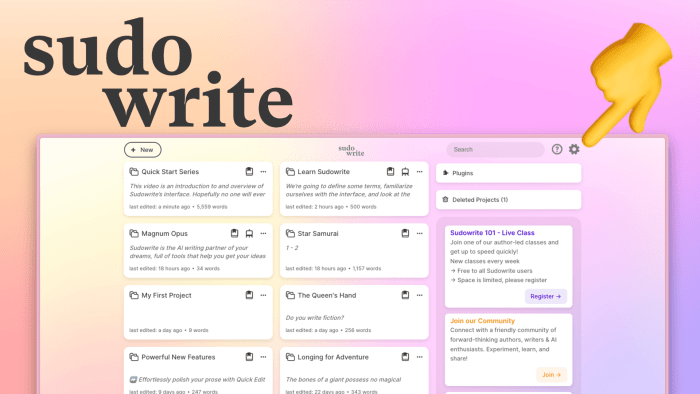
First, What Exactly Is Sudowrite?
Sudowrite is an AI-powered writing assistant designed specifically for creative writers. Unlike other AI tools focused on marketing copy or technical documents, Sudowrite lives and breathes fiction, narrative nonfiction, and screenplay writing. It does not just write for you; it writes with you.
Its core philosophy revolves around augmenting your creativity, not replacing it. You remain the author, the captain of the ship. Sudowrite acts as your first mate, suggesting courses, spotting icebergs, and helping you navigate the vast ocean of your story.
Getting Started with Sudowrite: Your First Steps with Sudowrite
Your journey begins at Sudowrite’s website. You will sign up for an account and choose a subscription plan. They offer a free trial, so you can comfortably explore its features without immediate commitment.
Next, you will create a new project. Give it a title and paste in your existing text. Even a single sentence serves as a powerful launchpad. Do not worry about perfection; get your ideas down. The AI needs your voice and context to generate its best, most relevant suggestions.
Now, let us explore the powerhouse features that make Sudowrite so revolutionary.
If you want to read about Dumbphone, click here.
Mastering the Core Features: Your Creative Toolkit Sudowrite
Sudowrite’s interface centers on three primary functions: Write, Rewrite, and Brainstorm. Each one tackles a different part of the writing process.
1. The Write Command (Beat Writer Mode)
This is your go-to for generating new content.
- How it works: You highlight a sentence or a paragraph. Sudowrite analyzes your style, tone, and context. Then, it suggests several options for what could happen next.
- Pro Tip: Do not just write a sentence and hit “Write.” Set the scene. Give the AI more context—a full paragraph works best. The more you give it, the more accurate and stylistically consistent its output becomes.
- Use it when: You hit a plot wall, need to describe a setting, or want to explore different directions for a character’s dialogue or action.
2. The Rewrite Command (Paraphraser & Tone Shifter)
You have a passage that feels clunky, repetitive, or just… flat. The Rewrite command is your solution.
- How it works: Highlight the text you want to improve. Sudowrite offers a suite of options:
- Improve: Firstly, it smooths out awkward phrasing and enhances clarity.
- Expand: Secondly, it adds rich, sensory details to bring a scene to life.
- Shorten: Thirdly, it tightens up verbose sentences.
- Custom: Then this is where the magic happens. You can command it to make a passage more poetic, more humorous, more suspenseful, or anything else you imagine.
- Moreover, Pro Tip: Use “Expand” on bare-bones descriptions. For example, instead of “the forest was dark,” you can generate “The ancient forest was a cathedral of shadows, where sunlight dared only to dapple the mossy floor in fleeting, golden coins.”
- Use it when: Your prose needs a punch-up, you are “telling” instead of “showing,” or you want to experiment with narrative tone.
If you want to read about ElevenLabs, click here.
3. The Brainstorm Feature (Idea Generator)
Stuck on a character name? Need a plot twist? Can’t describe a smell? The Brainstorm feature is your infinite idea machine.
- How it works: You type a prompt—like “medieval tavern smells” or “names for a cynical space pirate”—and Sudowrite generates a long list of creative suggestions.
- Pro Tip: Get weirdly specific with your prompts. “Synonyms for ‘walked’ that imply fear” will yield far better results (e.g., “shrank back,” “skittered,” “edged away”) than a generic request.
- Use it when you need to overcome any micro-block in your writing process, from sensory details to character motivations.
Weaving It All Together: A Practical Workflow
How do these features function in a real writing session? Follow this workflow:
- Draft Bravely: Firstly, write your first draft without self-editing. Get the raw story down. Embrace the mess.
- Identify the Gaps: Secondly, read through your draft. Where does it feel thin? Where does the pace drag? Mark these spots.
- Generate with Write: Thirdly, for thin scenes, use the Write command to generate new possibilities and flesh out the action.
- Refine with Rewrite: Fourthly, for clunky or uninspiring paragraphs, use Rewrite to improve flow, add detail, or shift the tone.
- Fill in the Blanks with Brainstorm: Moreover, use Brainstorm to find the perfect words, names, and details you are missing.
- Edit as the Author: Then this is the most crucial step. Curate the AI’s suggestions. Keep what resonates, edit what’s close, and discard what doesn’t fit. The final voice must always be yours.
Best Practices for a Stellar Sudowrite Experience
- Firstly, lead with Your Voice: The AI mimics what you give it. Feed it your best writing to get your best results.
- Secondly, you are the Curator, not the Passenger: Sudowrite offers options, not commands. Your job is to choose, adapt, and integrate.
- Thirdly, embrace the “Weird”: Sometimes, the AI will suggest something utterly bizarre. See this as a feature! These oddities can spark incredibly original ideas you’d never have considered alone.
- Fourthly, use it for Inspiration, Not Completion: Avoid the temptation to have Sudowrite write entire chapters. Its power lies in collaboration on the sentence and paragraph level.
Navigating the Ethical Landscape
A question naturally arises: Is using Sudowrite cheating?
The answer is a resounding no, provided you use it as intended. You are not plagiarizing another human’s work. You are using a tool to enhance your own creativity, much like a photographer uses Photoshop to enhance their photos. Then, the original composition, the narrative vision, the final editorial control, all of it remains squarely with you, the writer.
The writing community is still defining the ethics of AI assistance. Moreover, our best practice is transparency. If you publish a work created with significant AI help, consider adding a brief author’s note explaining your process.
Frequently Asked Questions (FAQ)
Q: Does Sudowrite write entire stories for me?
A: It can generate text, but it won’t write a coherent, plot-driven novel from a single prompt. It excels at helping you write your story, filling in gaps, and overcoming blocks. The macro-level plotting and character arcs must come from you.
Q: Does Sudowrite remember what it writes? Does it understand my plot?
A: Its memory is contextually limited to the text you provide it in a single session. It does not have a long-term memory of your entire manuscript. This is why providing strong context in your prompts is so important.
Q: Who owns the copyright to the content I generate with Sudowrite?
A: According to Sudowrite’s Terms of Service, you own the output it generates for you. However, copyright law regarding AI-generated content is still a developing field. It is always best to significantly alter and adapt the output to make it uniquely yours.
Q: How is Sudowrite different from ChatGPT?
A: While both are AI models, Sudowrite is specifically fine-tuned and designed for creative fiction writing. Its features, like Brainstorm, Rewrite, and the focus on sensory details, are built for storytellers, whereas ChatGPT is a more general-purpose tool.
Q: Will using Sudowrite make me a worse writer?
A: Not if used correctly. Think of it like training wheels. It can help you ride faster and further while you build confidence and skill. Then, the goal is to eventually internalize those skills, learning what makes a description powerful or dialogue snappy, so you need the tool less. It is a teacher, not a crutch.
Q: What are the subscription costs?
A: Sudowrite operates on a credit-based subscription model, with tiers ranging from a limited free plan to unlimited professional plans. Prices are listed on their website and are subject to change.
Then, the blank page will always be a challenge. But now, it does not have to be a solitary one. Sudowrite offers a revolutionary way to engage with your creativity, break down walls, and find joy in the process of building worlds, one word at a time. Your story is waiting. It is time to tell it.