
Introduction
Wireframe, imagine building a house without a blueprint. Where would the walls go? Where would the pipes and wires run? The project would quickly become a mess. It would cost too much money and likely fail.
Now, think about your website or app. The same idea applies. You need a plan. This is where it comes in. A wireframe is a simple drawing of your digital product. It shows the structure without any colors or fancy fonts. It is the blueprint for your app or website.
Additionally, learning it will save you time and money. It gets your entire team on the same page before you start building anything. Let’s break down how to create a wireframe and why you need one.
What is a Wireframe? The Simple Answer
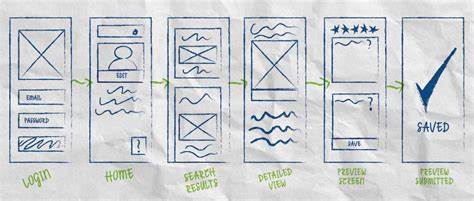
It is a basic outline of a screen. It focuses on what each element does, not what it looks like.
Think of it as the skeleton of a house. You see the frame and the room layout. You don’t see the paint or the furniture. A wireframe shows you:
- Where text and pictures will go.
- Where buttons and menus will be placed.
- How important each piece of content is.
- How a user moves from one screen to the next.
It makes your team focus on how the product works first. Looks come later.
Why You Need to Wireframe: The Key Benefits
It might be tempting to skip this step. Don’t. It offers huge advantages for any project.
If you want to read about Maxon, click here.
1. It Gets Everyone on the Same Page
Firstly, an idea in your head is hard to share. It makes it real. Your team, clients, and developers can all view the same plan. This stops misunderstandings before they happen.
2. It Saves Time and Money
Secondly, changing a drawing is easy and free. Changing code is hard and expensive. It helps you find problems early. You can fix them before any real work begins.
3. It Focuses on the User
Thirdly, without distracting colors, your team can focus on the user’s journey. Is the menu easy to find? Is the button in the right place? It helps you build a product that works well for the people who use it.
4. It Helps Plan Your Content
Fourthly, writers and marketers love wireframes. They can see exactly how much space they have for text. This prevents last-minute problems. You won’t have to cut a paragraph in half or stretch one sentence to fill a big space.
Types of Wireframes: Simple to Detailed
It can be rough sketches or more detailed plans. We group them by their level of detail, or “fidelity.”
Low-Fidelity Wireframes
Firstly, these are quick and rough drawings.
- Goal: To brainstorm and share ideas fast.
- How they look: Made with pen and paper. Then, they use simple boxes and lines. Words are often scribbles.
Mid-Fidelity Wireframes
Secondly, this is the most common type. They are made on a computer.
- Goal: To define the layout clearly.
- How they look: Made with tools like Figma or Adobe XD. They have clear buttons and headings. They still use only black, white, and gray.
High-Fidelity Wireframes
Then, these are very detailed and close to the final product.
- Goal: To show complex details to developers.
- How they look: They might use real text and specific image sizes. Then they sometimes show simple interactions.
How to Create a Wireframe: A Simple 5-Step Plan
Follow these steps to make your first.
Step 1: Do Your Research
Start by gathering information.
- Firstly, who is your user? What do they need?
- Secondly, what is the main goal of this screen? (e.g., buy a product, sign up for emails).
- Thirdly, look at other websites for ideas.
Step 2: Draw the User’s Journey
Moreover, map out how a user will move through your app. Where do they start? Where do they go next? Then this map will show you which screens you need to draw.
Step 3: Sketch Your Ideas
Grab a pen and paper. Draw boxes for the header, the main content, and the footer. Don’t worry about making it perfect. Then the goal is to get ideas out of your head and onto paper.
Step 4: Make a Digital Wireframe
Choose a digital tool. Turn your best sketch into a cleaner, digital.
- Firstly, use a grid to keep things aligned.
- Secondly, try to use real words instead of fake Latin text.
- Thirdly, use size and spacing to show what is most important.
- Fourthly, add short notes to explain how things work.
Step 5: Share It and Get Feedback
Show it to other people. Ask them questions. “Is this button clear?” “Can you find the contact page?” Use their answers to make your wireframe better.
What to Include in Every Wireframe
It should always have these key parts:
- Firstly, layout: The arrangement of headers, content, and footers.
- Secondly, navigation: Menus, links, and buttons that show how to move around.
- Thirdly, content Boxes: Placeholders for text, images, and videos.
- Fourthly, call-to-action Buttons: Then, the main actions you want users to take.
- Then, notes: Short explanations for anything that isn’t obvious.
Best Practices for Great Wireframes
Keep these tips in mind.
- Keep it simple. Firstly, use only black, white, and gray.
- Follow standard patterns. Secondly, put the logo in the top left. Put the main menu at the top. Users expect this.
- Focus on function. Then, always ask “Does this work?” not “Does this look good?”
- Work with others. Share your wireframes early to get feedback.
- Be consistent. Then, use the same style for all your wireframes.
Frequently Asked Questions (FAQ)
Q1: What’s the difference between a wireframe, a mockup, and a prototype?
- Firstly, a wireframe is a simple blueprint (the skeleton).
- Secondly, a mockup is a styled wireframe with colors and fonts (the skin).
- Thirdly, prototype is an interactive model you can click through (the working version).
Q2: Do I need to be a designer to make a wireframe?
No. Anyone can draw a basic. The goal is to share ideas, not to create art.
Q3: What is the best tool for making wireframes?
It depends.
- Firstly, use pen and paper to jot down your initial ideas.
- Secondly, Balsamiq for fast digital sketches.
- Then, Figma or Adobe XD for more detailed wireframes.
Q4: How detailed should my wireframe be?
Start simple. Add details only when you need to explain something complex. Then, use the simplest wireframe that effectively conveys the point.
Q5: Who needs to see my wireframes?
Everyone involved in the project! Show them to:
- Firstly, Project Managers
- Secondly, Designers
- Thirdly, Developers
- Fourthly, Writers
- Then, Clients
Conclusion: Build on a Strong Foundation
Wireframing is a crucial first step. It is the best way to ensure your digital product is built on a solid foundation. Then, a good wireframe leads to better teamwork, fewer mistakes, and a happier user.
Remember, a great app or website starts with a simple plan. So pick up a pen and start drawing your blueprint for success.