
Introduction
Choosing the right password manager is crucial for online security. With so many options available, Dashlane and Keeper stand out as two of the best. But which one is right for you?
Selecting the right password manager is crucial for safeguarding your online accounts. Two popular options. Both help store passwords securely, but they work in different ways.
This easy-to-read guide will compare both in simple terms. You’ll learn about their security, ease of use, prices, and special features. By the end, you’ll know which one fits your needs best.
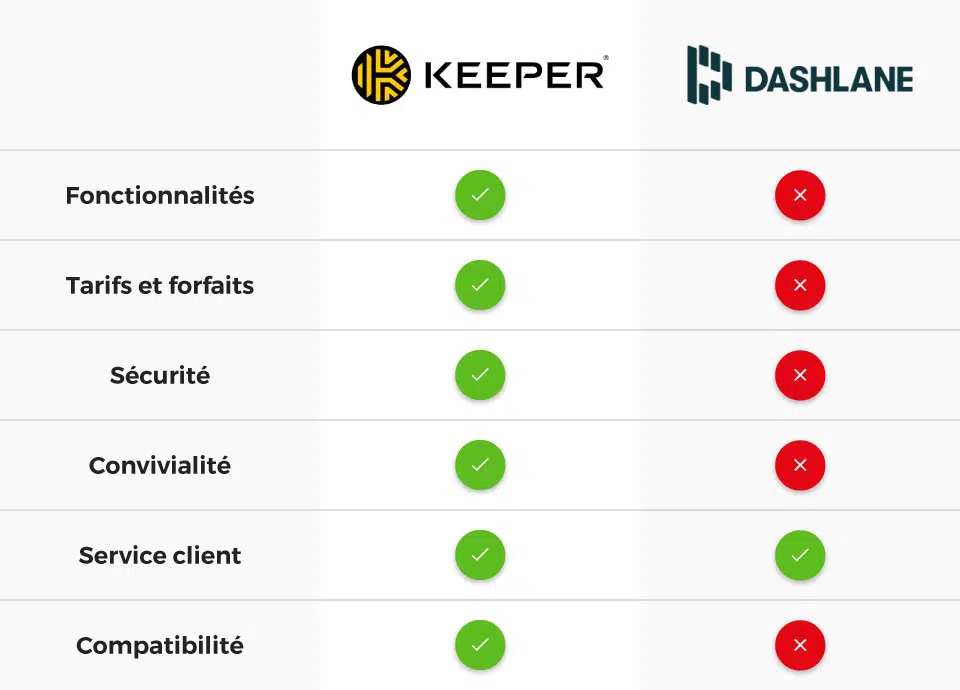
Quick Comparison: Dashlane vs. Keeper
Before we dive deep, here’s a fast look at how they stack up:
| Feature | Dashlane | Keeper |
|---|---|---|
| Price | Starts at $4.99/month | Starts at $2.91/month |
| Free Plan | Yes (50 passwords max) | No (only 30-day trial) |
| Security | Strong encryption + VPN | Strong encryption + dark web scans |
| Works On | Windows, Mac, iOS, Android | Windows, Mac, iOS, Android, Linux |
| Best For | Beginners, VPN users | Budget users, extra security |
Now, let’s look at each one more closely.
1. Dashlane vs. Keeper Security: Which Keeps Your Passwords Safer?
Both use military-grade encryption to protect your passwords. Then, this means no one can read your data without your master password.
Dashlane’s Security
- Comes with a free VPN (on paid plans) for safer browsing
- Then, checks if your passwords are weak or reused
- Alerts you if a website gets hacked
Keeper’s Security
- Firstly, scan the dark web to see if your passwords have leaked
- Let’s you share passwords safely with family or coworkers
- Then, offers extra secure file storage
Winner? If you want a VPN, pick one. If dark web scans matter more, choose Keeper.
2. Ease of Use: Which Is Simpler?
A good password manager should be easy to use every day.
Dashlane’s Interface
- Firstly, very clean and simple
- Secondly, automatically fills in passwords on websites
- Then, can change many passwords at once
Keeper’s Interface
- Firstly, a little more technical but flexible
- Secondly, lets you unlock with fingerprint or face ID
- Thirdly, has emergency access for trusted contacts
Moreover, Winner? Dashlane is easier for most people. Keeper has more options if you like control.
3. Price: Which Costs Less?
Money matters when choosing a password manager.
Dashlane Pricing
- Free: 50 password limit
- Advanced: $4.99/month (unlimited passwords + VPN)
- Premium: $6.49/month (adds credit monitoring)
Keeper Pricing
- Personal: $2.91/month (unlimited passwords)
- Family: $6.24/month (covers 5 people)
- Business: Custom pricing for teams
Furthermore, the winner? Keeper costs less, especially for families.
4. Dashlane vs. Keeper Extra Features: What Cool Extras Do They Offer?
Dashlane’s Bonus Features
- Firstly, built-in VPN for private browsing
- Then, automatic password changer for hacked sites
Keeper’s Bonus Features
- Secure storage for important files
- Then, instant alerts if your passwords appear in leaks
Moreover, Winner? Dashlane’s VPN is unique. Keeper’s file storage is handy.
Dashlane vs. Keeper Final Decision: Which Should You Pick?
Choose Dashlane If You Want:
Firstly, super simple to use
Secondly, a free VPN is included
Thirdly, automatic password updates
Choose Keeper If You Want:
Firstly, lower monthly cost
Secondly, dark web scanning
Thirdly, Linux support
Furthermore, both are great—it just depends on what matters most to you!
FAQs: Quick Answers to Common Questions
1. Is it more secure?
Both are equally secure for passwords. Then, one has a VPN; the other has dark web scans.
2. Can I try them for free?
Dashlane has a free plan (50 passwords). Then, Keeper offers a 30-day trial.
3. Which works on Linux?
Only Keeper works on Linux computers.
4. Which is better for families?
Keeper’s family plan covers 5 people for $6.24/month—a better deal than one.
5. Can I move my passwords from another app?
Yes! Both let you import from LastPass, 1Password, and others.
Bottom Line
Both keep passwords safe, but suit different needs:
Furthermore, try their free versions to see which you prefer!