
Introduction
Serverless computing is revolutionizing the way developers build and deploy applications. Instead of managing servers, you focus solely on writing code while the cloud provider handles infrastructure. Sounds great, right? But how does it work, and what do you need to know before diving in?
In this guide, we’ll walk you through the essentials of serverless computing, its benefits, challenges, and a step-by-step approach to getting started. Additionally, we provide answers to common questions in our FAQ section.
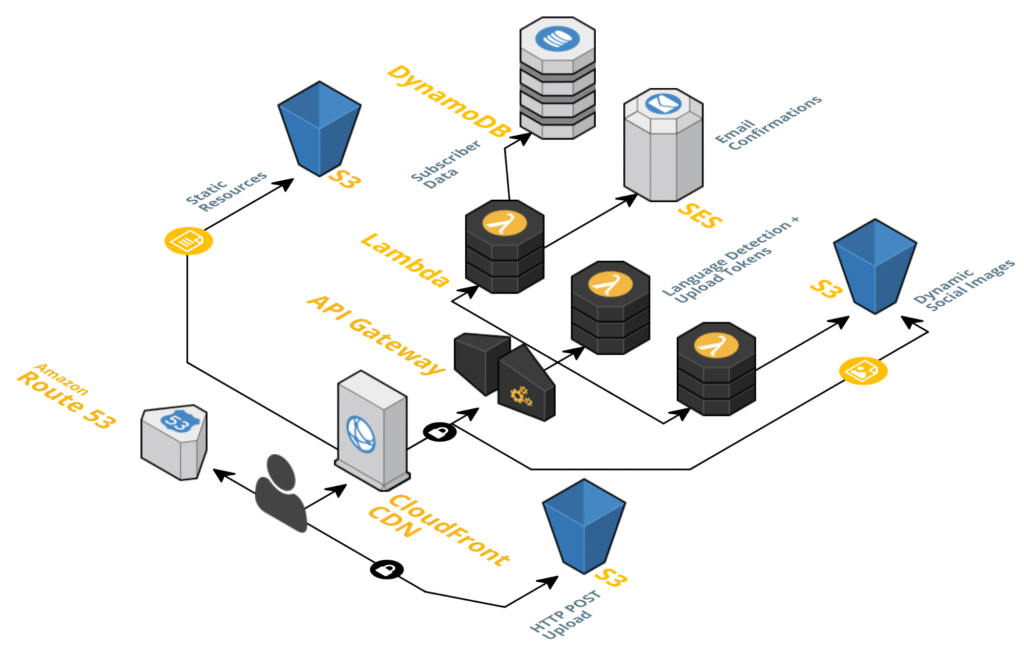
What Is Serverless Computing?
Think of serverless like a taxi service for your code. You don’t own the car (server), but you can ride (run your app) whenever needed. The best part? You only pay for the distance traveled (actual usage).
Additionally, big cloud companies like Amazon, Microsoft, and Google handle all the maintenance. Your job? Just write the code.
Serverless in Plain Terms:
- No servers to manage – Firstly, the cloud provider does it all
- Pay only for what you use – Secondly, like an electricity bill
- Auto-scaling – Thirdly, handles traffic spikes without crashing
- Event-triggered runs when something happens (like a file upload)
if you want to read about Kubernet, click here.
Why Use Serverless?
1. Save Money
Traditional servers charge you 24/7. Serverless only bills you when your code runs. No traffic? No cost.
2. Launch Faster
Skip the server setup. Furthermore, just upload your code and go live in minutes.
3. Never Worry About Traffic Spikes
Your app automatically scales during busy times. Then, no more crashed websites!
4. Focus on Coding
Spend time building features instead of fixing servers.
Getting Started: Your First Serverless Project
Step 1: Pick Your Platform
- AWS Lambda (Most popular)
- Azure Functions (Good for Microsoft users)
- Then, Google Cloud Functions (Works well with Google services)
Step 2: Write a Simple Function
Additionally, here’s a basic “Hello World” in Python for AWS Lambda:
Moreover, Python
def greet_user(event, context):
    return {
        'message': 'Hello! Your serverless function works!'
    }
Step 3: Deploy in Minutes
All platforms let you upload code directly from their website. No complex setup needed.
Step 4: Make It Do Something Useful
Then, connect your function to:
- Firstly, websites (via API Gateway)
- Secondly, file upload (like resizing images)
- Thirdly, database changes (process new orders instantly)
Step 5: Watch It Work
Furthermore, check the logs to see if your function is running successfully.
Serverless Common Problems (And Easy Fixes)
Problem: Slow First Response
Fix: Keep your function “warm” with occasional pings.
Problem: Hard to Debug
Fix: Use the platform’s built-in logging tools.
Problem: Vendor Lock-In
Fix: Use its Framework for easy switching.
Problem: Time Limits
Moreover, Fix: Break big tasks into smaller functions.
Great Uses for Serverless
- Automatic file processing (Convert PDFs when uploaded)
- Smart chatbots (Respond to customer questions)
- Backend for mobile apps (Handle user logins and data)
- Scheduled tasks (Send daily email reports)
FAQ: Quick Answers to Common Questions
Q: Is serverless good for beginners?
A: Yes! It’s simpler than managing servers. Start with small projects.
Q: When shouldn’t I use serverless?
A: For constant heavy workloads (like video streaming), traditional servers may be cheaper.
Q: How much does it cost?
A: Most small projects stay in the free tier. After that, pay per millisecond of use.
Q: Can I use my favorite programming language?
A: Yes! All major platforms support Python, JavaScript, C#, and many other languages.
Q: What’s next for serverless?
A: Faster startups, better tools, and more real-world uses like IoT and AI.
Final Thoughts
Serverless removes the headaches of server management while saving money. It’s perfect for:
Firstly, new developers
Secondly, startups
Thirdly, businesses are automating tasks
The easiest way to learn? Pick a small project and try it today!
Need help getting started? Ask your questions below!