
Introduction
In today’s digital world, security is more important than ever. Cyberattacks are increasing, and traditional passwords often fail to protect our accounts. That’s where passkeys come in as a modern, more secure alternative. But how do they work? Should you switch from Passkey vs.Password?
Passkey vs.Password: Why You Should Care About Login Security
Every day, hackers steal passwords. Weak or reused passwords cause most account breaches. But there’s a better way to log in with a passkey. They’re safer, easier, and faster than passwords.
This guide explains:
- Firstly, what are passkeys?
- Secondly, how do they beat passwords?
- Thirdly, how to start using them.
- Then, Answers to common questions
Let’s make your online life more secure!
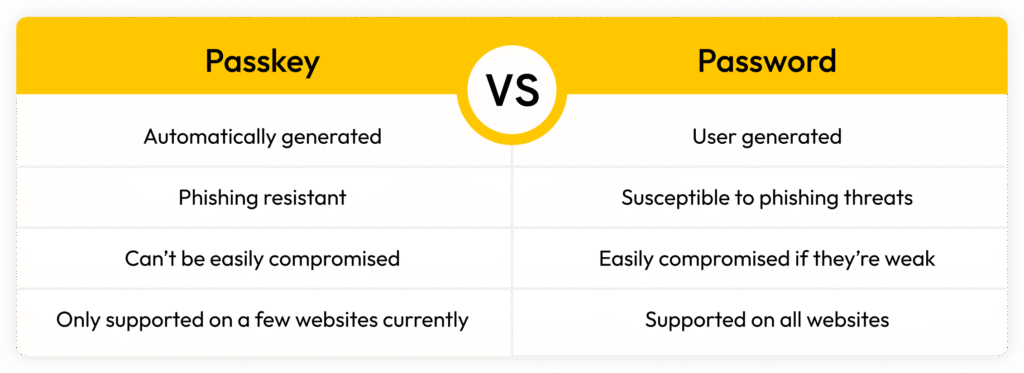
Passkeys Explained (Without the Tech Jargon)
Passkeys are like digital keys for your accounts. Instead of remembering passwords, you unlock accounts with:
- Firstly, your fingerprint
- Secondly, face scan
- Thirdly, phone PIN
How Passkey Works (Simple Version)
- Your phone or computer creates two special keys: one stays private, and one goes to the website.
- When you log in, your device proves it’s you without sending secrets.
- No typing. No remembering. Just tap and go.
Furthermore, the Best part: Hackers can’t steal passkeys like they steal passwords.
Why Passkey Win for Security
- Firstly, no more phishing – Fake login pages can’t trick you
- Secondly, breach-proof – Even if a site gets hacked, you’re safe
- Thirdly, no weak passwords – People pick “123456”, passkeys don’t allow that
How to Start Using Passkey Today
1. Check if Your Devices Work
- Firstly, iPhone (iOS 16+)
- Secondly, Android (9+)
- Thirdly, Mac (Ventura+)
- Then, Windows (10/11)
2. Try Them on These Sites
- Google (Account Settings)
- Apple (iCloud)
- Microsoft
- PayPal, eBay, Best Buy
3. Set It Up in 2 Minutes
- Go to account security settings
- Choose “Add a passkey.”
- Scan your face/fingerprint or enter PIN
Passkey vs.Password: Will Password Disappear?
Not yet. Many old systems still need passwords. But more sites add passkeys every month. You should:
Firstly, use passkeys where available.
Secondly, keep passwords as a backup.
Thirdly, expect passwords to fade away slowly.
Passkey vs.Password: Quick Questions Answered
Q1: What if I lose my phone?
A: Your passkeys sync to new devices (via iCloud/Google) or use a backup key.
Q2: Can someone steal my passkey?
A: Nearly impossible for it to stay locked on your device.
Q3: Do I need the internet to use passkeys?
A: Usually yes, but some work offline.
Q4: Should I stop using passwords now?
A: Not yet used both until passkeys work everywhere.
Passkey vs.Password: Bottom Line
Passkeys are:
🔒 Safer than passwords
👍 Easier than typing
⚡ Faster to use
Next Step: Check if your email account supports passkeys and try one today!