
Introduction
Technical SEO is the backbone of your website’s visibility in search engines. Without it, even the best content can struggle to rank. But what exactly is Technical SEO, and how can you optimize it effectively?
In Let’s be honest, you could write the world’s best content, but if your technical SEO isn’t right, no one will ever see it. I’ve seen too many businesses struggle with this exact problem. The good news? Fixing technical SEO isn’t as complicated as you might think.
What Exactly Is Technical SEO? (In Simple Terms)
Imagine your website is a house. Technical SEO is like making sure:
- Firstly, the foundation is solid
- Secondly, all the doors open properly
- Thirdly, the address is easy to find
- Then, visitors can move around without tripping
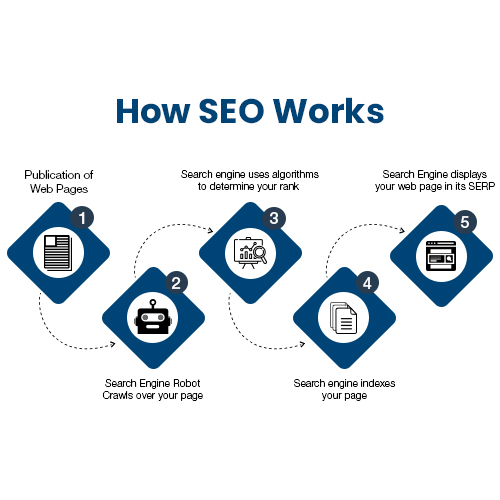
In web terms, it’s about helping search engines:
- Firstly, find your pages (crawling)
- Secondly, understand your pages (indexing)
- Thirdly, rank your pages properly
Technical SEO: Why This Matters More Than Ever
Here’s the hard truth – Google’s getting smarter every day. Last year alone, they made over 4,500 changes to their search algorithm. Many of these updates specifically target technical website health.
The 8 Technical SEO Fixes That Deliver Real Results
1. Fixing Crawl Errors (Stop Blocking Google!)
First things first – can Google even see your pages?
Quick fixes:
- Check Google Search Console for crawl errors
- Fix broken links (I recommend Screaming Frog)
- Update your robots.txt file (don’t accidentally block important pages)
Pro tip: Submit an XML sitemap – it’s like giving Google a map of your website.
2. Speed Up Your Site (Users Hate Waiting)
Did you know?
- 53% of mobile users leave if a page takes over 3 seconds to load
- Google now uses speed as a direct ranking factor
Speed boost checklist:
☑ Compress images (WebP format works best)
☑ Enable browser caching
Use a CDN (Cloudflare is great for starters)
☑ Minify CSS/JS files
Real-world example: One client improved their load time from 5.2 seconds to 1.8 seconds and saw a 34% increase in organic traffic in 60 days.
If you want to read about Local SEO, Click Here
3. Mobile Optimization (No More “Pinch to Zoom”)
With mobile-first indexing, your mobile site IS your main site.
Must-do mobile checks:
✓ Test with Google’s Mobile-Friendly Test
✓ Ensure buttons are finger-friendly
Fix any “content wider than screen” issues
✓ Use responsive design (no separate mobile URLs)
4. HTTPS Security (The Padlock Matters)
Google warns visitors about “Not Secure” sites now.
Migration checklist:
- Firstly, get an SSL certificate (many hosts offer free ones)
- Secondly, update all internal links
- Then, set up 301 redirects from HTTP to HTTPS
- Finally, update Google Search Console
5. Structured Data (Get Those Rich Snippets!)
This is like putting sticky notes on your content, telling Google exactly what it is.
Easy wins:
★ Add FAQ schema (great for voice search)
★ Implement product schema for e-commerce
Use breadcrumb navigation
Tool to try: Google’s Structured Data Markup Helper makes this surprisingly simple.
Common Technical SEO Mistakes (And How to Fix Them)
Mistake #1: Duplicate Content
Moreover, the fix: Use canonical tags to show Google which version is “official.”
Mistake #2: Poor URL Structure
Better approach:
- Firstly, use hyphens (not underscores)
- Secondly, keep URLs short and descriptive
- Then, avoid session IDs and parameters
Mistake #3: Ignoring Core Web Vitals
Google’s new metrics you MUST track:
- Firstly, LCP (Loading performance) – under 2.5s
- Secondly, FID (Interactivity) – under 100ms
- Then, CLS (Visual stability) – under 0.1
Your Technical SEO Action Plan
Week 1:
- Firstly, run a site audit (try Google Search Console + Screaming Frog)
- Secondly, fix critical crawl errors
- Then, implement HTTPS if missing
Week 2:
- Firstly, optimize your 5 slowest pages
- Secondly, add structured data to key pages
- Then, check mobile usability
Month 1:
- Firstly, monitor rankings and traffic changes
- Secondly, set up ongoing monitoring
- Thirdly, plan the next optimization phase
FAQs (Real Questions From Business Owners)
Q: How often should I check technical SEO?
A: Monthly for quick checks, full audit every 3-6 months.
Q: Will this help my local business?
A: Absolutely! Local rankings heavily depend on technical health too.
Q: What’s the biggest technical SEO mistake you see?
A: Blocking Googlebot with robots.txt without realizing it.
Q: How soon will I see results?
A: Some fixes show impact in days, others take months. But they all compound.
Final Thoughts (And Your Next Step)
Technical SEO isn’t about chasing the latest “hack,” it’s about creating a website that users and search engines love. The best part? Many of these fixes are one-time changes with lasting benefits.
Your action item today: Pick just ONE section from this guide (probably site speed or mobile) and spend 30 minutes making improvements. Small steps lead to big results.