
Introduction
The world of AI Interior Design is evolving rapidly, and artificial intelligence (AI) is at the forefront of this transformation. Whether you’re a homeowner looking to refresh your space, a designer seeking efficiency, or just curious about the latest tech trends, AI-powered interior design tools can help you easily create stunning, personalized spaces.
Additionally, AI Interior Design just got smarter! Artificial intelligence (AI) allows anyone to create beautiful spaces without being a design expert. Moreover, AI tools help you pick colors, arrange furniture, and even shop for decor, all with just a few clicks.
But how does it work? And how can you get the best results? This guide will show you:
- Firstly, how AI is changing interior design
- Secondly, simple steps to use AI for your home
- Thirdly, smart tips for better designs
- Then, what’s coming next in AI design
Let’s dive in and make your dream room a reality!
If you want to read GitHub Copilot, Click Here
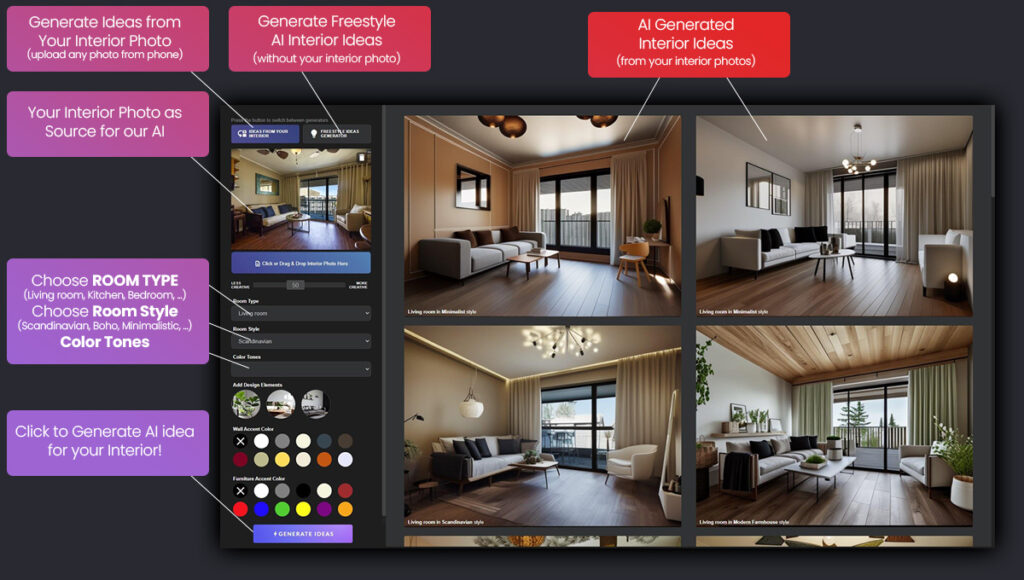
How AI Interior Design is Making Design Easier
Remember when designing a room meant guessing how things would look? Those days are gone! Now, AI tools help by:
✔ Firstly, creating instant designs – Tell the AI your style, and it suggests complete room looks
✔ Secondly, showing furniture in your space – Use your phone to “place” virtual sofas and tables
Thirdly, finding perfect color matches – Get paint colors that work with your existing decor
✔ Then, saving money – Try before you buy to avoid costly mistakes
Popular tools like Houzz, Planner 5D, and IKEA Place put professional design help in your pocket.
How to Use AI Interior Design for Your Home (Simple Steps)
1. Pick Your Tool
Different apps do different things:
- Firstly, are you new to design? Try Roomstyler – drag and drop items
- Secondly, want to see furniture in your room? Use IKEA Place
- Thirdly, planning a remodel? Planner 5D is for floor plans
2. Snap a Photo
Take a clear picture of your room. Additionally, make sure the lighting is good so the AI can work its magic.
3. Play with Designs
Now the fun begins! Try:
- Firstly, changing wall colors in seconds
- Secondly, swapping out furniture pieces
- Thirdly, testing different styles (modern, cozy, etc.)
4. Shop What You Like
Additionally, many apps show where to buy the items you choose. Some even give price estimates.
5. Add Your Personal Touch
AI gives good ideas, but you know your space best. Adjust the designs until they feel just right.
AI Interior Design Smart Tips for Best Results
1. Start with What You Love
Moreover, show the AI pictures of rooms you like. It will learn your style fast.
2. Measure First
AI can arrange furniture, but you should know your room’s real size.
3. Try Bold Ideas
Not sure about that colorful rug? Test it virtually first—no risk!
4. Check Lighting
Some apps let you see how light changes throughout the day.
5. Save Your Favorites
Most tools let you save different versions to compare later.
The Good and Not-So-Good of AI Interior Design
What’s great:
- Firstly, saves hours of planning
- Secondly, helps avoid expensive mistakes
- Thirdly, makes design fun and easy
What to watch for:
- Some tools need practice to use well
- Virtual colors might look different in real life
- Nothing beats seeing fabrics and materials in person
What’s Next in AI Interior Design?
The future looks exciting! Soon we might have:
- AI that remembers all your past projects
- Tools that adjust designs when you say “make it cozier”
- Apps that suggest eco-friendly materials
Final Thoughts: AI Interior Design
AI won’t replace your creativity—it supercharges it! Whether you’re refreshing one room or planning a whole home makeover, AI tools make designing faster, easier, and more fun.
Why not try one today? Free apps like Roomstyler or IKEA Place are perfect for beginners. Your dream home is just a few taps away!
Quick Questions Answered
Q: Do I need to pay for AI design tools?
A: Many great tools are free! Some offer extra features for a fee.
Q: Can AI understand my style?
A: The more you use it, the better it gets. Start by showing pictures you love.
Q: What’s the easiest app to start with?
A: Try Roomstyler—it’s simple and works right in your web browser.